
Mini Projectors with Netflix: What You Really Need to Know Before You Buy
A mini projector with Netflix can turn your living room, bedroom or garden into a flexible space for watching films. However, portable projectors vary considerably when it comes to streaming access, image brightness and ease of use. If you focus only on terms such as “4K supported” or “smart”, you could end up with a device that can’t run Netflix directly or produces a barely usable picture in daylight.
This buying guide from the Joybuy Product Recommendation Officer will help you make sense of the technical specifications and avoid common buying mistakes.
Common pitfalls when buying a mini projector with Netflix
1. “4K supported” does not mean native 4K resolution
Many listings advertise 4K support. This often means the projector can process or decode 4K video files. The panel may still only have a resolution of 1280 × 720 pixels or 1920 × 1080 pixels.
For a sharp picture, it’s important to distinguish between these specifications:
- Native resolution: the projector’s actual image resolution
- 4K decoding: a supported input signal or video file format
- Full HD 1080p: 1920 × 1080 pixels, and a practical resolution for films, series and gaming in most cases
A Full HD 1080p projector with native resolution provides a different level of detail from a 720p model with 4K decoding.
2. Pre-installed apps don’t automatically mean Netflix certification
A smart projector may use Android, Linux or its own operating system and still offer only limited access to Netflix. Some devices only support screen mirroring. However, streaming services may block playback over Miracast or AirPlay due to copyright protection requirements.
So look for a clear statement such as “officially licensed for Netflix” or “Netflix-certified”. If you can’t find one, you may need a compatible streaming stick, laptop or set-top box.
3. Don’t confuse ANSI and ISO lumens with marketing lumens
Brightness affects whether a projector is suitable for a darkened bedroom, living room or outdoor use. Figures such as “10,000 lumens” are difficult to assess without a measurement standard. ANSI lumens and ISO lumens provide more meaningful figures.
As a general guide:
- Lower brightness levels are better suited to a dark room and smaller image sizes.
- Around 500 to 700 ANSI or ISO lumens offer more flexibility for evening use.
- Even a bright projector can’t replace blackout conditions in direct sunlight.
- The larger the image, the more the light is spread across the screen.
The key specifications to check before you buy
Native resolution and image size
Check the native resolution and recommended image size together. A device with native 1080p can provide a good basis for watching films and series. However, with very large projections, the wall surface, viewing distance and ambient light will also become more noticeable.
The maximum stated image size isn’t always the most practical for everyday use. For many rooms, a projection between 60 and 120 inches is a better-balanced choice.
Autofocus and automatic keystone correction
A projector with autofocus automatically sharpens the image when you switch it on or move it. Automatic keystone correction compensates for a trapezoid-shaped image when the projector isn’t positioned exactly parallel to the wall.
It’s worth checking the technical capabilities:
- Some models only correct vertical distortion.
- Others use 4D or 6D keystone correction.
- Obstacle detection and automatic image adjustment can make setup easier, but they don’t replace a stable position.
- Digital correction can reduce the usable image area.
Wi-Fi, Bluetooth and connections
A projector with Wi-Fi and Bluetooth can access streaming content and connect to external speakers or headphones. For reliable playback, make sure the router is close enough. Dual-band Wi-Fi at 2.4 and 5 GHz can be useful, depending on your home setup.
HDMI ports are essential for games consoles, laptops and TV sticks. USB, a 3.5 mm audio output and screen mirroring offer more ways to use the projector. Bluetooth isn’t suitable for every type of image transmission; it’s often used solely for audio.
Our picks for different users
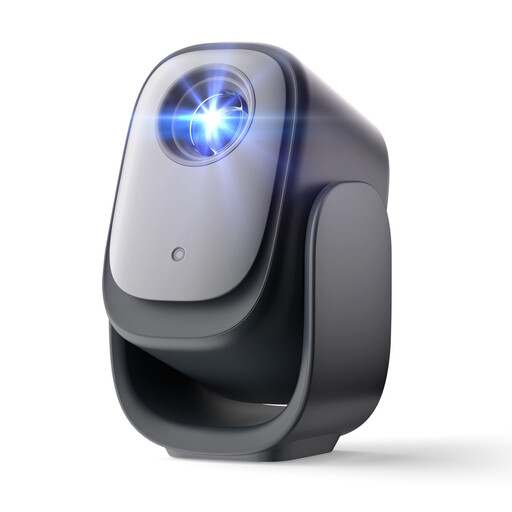
Dangbei N2 Mini Projector with Wi-Fi and Bluetooth
Why this product suits this profile: According to the product specifications, this portable projector combines native 1080p resolution, Netflix licensing, Wi-Fi, Bluetooth, autofocus and automatic keystone correction for straightforward everyday use.
Netflix licensing is explicitly stated. This makes it less likely that you’ll need an additional streaming stick to watch Netflix.
Native 1080p resolution, integrated streaming, autofocus and automatic image correction.
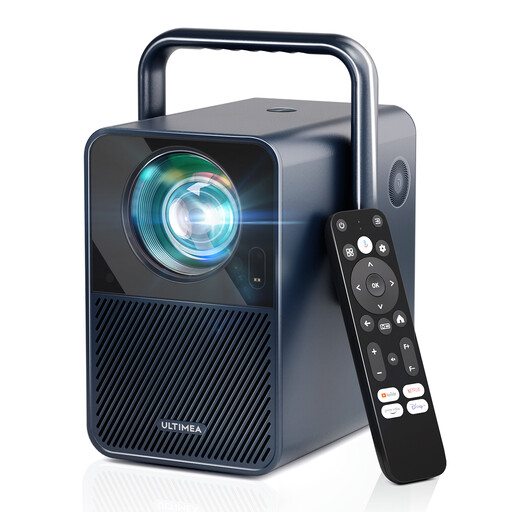
Ultimea Poseidon E40 projector
Why this product suits this profile: This home cinema model combines native 1920 × 1080 pixel resolution, 1000 ANSI lumens, Android TV 11.0, Netflix, HDR10 and Dolby Audio.
The specifications distinguish native 1080p resolution from 4K decoding. They also clearly list automatic focus and 6D keystone correction.
1000 ANSI lumens, native 1080p resolution and integrated ToF-assisted automatic adjustments.
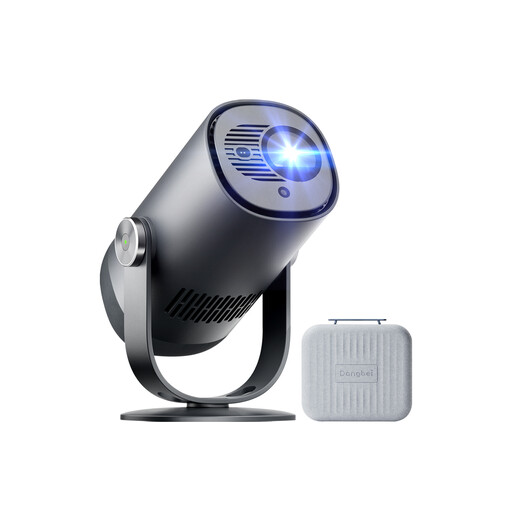
Dangbei Freedo Portable Projector
Why this product suits this profile: For outdoor film nights, camping or moving between rooms, this portable projector offers native 1080p resolution, Google TV, licensed Netflix, Wi-Fi, Bluetooth and a built-in battery with up to 2.5 hours of runtime, according to the product specifications.
The stated battery life makes it easier to plan for power. Netflix is also described as licensed, rather than simply being listed as generally compatible with apps.
A built-in battery, 450 ISO lumens, Google TV and Dolby Audio in a compact design.
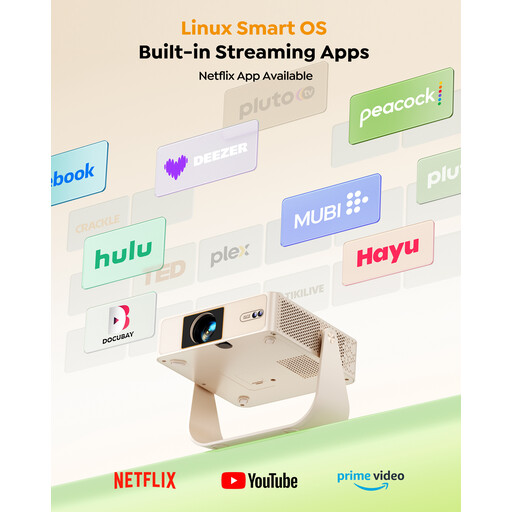
Yaber L1 Pro Native 1080P
Why this product suits this profile: This portable projector is designed for flexible positioning and can be rotated up to 330 degrees, according to the product specifications. Netflix, YouTube and Prime Video are available directly.
The built-in stand reduces the need for extra accessories. The native resolution is listed separately from the streaming features.
Native 1080p resolution, 330-degree rotation, built-in stand and 8-watt speaker.
Looking for more options?
We’ve put together a complete, regularly updated list of products that meet these strict selection criteria and fully comply with the safety regulations in force in the EU.
Practical advice for setup and use
For a stable picture, place the projector on a firm, level surface. Make sure bedding, rugs or cushions don’t cover the ventilation openings. If you’re using an outdoor projector, choose a dry, sheltered spot; these devices aren’t automatically protected from rain or high humidity.
You should also:
- Never look directly into the lens while the projector is switched on.
- After switching it off, let it cool down before unplugging it.
- For games consoles, use HDMI rather than wireless mirroring wherever possible.
- A white, matt wall or a suitable projection screen can improve the picture.
- For continuous use, power consumption, fan noise and the availability of replacement parts or software are also worth checking.
Mini projector with Netflix FAQs
Does Netflix work on every smart projector?
No. The key is official Netflix licensing or a confirmed native Netflix app. With non-certified devices, you may need an external streaming stick. Check the product specifications for compatibility before you buy.
Is a mini projector with Netflix suitable for outdoor use?
Portable models with a low weight, sufficient brightness and preferably a built-in battery are well suited to outdoor film nights. Only use the projector after dark, and protect it from moisture and dust. Make sure it’s positioned securely, too.
How long does a portable projector last?
Lifespan depends on the light source, cooling, operating time and surroundings. LED and laser projectors are often advertised with long light-source lifespans. These figures are manufacturer estimates under specific conditions, not a guarantee for every use. Good ventilation and letting the fan run its cooling cycle can help support reliable operation.