
Buying a Mini 1080p Projector: What to Consider for Picture Quality, Streaming and Portability
A mini 1080p projector can offer a flexible big-screen solution in the bedroom, living room, garden or at the campsite. However, compact projectors vary considerably in resolution, brightness, streaming features and automatic image correction. If you focus only on terms such as “4K support”, “8K compatible” or high lumen figures, you could end up buying a device that doesn’t suit the way you plan to use it.
This buying guide explains which technical specifications really matter and which product features to check before you buy.
Common pitfalls when buying a mini projector
1. “4K support” doesn’t mean native 4K resolution
Many models are advertised as 4K projectors or 8K-compatible. However, this often refers to decoding the incoming signal. The image is then displayed at the projector’s native resolution. So a device with native 1080p resolution won’t automatically display 4K content in true 4K resolution.
For films, TV series and sports, a Full HD projector with 1920 × 1080 pixels is often a sensible choice. More affordable mini projectors, on the other hand, may have a native resolution of 720p, even if they can process 1080p or 4K video.
2. Lumen figures aren’t always directly comparable
When comparing brightness, check the specific measurement quoted. ANSI lumens and ISO lumens are based on different measurement methods. Figures that don’t specify a standard, such as “9000 lumens”, are therefore difficult to compare with 500 ANSI lumens.
A portable projector with 200 to 330 ANSI lumens is best suited to darkened rooms and evening use. Models with 500 to 1000 ANSI lumens offer more flexibility in ambient light, subject to the manufacturer’s stated conditions. However, even a bright projector can’t fully replace a TV in direct sunlight.
3. Pre-installed apps aren’t automatically officially licensed
A smart projector with Android, Linux or Google TV may include streaming apps. Even so, check whether Netflix is officially supported or whether you’ll need an external TV stick or HDMI device. Wireless screen mirroring may be restricted for protected streaming content by DRM or HDCP rules.
So if you’re looking for a projector with Netflix, a projector with Android TV or a Wi-Fi projector, check the product description and the specific certification stated.
The key buying criteria explained
Native resolution and picture size
For a Full HD projector, 1920 × 1080 pixels is the key native resolution. The possible screen size depends on the distance, lens and room. Figures such as “up to 300 inches” usually describe a technical maximum. A smaller, more practical picture size may be a better choice for a sharp image.
Also check the throw ratio. A ratio of 1.2:1, for example, means the distance to the screen should be roughly 1.2 times the width of the image. Models with a short throw distance are better suited to small bedrooms or flats.
Brightness, contrast and ambient light
Lower brightness levels are often enough for films in a darkened room. If you want a projector for outdoor use or for sport and presentations, allow for more brightness headroom. Outdoors, it’s best to use the projector after dark; you’ll also need a stable, dry and level surface.
Contrast figures such as “20,000:1” come from the relevant product specifications and aren’t readily comparable across different measurement conditions. For choosing a projector, native resolution, the brightness standard, your preferred picture size and the room’s ambient light are more useful.
Auto focus, keystone correction and connections
A projector with auto focus adjusts the sharpness automatically when you switch it on or change its position. Automatic keystone correction fixes trapezoidal distortion when the device isn’t exactly parallel to the projection surface. This makes set-up easier, but heavy correction can reduce the usable picture area.
For gaming and external devices, HDMI, USB and low input lag also matter. Bluetooth is mainly useful for headphones or speakers. For a home cinema, check the audio output too: built-in speakers are convenient, but they won’t replace a soundbar in every room.
Our picks by user profile

MAGCUBIC Mini Projector HY300Pro
Why this product suits this profile: This compact model is designed for occasional film nights, bedrooms and short trips. It features Android 14, WiFi 6, Bluetooth 5.4 and a rotating mount.
The product specifications explicitly state a native resolution of 720p, helping you put the “8K support” claim into perspective.
290 ANSI lumens, 180-degree rotation and automatic vertical keystone correction.
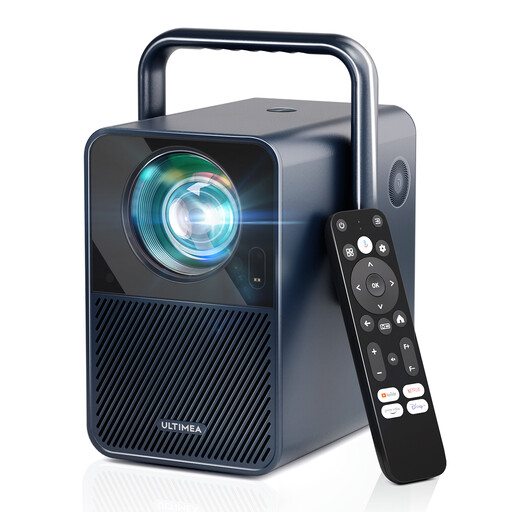
ULTIMEA Poseidon E40
Why this product suits this profile: This native 1080p projector is for anyone looking to combine Full HD, built-in streaming features and automatic set-up in one device.
The specifications distinguish native 1920 × 1080 pixels from 4K decoding. They also state that it has Netflix certification for Android TV 11.0.
1000 ANSI lumens, auto focus, 6D keystone correction and Dolby Audio with a 30 W speaker system.
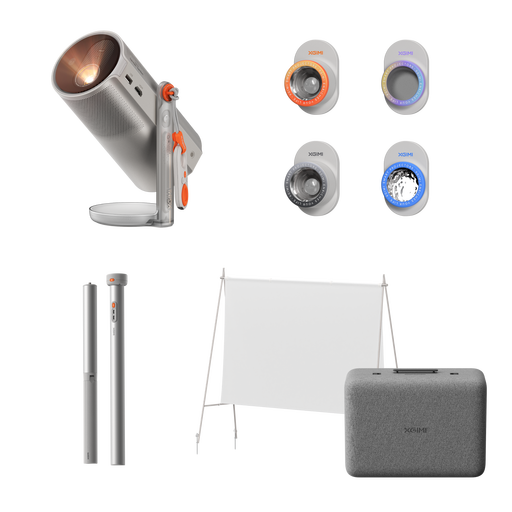
XGIMI MoGo 4 Portable Projector
Why this product suits this profile: Its portable design and built-in battery make it a flexible choice for anyone wanting to use a projector at home, in the garden or while travelling.
The product specifications state a native resolution of 1080p and distinguish it from the brightness figure in ISO lumens. Battery life depends on the operating mode.
Google TV, licensed Netflix support, 450 ISO lumens, Harman Kardon speakers and a built-in battery.
Looking for more options?
We’ve put together a complete, regularly updated list of products that fully meet these strict selection criteria and the safety regulations in force in the EU.
Practical tips for set-up and use
- Place the projector on a stable, level surface and keep the ventilation openings clear.
- For films and TV series, choose a projection surface that’s as smooth, matt and light-coloured as possible.
- For ceiling projection, make sure the stand is securely fixed. A projector for ceiling projection should have a suitable mount or a sturdy rotating stand.
- Let the device cool down after switching it off, before packing it away.
- Don’t look directly into the active lens, and keep children away from the light source.
- If you’re choosing a projector for gaming, check the technical specifications for HDMI connections, signal processing and input lag.
Mini 1080p projector FAQs
Is a mini 1080p projector good enough for films and sport?
Yes, native 1080p resolution is generally suitable for films, TV series and sports. Brightness, viewing distance, picture size and room lighting also matter. For outdoor use, it’s best to watch after dark.
How long does a mini projector’s LED light source last?
Lifespan depends on the light source, operating mode, cooling and use. Some product specifications quote figures such as 20,000 or 30,000 hours. These are manufacturer figures based on specific conditions, not a guarantee of the same lifespan in your home.
Does a mini projector use a lot of electricity?
Power consumption depends on the brightness mode, speakers, operating system and battery use. A device with a built-in battery can be used on the go without a mains socket. For everyday use at home, check the power consumption figure on the rating plate or in the data sheet.