
Buying a 1080p mini projector: what to look for in picture quality, streaming and portability
A 1080p mini projector can replace a TV, streaming stick and, occasionally, even speakers. In practice, however, compact models vary considerably in brightness, resolution, app support and ease of use. If you focus only on terms such as ‘4K supported’, ‘8K compatible’ or high lumen ratings, you could end up with a projector that’s too dim for your living room or won’t play Netflix directly.
This guide explains which specifications really matter and which portable projector is right for different situations.
Common pitfalls when buying a mini projector
1. Supported resolution is not the same as native resolution
‘4K supported’ usually means that a projector can process 4K signals or decode 4K content. The projected image may still be displayed at a native resolution of 1280 × 720 pixels. So, for sharp subtitles, presentations and games, the native resolution is what matters.
A Full HD projector should output a native resolution of 1920 × 1080 pixels. A 4K projector with a genuinely native 4K resolution is a different product category and is usually larger and more expensive.
2. Lumen ratings are hard to compare without a measurement standard
Manufacturers use different ratings, such as LED lumens, ANSI lumens or ISO lumens. These values shouldn’t be treated as directly comparable. ANSI lumens or ISO lumens are more useful for making a meaningful comparison, although room size, wall colour and ambient light also affect the result.
For a bedroom projector, lower brightness is often enough in a darkened room. In a living room, or when using an outdoor projector, it’s best to project after sunset and with as little ambient light as possible.
3. Smart features don’t automatically mean Netflix compatibility
Wi-Fi, Android or an app store don’t guarantee that Netflix will run directly on the projector. Some models only support screen mirroring, which may be restricted when streaming protected content.
So, look specifically for details such as an officially licensed Netflix app, Google TV, or the option to connect a TV stick or laptop via HDMI. A projector with Netflix and a projector that simply mirrors your smartphone are not the same thing.
Check these specifications before you buy
Native resolution and image processing
For films, TV series, photos and games, native 1080p resolution offers a clear practical advantage over 720p. The diagonal image size should still suit your viewing distance. A very large image won’t automatically look sharper when viewed from close up.
If you’re looking for a gaming projector, HDMI version, input lag and a stable wired connection also matter. Wi-Fi is suitable for streaming, but gaming performance can be affected by network conditions.
Brightness and room conditions
Check the actual measurement given and consider where you plan to use the projector:
- Darkened bedroom: compact models with lower brightness may be enough.
- Living room with some ambient light: higher ANSI or ISO ratings make the image easier to see.
- Outdoor evening use: a suitable projection surface and as little ambient light as possible matter more than an exaggerated maximum rating.
- Presentations: text needs even illumination and sufficient contrast.
Focus, keystone correction and positioning
An autofocus projector saves time if you move it regularly. Keystone correction compensates for a trapezoidal image when the projector isn’t positioned squarely in front of the wall. However, digital correction can slightly reduce the image area and sharpness.
For a clean image, it’s still best to position the projector as straight as possible. Also check the throw ratio: this tells you how far the projector needs to be from the wall to produce a particular image width.
Our picks for different types of user
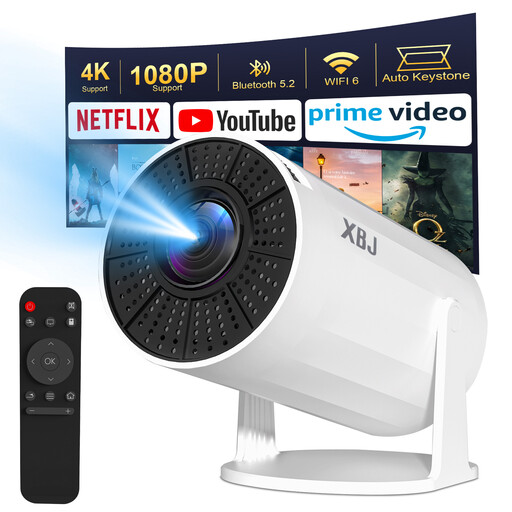
XBJ Portable White Projector with Wi-Fi 6 and Bluetooth
Why this product suits this profile: This compact model is designed for occasional film nights in the bedroom or use in a darkened room. Its rotating stand makes it easy to position towards a wall or ceiling.
According to the product details, its native resolution is 1280 × 720 pixels. This helps avoid confusing ‘4K decoding’ with native 4K or 1080p resolution. An external TV stick may be needed for Netflix.
Wi-Fi 6, Bluetooth 5.2, HDMI, USB, automatic vertical keystone correction and rotation up to 180°.
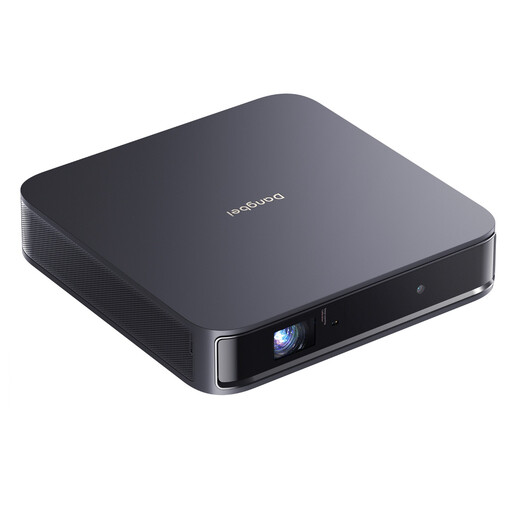
Dangbei Atom Portable Laser Projector
Why this product suits this profile: This portable projector combines native 1080p resolution with a laser light source and built-in smart TV features. It’s suitable for regular film and TV viewing in different rooms.
The specifications distinguish between native 1080p resolution and 4K HDR input. Netflix is listed as officially supported, but it’s still worth checking app versions and regional availability before buying.
1200 ISO lumens, ALPD laser light source, autofocus, automatic keystone correction, Google TV, 2.4 and 5 GHz Wi-Fi, and Bluetooth 5.1.
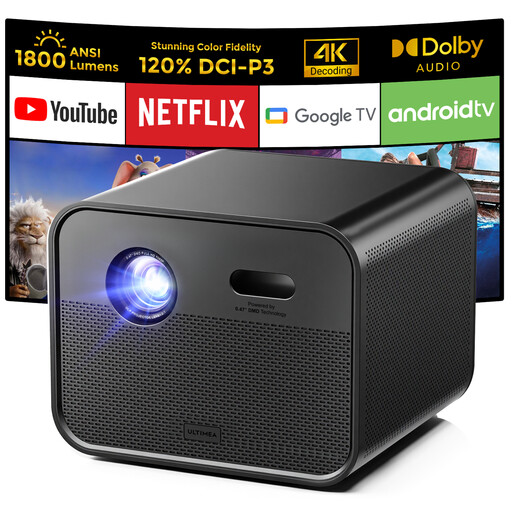
Ultimea Poseidon E100 Full HD projector
Why this product suits this profile: This model is aimed at users looking for a home cinema projector with a higher brightness rating, Google TV and connections for a console, streaming device or laptop.
The product specifications list 1800 ANSI lumens, native 1080p resolution and 4K decoding separately. This makes it easy to distinguish image resolution from signal processing.
Google TV, automatic focus and 6D keystone correction, HDMI, Wi-Fi, Bluetooth 5.3, HDR10/HLG and support for active 3D with suitable glasses.
Looking for more options?
We’ve put together a complete, regularly updated list of products that meet these strict selection criteria and fully comply with the safety regulations in force in the EU.
Practical tips for use and longevity
- Place the projector on a stable, level surface with good ventilation.
- Don’t cover the ventilation openings or place the device on bedding or carpets.
- After switching it off, wait for the fan to stop before unplugging it.
- Clean the lens only with a soft, dry cloth.
- When using the projector outdoors, choose a dry, sheltered spot. Projectors aren’t designed for rain or high humidity.
- Don’t look directly into the projection lens while the projector is running, and supervise children near the device.
Frequently asked questions about 1080p mini projectors
Is a 1080p mini projector suitable for Netflix?
It depends on the operating system and licensing. Models that officially list Netflix support may have the app built in. With other devices, connecting a laptop or TV stick via HDMI is the more reliable option. Wi-Fi alone doesn’t guarantee Netflix compatibility.
How far should a portable projector be from the wall?
The distance depends on the throw ratio and the image size you want. A ratio of 1.2:1 means, roughly, that the distance should be about 1.2 times the image width. You should also take the manufacturer’s recommended image size into account.
How much power does it use, and what are the running costs?
LED and laser light sources use electricity while operating, with consumption varying by model and mode. You may also need to budget for a TV stick, external speakers, HDMI cables or a projection screen. For a realistic estimate, check the electrical power consumption in the specifications.