
Buying a Mini Projector: How to Compare Resolution, Brightness and Features
A mini projector can be a flexible alternative to a television in the bedroom, a small living room, or when you're travelling. These compact devices differ significantly in picture quality, operating system and connectivity options. If you only pay attention to terms like "8K supported" or "4K compatible", you could end up buying a model that doesn't meet your expectations.
Common Pitfalls When Buying a Mini Projector
1. Supported Resolution Is Not the Same as Native Resolution
Labels such as 1080P projector, Full HD projector and 4K projector are often used interchangeably. What really matters is the projector's native resolution. A device with a native resolution of 1920 × 1080 pixels genuinely displays Full HD. "4K supported", on the other hand, can mean the device processes 4K video but outputs it at a lower native resolution.
For films, series and games, the "native resolution" specification is therefore more important than the maximum supported signal resolution.
2. Lumen Figures Are Hard to Compare Without a Standard
Manufacturers quote ANSI lumens, ISO lumens, or simply "lumens". These values cannot be directly equated. For a sensible choice, buyers should check whether a standardised figure such as ANSI lumens or ISO lumens is provided.
A portable projector with low brightness is usually best suited to darkened rooms. In daylight, outdoors, or with larger image sizes, perceived contrast drops. Even a device with a higher brightness rating needs a projection surface that is as bright and even as possible.
3. Smart Features Don't Automatically Replace External Devices
A smart projector with Android can integrate apps and screen mirroring. However, app selection, licensing, updates and copy protection are all relevant. Not every streaming app runs directly on every Android projector. For protected content, a TV stick or an HDMI device may be necessary.
Before buying, you should check whether the services you want are officially supported, and whether HDMI, USB and Bluetooth are available for external sources.
The Technical Specs That Really Matter
Native Resolution and Image Size
For a projector for the bedroom or occasional film nights, 720P can be sufficient from a short distance if the image size stays moderate. For series, presentations and gaming, a native Full HD projector offers more detail. The possible image size also depends on the projection distance and the throw ratio.
A projector with a 1:1 projection ratio, for example, can produce a large image from a relatively short distance. This is handy for flats with limited space. A digital zoom of 50 to 100 per cent can make positioning easier, but depending on the setting, it reduces the effective image area used.
Autofocus and Keystone Correction
A projector with autofocus adjusts the picture sharpness automatically after switching on or when the position changes. With devices that have manual focus, you need to adjust the lens ring.
Automatic keystone correction compensates for trapezoidal distortion when the projector is not positioned exactly in the centre of the screen. The range is important: some models only correct vertically, others also correct horizontally or offer a 4-point correction. For ceiling projection, side placement or changing locations, a larger correction range is useful.
Connections, Network and Power Supply
A projector with Wi-Fi and Bluetooth can receive content wirelessly and connect speakers or headphones. However, HDMI remains important for gaming and stable playback. If you're looking for a projector for PS5, you should connect the console via HDMI and look for the lowest possible input lag. Simply supporting 1080P or 4K says nothing about gaming latency on its own.
For a projector for outdoors, weight, stand, power supply and noise level are also relevant. A built-in battery increases mobility, but it is limited in time for longer films.
Recommendations by User Profile
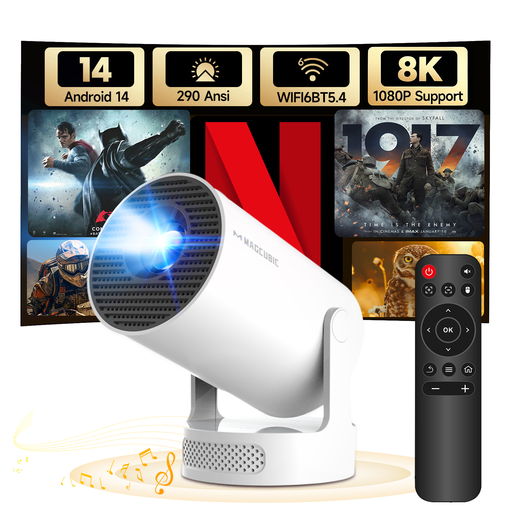
MAGCUBIC HY300Pro+ Mini Projector
Why this product fits the profile: This compact model is aimed at users looking for a mobile entry-level option for darkened rooms, bedrooms or occasional outdoor evenings. According to the product information, it weighs 0.88 lb and has a 180-degree rotatable stand.
The native resolution is stated as 1280 × 720 pixels. This clearly sets expectations for true Full HD, even though 1080P and 4K content can be processed.
Android 14, dual-band Wi-Fi 6, Bluetooth 5.4, automatic vertical correction and manual 4-point keystone correction. Brightness is stated as 290 ANSI lumens.
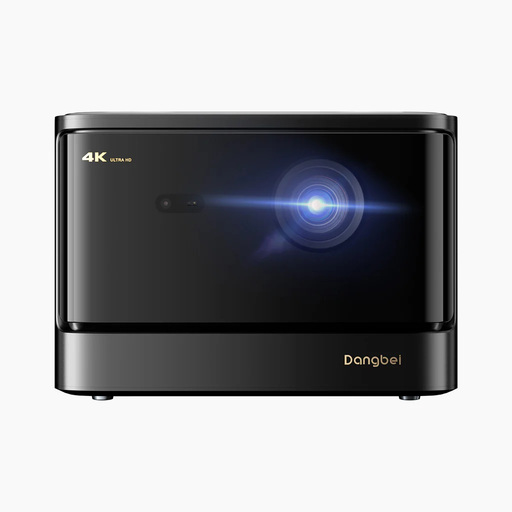
Dangbei DBOX02 Laser Projector 4K
Why this product fits the profile: This model is designed for larger home cinema setups and suits users who prioritise high brightness, 4K playback and integrated streaming features over a particularly compact casing.
The product specification states 2450 ISO lumens. This is a clearly named measurement and should not be directly equated with ANSI lumens from other devices.
Laser light source, 4K alignment, HDR10+, Blu-ray 3D support, officially licensed Netflix, plus Wi-Fi and Bluetooth. The audio setup includes Dolby Audio and two 12 W speakers according to the specification.
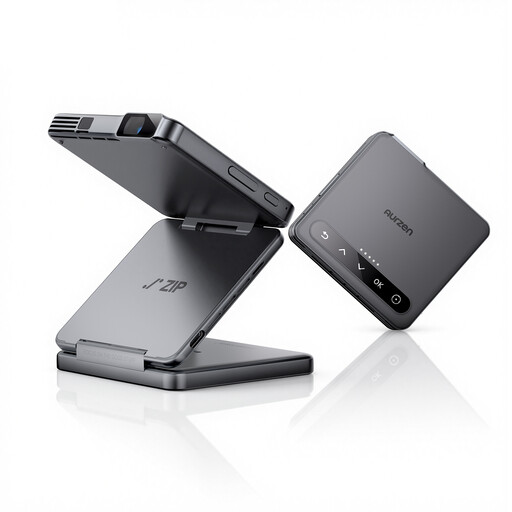
Aurzen Tri-Fold DLP Mini Projector
Why this product fits the profile: This foldable DLP model is designed for travel, presentations and spontaneous film nights. The built-in stand makes it easy to set up without a separate tripod.
The battery life is specifically stated as up to 1.5 hours of video playback. This makes mobile use easier to plan, rather than assuming unlimited runtime.
5000 mAh battery, USB-C PD charging, ToF autofocus, automatic vertical image correction, plus Wi-Fi and Bluetooth. According to the product description, screen mirroring also works without an existing network.
Looking for more options?
We've put together a complete, regularly updated list of products that fully meet these strict selection criteria and the safety regulations in force in the EU.
Practical Tips for Operation and Safety
- Place the projector on a stable, hard surface and keep the ventilation openings clear.
- Use the supplied power adapter and let the device cool down after switching it off.
- Do not look directly into the projection lens. Children should only use the device under supervision.
- For outdoor use, choose dry, sheltered areas. A mini projector is generally not designed for rain or high humidity.
- A matt, light-coloured wall or screen improves even image reproduction compared to uneven or strongly coloured surfaces.
FAQ About Mini Projectors
How bright should a mini projector be?
For a darkened bedroom, lower ANSI lumen values can be sufficient. For larger images, living rooms with ambient light, or a projector for outdoors, higher standardised brightness ratings make sense. ISO lumens and ANSI lumens should not be directly compared with each other.
Is a mini projector suitable for the PS5?
That depends on HDMI support, native resolution and input lag. A device can be fundamentally compatible with the PS5 without offering particularly low latency for fast-paced games. Before buying, you should check the signal format, refresh rate and connections.
How high are the power consumption and maintenance requirements?
LED and DLP mini projectors generally take up less space depending on the model and don't require a traditional lamp replacement routine. Actual power consumption depends on the light source, brightness and operating mode. Keeping the ventilation clear, regularly removing dust from the external surfaces and using the correct power adapter all remain important.