
Mini Projector Buyer's Guide: Smart Selection Tips
A spontaneous movie night in the garden, a large-screen gaming session on the bedroom ceiling, or a presentation without a complex setup – a mini projector promises flexible entertainment far beyond the limits of a television. But the market is crowded and full of technical jargon that obscures more than it explains. Many devices quickly turn out to be a poor investment.
As your Joybuy Product Recommendation Officer, I'll help you separate the wheat from the chaff. Instead of falling for marketing hype, we'll focus on the facts. This guide will show you which pitfalls to avoid and what technical specifications you should really pay attention to in order to find the right portable projector for your needs.
Buyer Beware: 3 Pitfalls to Check Before Buying a Mini Projector
Manufacturers often advertise with impressive numbers and features. But behind many of these promises lie technical flaws that can ruin the cinema experience. Here are the three most common traps.
Pitfall 1: "Fantasy Lumens" vs. Standardised Brightness
Perhaps the biggest misconception concerns the brightness specification. Many vendors advertise values like "9000 Lumens" or "15000 Lux," which sound impressive but have no standardised meaning. These figures are often measured under unverifiable conditions and serve purely for marketing.
The only reliable and comparable unit of measurement for a projector's brightness is ANSI Lumens. This value is measured according to a standardised procedure by the American National Standards Institute and indicates how bright the image actually appears on the screen. A device with 300 ANSI Lumens can produce a brighter and clearer image than a competing product advertised with "8000 Lumens."
Pitfall 2: "4K Support" Is Not the Same as 4K Picture Quality
Another common trick is the claim "4K Supported" or "4K-Ready." This simply means that the projector can receive and process a 4K video signal (3840 x 2160 pixels). However, the actual image sharpness depends on the projector's native resolution—the physical number of pixels on its chip.
A projector that supports 4K but only has a native resolution of 720p (1280 x 720 pixels) will downscale the high-resolution signal to this lower pixel count. The result is an image that is far less sharp than one from a projector with native Full HD (1920 x 1080 pixels) resolution.
Pitfall 3: "Smart" Features Without Official App Licences
A smart projector with a built-in operating system and apps like Netflix or YouTube sounds convenient. However, many budget models use outdated or uncertified Android versions. This often leads to popular streaming apps not working at all, crashing constantly, or only playing videos in poor quality (SD). Without official licences from the service providers (e.g., "Netflix-Licensed"), a smooth streaming experience is not guaranteed.
What Really Matters: The Key Features for Your Home Cinema
To avoid a costly mistake, you should focus on a few crucial technical parameters. These are the primary determinants of image quality and user experience.
Brightness in ANSI Lumens: The True Measure of Image Quality
Brightness is crucial for determining whether you can use the projector only in completely dark rooms or also with some ambient light.
- Up to 300 ANSI Lumens: Suitable for use in very dark rooms, ideal for the bedroom or a movie night after sunset.
- 300 to 700 ANSI Lumens: Good all-around performance. These devices deliver a clear picture even in slightly dimmed living rooms or outdoors at dusk.
- Over 700 ANSI Lumens: Offers enough brightness to produce a high-contrast image even in rooms with some daylight or for larger projection surfaces.
Native Resolution: The Key to a Sharp, Big-Screen Experience
For a true home cinema projector feel, native resolution is essential.
- Native 720p (HD): An acceptable entry-point for smaller screen sizes (up to approx. 80 inches) and occasional use.
- Native 1080p (Full HD): The current standard for a sharp and detailed image. Ideal for movies, TV series, and gaming on large surfaces.
- Native 4K: Offers the highest pixel density but is still less common and comes at a higher price point in the compact mini projector segment.
Modern Connectivity and Easy Setup
A good mini projector should integrate seamlessly into your digital ecosystem.
- Projector Wi-Fi & Bluetooth:WiFi 6 ensures a stable and fast connection for stutter-free streaming. Bluetooth 5.0 or higher allows for the easy connection of external speakers or headphones.
- Automatic Image Correction: Features like Auto Keystone Correction and autofocus are essential. They automatically straighten and focus the image in seconds, even if the projector is placed at an angle to the wall. This is especially practical for ceiling projection or quick setup in different locations.
- Ports: Look for at least one HDMI port for laptops or game consoles and a USB port for media playback from a projector for phone or USB stick.
Top Mini Projector Picks
Based on the criteria above, we have compiled a selection of devices suitable for various use cases.
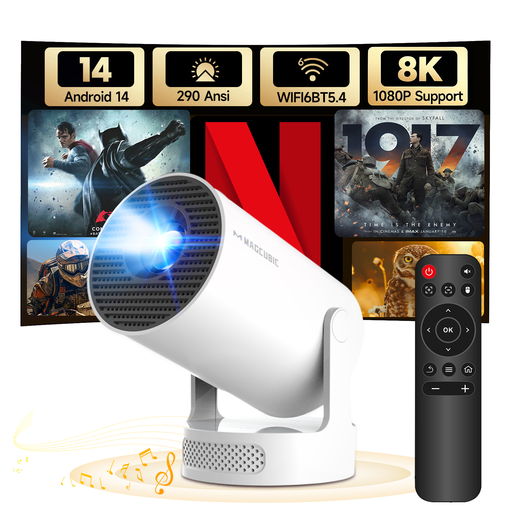
MAGCUBIC HY300Pro+ Mini Projector
Why This Fits Their Persona: Ideal for anyone looking for a straightforward and extremely flexible solution. Thanks to its 180° rotating stand, the image can be effortlessly projected onto the ceiling or a wall—perfect for movie nights in bed or in small apartments.
The projector specifies a clear brightness of 290 ANSI Lumens, which is sufficient for darkened rooms. It runs on a current Android 14 system, promising better app compatibility than many no-name devices.
The integrated 180° rotating stand allows for easy ceiling projection without an additional tripod. The automatic vertical keystone correction makes setup significantly easier.
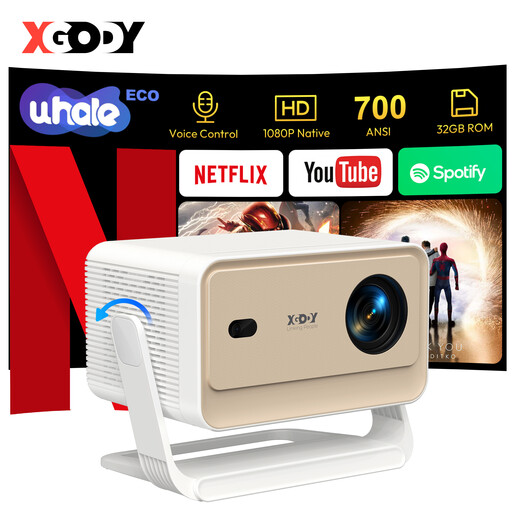
XGODY Gimbal N6 Pro Portable Projector
Why This Fits Their Persona: For users who don't want to compromise on image quality and the streaming experience. This model is a strong alternative to a TV in the living room and delivers a bright, sharp picture.
With 700 ANSI Lumens and a native 1080P (Full HD) resolution, this device avoids the pitfalls of exaggerated brightness and misleading resolution claims. The official Netflix licence guarantees a smooth app experience.
The combination of high brightness, native Full HD resolution, and licensed apps makes it a powerful home cinema projector. Fully automatic image correction and obstacle avoidance simplify setup.
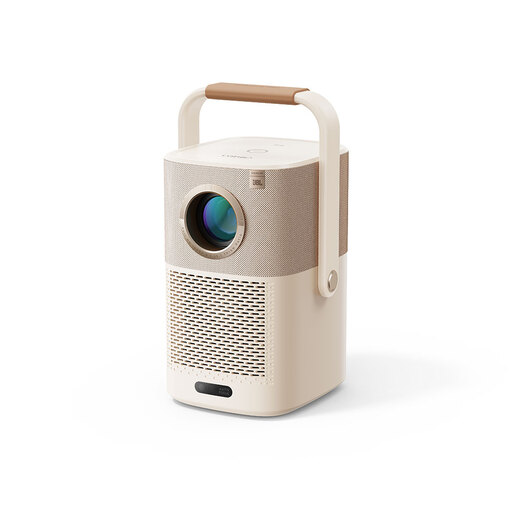
Yaber T2 Plus GTV Outdoor Projector
Why This Fits Their Persona: Perfect for anyone who wants to take their cinema experience outdoors. The built-in battery, convenient carrying handle, and robust design make it the ideal companion for the garden, camping trips, or the balcony.
This model is a true projector with a battery, offering genuine portability. The integrated Google TV system ensures a stable and licensed app environment, thereby bypassing the software trap.
The built-in battery provides up to 2.5 hours of video playback, according to the manufacturer. The combination of JBL speakers, Google TV, and automatic image correction makes it a complete outdoor projector package.
Looking for more options?
We have compiled a complete, up-to-date list of products that fully meet these strict selection criteria and local safety regulations.
Frequently Asked Questions (FAQ)
How many ANSI Lumens do I really need?
That depends heavily on your viewing environment. For an evening movie experience in a darkened room, 200-400 ANSI Lumens are often sufficient. If you also want to use the projector at dusk or in a living room that isn't completely dark, you should consider a model with 500 ANSI Lumens or more. For use in daylight, most mini projectors are not bright enough.
Can a mini projector replace a TV?
A mini projector can be a flexible and space-saving alternative, but it doesn't replace a TV in every situation.
- Advantages: Huge, variable screen size; high portability; creates a true cinema feel.
- Disadvantages: Image quality is highly dependent on ambient light; the lamp life is limited (although modern LED lamps often last over 20,000 hours); fan noise can be audible during quiet scenes.
What does Auto Keystone Correction mean?
Keystone correction fixes the image distortion that occurs when the projector is not placed perfectly centred and at a right angle to the projection surface. Auto Keystone Correction independently detects the device's angle and digitally adjusts the image to make it rectangular again. This is a huge convenience feature that significantly simplifies setup and ensures a perfect picture without manual adjustment.