
Wireless Mouse Buying Guide and Recommendations
A tidy, clutter-free desk boosts focus and creates more flexibility—whether in the office, at home, or while gaming. Switching to a wireless mouse is a crucial step towards achieving this. However, the selection is vast, and the technical specifications can be overwhelming. This article serves as a guide, introducing various models to help you choose the right device for your needs.
What to Look for When Buying a Wireless Mouse
To make the right choice, it helps to understand a few basic technical features and what they mean for different use cases.
Connection Type: 2.4 GHz Wireless or Bluetooth?
The type of wireless connection directly impacts the mouse's performance and compatibility.
- 2.4 GHz Wireless: This technology uses a small USB receiver (dongle) that plugs into your computer. It offers a highly stable and responsive connection with low latency, making it the preferred choice for a wireless gaming mouse, where every millisecond counts.
- Bluetooth: A Bluetooth mouse connects directly to your device without needing an extra USB receiver. This is especially convenient for laptops and tablets with limited ports. The connection is perfectly adequate for everyday tasks and office work but can have slightly higher latency than a 2.4 GHz connection. Some mice offer both connection options for maximum flexibility.
Sensor Precision (DPI) and Ergonomics
The sensor's technical properties and the mouse's shape are crucial for comfort and precision.
- DPI (Dots Per Inch): This value indicates how sensitive the mouse is to movement. A high DPI number means the cursor travels a long distance across the screen with only a small hand movement. For a wireless office mouse, a range of 1000 to 1600 DPI is typically sufficient. Gamers often prefer models with much higher and adjustable DPI settings (up to 26,000 DPI) to adapt sensitivity to different in-game situations.
- Ergonomics and Extra Features: An ergonomic mouse is shaped to reduce strain on your hand and wrist during long periods of use. For those working in quiet environments like offices or libraries, a silent mouse with dampened click sounds can be a valuable feature.
Strong Wireless Mice Choices
Based on different user profiles, we have compiled a selection of models that cover a variety of requirements.
RAPOO VT9Pro 4K Wireless Gaming Mouse
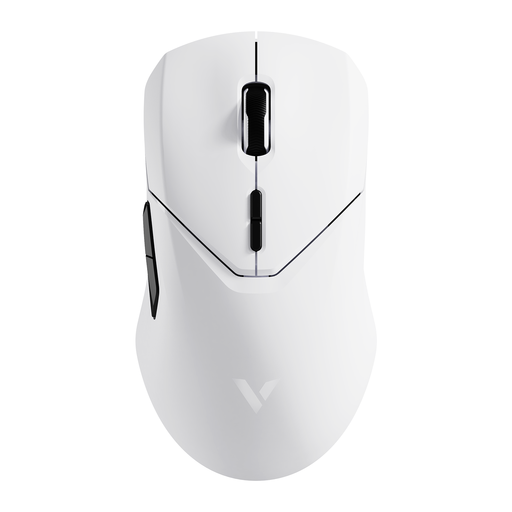
Why It Stands Out: The RAPOO VT9Pro is engineered for maximum gaming performance. Its V+ Wireless Gaming technology enables an extremely high 4000 Hz polling rate, resulting in near-instantaneous signal transmission. Combined with the PAW 3398 optical sensor, which offers a resolution of up to 26,000 DPI, it delivers elite precision for demanding games. The low weight of just 68 grams supports fast, controlled movements.
Pros:
- High Performance: 4K Hz polling rate and 8K Hz in wired mode for minimal latency.
- Precise Sensor: PAW 3398 with 26,000 DPI, 650 IPS, and 50G acceleration.
- Long Battery Life: The 800 mAh battery provides up to 180 hours of use, according to the manufacturer.
- Customisation: 10 programmable buttons and on-board memory for saving profiles.
- Lightweight Design: Only 68 grams for fatigue-free gaming.
Who It's For: This model is aimed at competitive gamers and esports enthusiasts looking for an extremely responsive and precise wireless gaming mouse for PC and laptop.
RAPOO 1680 Silent Wireless Mouse
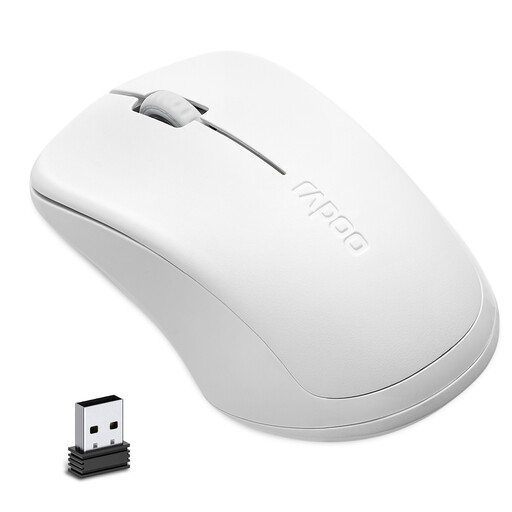
Why It Stands Out: The RAPOO 1680 focuses on the core essentials for the workday: reliability, durability, and quiet operation. Its click noise is significantly reduced, making it an ideal silent mouse for open-plan offices, libraries, or the home office. Its power efficiency is remarkable—with a single AA battery, it achieves a battery life of up to 12 months, according to the manufacturer.
Pros:
- Silent Operation: Effectively reduces click noise by 90%, according to Rapoo's lab test report.
- Long Battery Life: Up to 12 months on a single AA battery.
- Stable Connection: Reliable 2.4 GHz wireless technology with a 10-meter range.
- Comfortable Design: Ambidextrous shape, suitable for both right- and left-handed users.
- Solid Performance: The 1000 DPI optical sensor is designed for all common office applications.
Who It's For: Ideal for office users, students, and anyone looking for a straightforward, durable, and especially quiet mouse for laptop and PC.
Logitech Signature M550 Wireless Bluetooth Mouse
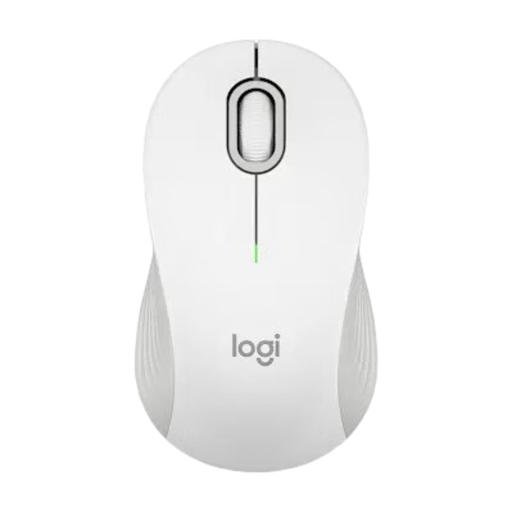
Why It Stands Out: The Logitech M550 is a versatile workhorse designed for productivity. Its key feature is the SmartWheel, which automatically switches between precise, line-by-line scrolling and hyper-fast scrolling for long documents or web pages. Dual connectivity via Bluetooth and the Logi Bolt USB receiver makes it extremely flexible for use across different devices.
Pros:
- Productivity Feature: SmartWheel for adaptive scrolling.
- Dual Connectivity: Connect via Bluetooth or the included Logi Bolt USB receiver.
- Exceptional Battery Life: Up to 24 months with the USB receiver and 20 months via Bluetooth.
- Precise Tracking: Optical sensor with up to 4000 DPI.
- Fit: Available in different sizes to accommodate various hand sizes.
Who It's For: An excellent choice for professionals and home office users who need a flexible wireless office mouse with productivity-enhancing features and frequently switch between devices like a PC and a laptop.
Didn't Find the Right Model?
The selection presented here already covers a wide range of needs. If you still haven't found the right model for your specific requirements, there are many more alternatives to discover.
Discover more models in our Laptop & PC Mice category to find the perfect solution for your needs.
Frequently Asked Questions (FAQ)
Which is better: A Bluetooth mouse or a 2.4 GHz wireless mouse?
Neither technology is inherently "better"; it all depends on the use case. A 2.4 GHz mouse is the top choice for gaming due to its extremely low latency. A Bluetooth mouse offers more flexibility because it doesn't occupy a USB port and can easily connect to multiple devices like tablets and laptops, making it ideal for mobile use and office work.
How long does the battery in a wireless mouse last?
Battery life varies greatly depending on the model and usage. Power-efficient office mice with replaceable AA or AAA batteries can last 12 to 24 months (e.g., RAPOO 1680, Logitech M550). Rechargeable, high-performance gaming mice offer between 40 and 180 hours per charge, depending on usage intensity (e.g., RAPOO VT9Pro).
What should you look for in a wireless gaming mouse?
For a wireless gaming mouse, four factors are especially important:
- Low Latency: A stable 2.4 GHz connection with a high polling rate (1000 Hz or more) is crucial.
- Precise Sensor: High and adjustable DPI settings (at least 12,000 DPI) and a high IPS (Inches Per Second) rating for fast movements.
- Low Weight: Lightweight mice (under 80 grams) allow for quicker reactions and help prevent fatigue.
- Programmable Buttons: Extra buttons that can be assigned macros or in-game functions provide a competitive advantage.