
Wireless Keyboard and Mouse Sets for a Clutter-Free Desk
A cluttered desk with tangled wires can disrupt concentration and hinder your workflow. A wireless keyboard and mouse set solves this problem, creating a clean, flexible workspace—whether in the office, at home, or for your personal PC. However, the selection of models is vast, and the technical differences are not always apparent at first glance.
This article serves as a guide. We have compiled objective information on various keyboard and mouse combo models to make your decision easier and help you find the right set for your needs.
What to Look for When Choosing a Wireless Keyboard and Mouse
Before you decide on a model, several fundamental criteria should be considered. These will help you match the functionality to your personal work habits.
1. Connectivity: 2.4 GHz Wireless or Bluetooth?
Most wireless sets use one of two technologies:
- 2.4 GHz Wireless Connection: These sets come with a small USB receiver (dongle) that plugs into a free USB-A port on your computer. The connection is typically very stable, responsive, and setup is plug-and-play. The downside is that a USB port is permanently occupied.
- Bluetooth: A Bluetooth connection does not require a separate receiver, provided your computer (laptop, PC, tablet) already has an integrated Bluetooth module. This saves a USB port and often allows for pairing with multiple devices (multi-device connectivity), between which you can easily switch.
2. Typing Feel and Noise Level: Quiet Keys for Undisturbed Work
The sound of typing is an often-underestimated factor, especially in open-plan offices or quiet environments. A quiet keyboard and mouse set can make a significant difference here. Look for terms like "silent keys" or keyboards with scissor-switch mechanisms, which are known for a quiet and precise typing feel. There are also mouse models with noise-reduced clicks. For the English-speaking market, a QWERTY layout is essential to find all characters in their usual positions.
3. Power Source: Rechargeable Battery or Disposable Batteries?
Wireless devices need power. There are two common solutions:
- Rechargeable Batteries: Sets with built-in rechargeable batteries are usually charged via a USB-C cable. This is sustainable and practical, as they can often be used while charging.
- Disposable Batteries: Many models run on standard AA or AAA batteries. Depending on usage, the battery life can last from several months to years. It is advisable to always have spare batteries on hand.
Recommended Keyboard and Mouse Sets
Based on functionality, intended use, and user feedback, we have compiled a selection of wireless keyboard and mouse sets.
CHERRY Stream Desktop Recharge
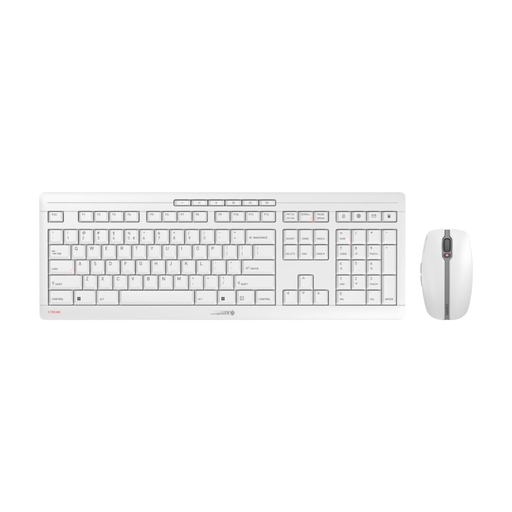
What makes it stand out The CHERRY Stream Desktop Recharge is a well-designed solution for users who value sustainability, quiet operation, and high-quality construction. The integrated NiMH batteries in both the keyboard and mouse can be conveniently charged via USB-C, even during use. The keyboard features the in-house CHERRY SX scissor technology, ensuring precise and whisper-quiet typing. An integrated metal plate and eight non-slip feet give the keyboard excellent stability.
Pros
- Rechargeable via USB-C for sustainable operation
- Very quiet and precise typing feel thanks to SX scissor technology
- Stable and non-slip construction
- Symmetrical 6-button mouse with quiet clicks and adjustable DPI (1000/1600/2400)
- Secure AES-128 encryption for the wireless connection
Who is it for? This set is ideal as a keyboard and mouse set for the office and home office, where a low noise level and reliability are top priorities. Users looking for an eco-friendly, rechargeable solution without cable clutter will find a perfect match here.
Logitech MX Keys S Combo
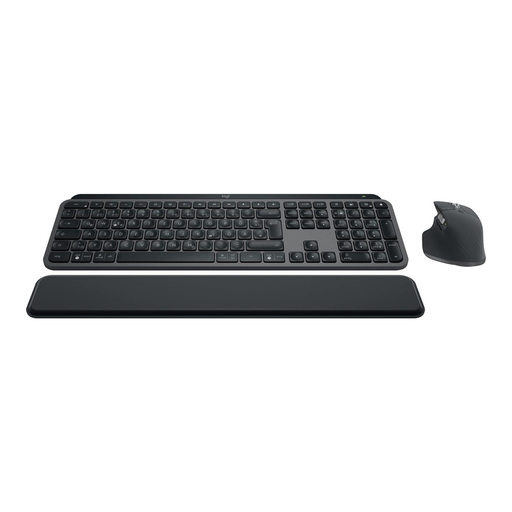
What makes it stand out The Logitech MX Keys S Combo is designed for high productivity and demanding users. The keyboard features spherically-dished keys that conform to your fingertips, providing a fluid typing experience. The smart illumination automatically adjusts to ambient light conditions. The included MX Master 3S mouse, with its 8,000 DPI sensor, offers precise tracking on almost any surface, including glass. Using the Logi Options+ software, you can automate repetitive tasks (Smart Actions) and seamlessly manage up to three devices.
Pros
- Premium combo for maximum productivity
- Smart key illumination and comfortable, concave keys
- High-precision MX Master 3S mouse with tracking on glass
- Multi-device connectivity for up to 3 devices (Bluetooth & Logi Bolt USB receiver)
- Extensive customization and workflow automation via software
Who is it for? This keyboard and mouse combo is aimed at power users, creatives, and professionals who spend many hours a day at the computer and demand the highest standards of precision, comfort, and efficiency. Those who frequently switch between multiple devices (e.g., laptop, desktop PC, and tablet) will greatly benefit from the multi-device features.
Logitech MK295 Silent Wireless Combo
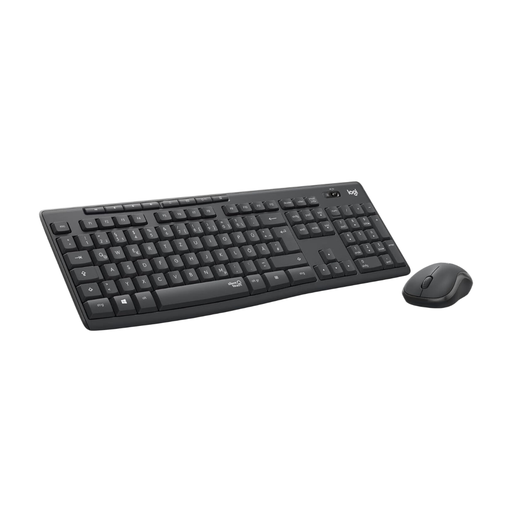
What makes it stand out The focus of the Logitech MK295 set is on near-silent operation. Thanks to SilentTouch technology, clicking and typing noises are reduced by over 90%, according to the manufacturer. The set offers a straightforward plug-and-play setup via a 2.4 GHz USB receiver. The battery life is exceptionally long, with up to 36 months for the keyboard and 18 months for the mouse (batteries included). The spill-resistant design and adjustable feet complete the package.
Pros
- Extremely quiet keys and mouse clicks thanks to SilentTouch technology
- Very long battery life
- Stable and lag-free 2.4 GHz wireless connection
- Full-size keyboard with number pad and 8 hotkeys
- Easy setup without software installation
Who is it for? This quiet keyboard and mouse set is an excellent choice for budget-conscious users, students, and anyone who works in a quiet environment and doesn't want to deal with recharging batteries. It is the ideal solution for anyone looking for a reliable, hassle-free, and above all, quiet wireless keyboard and mouse set.
Discover More Options
Haven't found the right model for your needs yet? There is a wide variety of other sets with different designs, features, and in various price ranges.
? Discover more models of wireless keyboard and mouse sets here
Frequently Asked Questions (FAQ)
1. How do I connect a wireless keyboard and mouse set to my computer? Most sets connect via a small USB receiver. Plug it into a free USB port on your PC or laptop. The keyboard and mouse usually connect automatically. For Bluetooth sets, activate pairing mode on the devices and select them in your computer's Bluetooth settings.
2. What is the difference between a wireless (2.4 GHz) and a Bluetooth connection? A wireless connection (usually 2.4 GHz) uses a dedicated USB dongle and is known for its stability and fast response. It is ideal for a fixed workstation. A Bluetooth connection does not require a dongle, saves a USB port, and often allows connection to multiple devices (e.g., PC, tablet, smartphone), making it more flexible.
3. Can I use the keyboard or mouse from a set individually? In most cases, yes. If the set uses a shared USB receiver, you can leave just one of the two devices turned on. With some manufacturers (e.g., Logitech with its Logi Bolt or Unifying Receiver), you can also pair other compatible individual devices with the same receiver.