
Top Wireless Keyboard and Mouse Bundles
A cluttered desk with tangled cables can disrupt concentration and hinder productivity. A wireless keyboard and mouse set is a simple and effective solution for creating order and designing a flexible work environment. However, the selection is vast, and the technical details can be confusing.
As a Joybuy Product Recommendation Officer, my job is to sift through market information and provide you with practical guidance. This article introduces various models and explains the key criteria you should consider when choosing a wireless keyboard and mouse.
What to Look for When Choosing a Wireless Keyboard and Mouse
To find the right set for your needs in the office or at home, you should evaluate a few fundamental features.
1. Connection Type: 2.4 GHz Wireless vs. Bluetooth
Most sets use a 2.4 GHz wireless connection via a small USB receiver. This method is known for its stability and simple plug-and-play setup. An alternative is Bluetooth, which doesn't occupy a USB port and often enables multi-device keyboard and mouse functionality. This allows you to seamlessly switch between multiple devices like a PC, laptop, and tablet. Some models even offer both connection types for maximum flexibility.
2. Ergonomics and Noise Level
Long workdays at the computer demand comfortable input devices. An ergonomic keyboard and mouse that supports a natural hand posture can help relieve strain on your wrists and arms. Look for features like integrated palm rests or an adjustable tilt. For work environments where quiet is valued, a silent keyboard and mouse combo is ideal. Models with scissor-switch technology or special silent switches significantly reduce clicking and typing noise.
3. Power Source: Battery or Rechargeable
The power supply is a crucial factor for user convenience. Traditional models run on replaceable batteries, with a lifespan ranging from a few months to several years. A rechargeable set, on the other hand, uses integrated batteries that can be conveniently charged via a USB cable—often even while in use. This reduces waste and long-term costs.
Top Wireless Keyboard Selections
Here is a selection of sets that stand out for their different features and cater to various user requirements.
CHERRY Stream Desktop Recharge
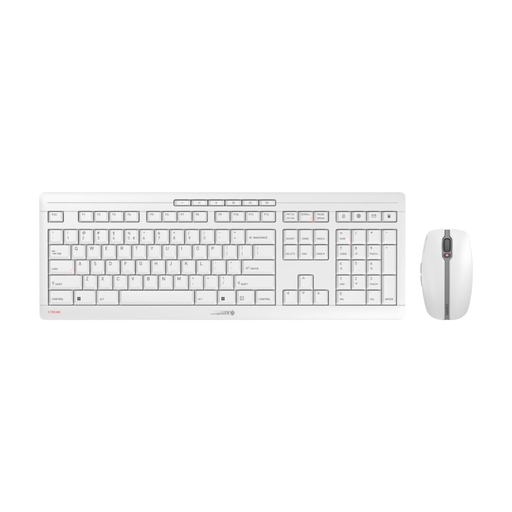
Why it stands out: The CHERRY Stream Desktop Recharge is a well-designed keyboard and mouse set for the office, focusing on sustainability and high quality. The integrated NiMH batteries can be charged via USB-C, making battery replacement obsolete. The keyboard uses CHERRY's proprietary SX scissor-switch technology, which ensures a precise and very quiet typing experience. An integrated metal plate gives it stability and substantial weight.
Pros:
- Rechargeable via a modern USB-C port
- Quiet and precise typing thanks to CHERRY SX scissor-switch technology
- Stable and non-slip construction with a metal plate
- Secure 2.4 GHz wireless connection with AES-128 encryption
- Symmetrical 6-button mouse with silent clicks and adjustable DPI (1000/1600/2400)
Who is it for?: Users in a professional setting or a demanding home office who value a quiet work environment, high-quality craftsmanship, and a sustainable, rechargeable solution.
CHERRY Gentix Desktop
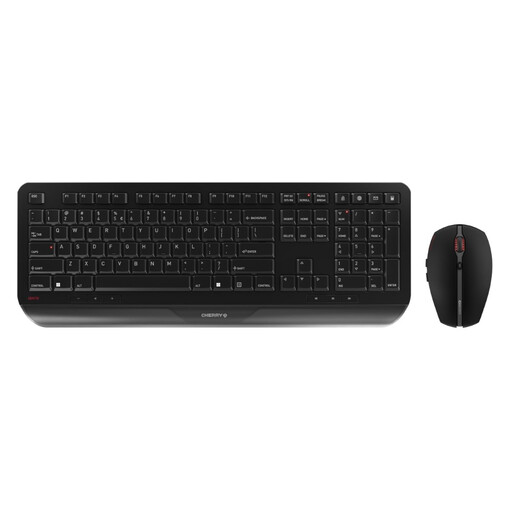
Why it stands out: The CHERRY Gentix Desktop focuses on ergonomics and endurance. The keyboard features a permanently integrated palm rest, providing comfort during long typing sessions. A standout feature is the battery life of up to three years for both the keyboard and mouse, making this set an exceptionally low-maintenance companion. The abrasion-resistant laser-etched keys ensure long-lasting legibility.
Pros:
- Integrated palm rest for ergonomic work
- Exceptionally long battery life of up to 3 years
- Durable, abrasion-resistant key lettering
- 10 practical hotkeys for multimedia and office functions
- Symmetrical mouse, suitable for both right- and left-handed users
Who is it for?: Users looking for a reliable, comfortable, and particularly durable ergonomic keyboard and mouse for daily use who don't want to worry about frequent battery changes.
Logitech MK295 Silent Wireless Combo
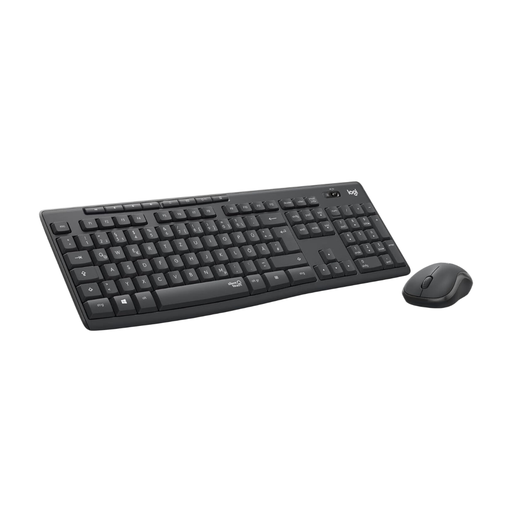
Why it stands out: The name says it all: the Logitech MK295 Silent Wireless Keyboard Mouse Combo is specifically designed for whisper-quiet operation. According to the manufacturer, SilentTouch technology reduces clicking and typing noises by over 90% compared to standard models. The set offers a full-size keyboard with a number pad and a long battery life.
Pros:
- SilentTouch technology for extremely quiet use
- Long battery life (up to 36 months for the keyboard, 18 for the mouse)
- Full-size keyboard with 8 hotkeys and a number pad
- Spill-resistant design for increased durability
- Made from certified recycled plastic
Who is it for?: Ideal for open-plan offices, libraries, a home office shared with family, or anyone who prefers the quietest possible work environment and is looking for a silent keyboard and mouse combo.
RAPOO 9010M Multi-Device Combo
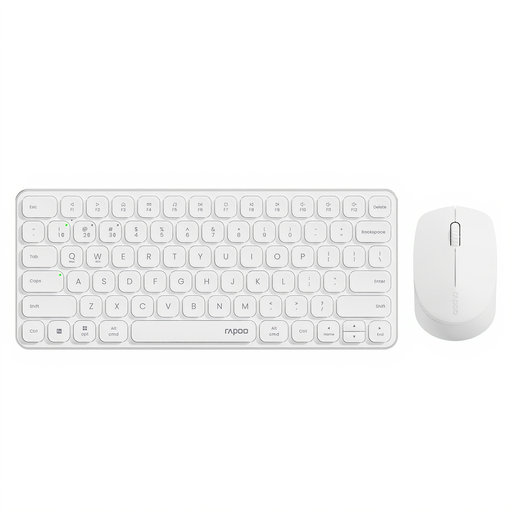
Why it stands out: The RAPOO 9010M set is the connectivity specialist. It can connect to up to four devices simultaneously and allows for quick switching between them. The connection can be flexibly established via Bluetooth 4.0, Bluetooth 5.0, or 2.4 GHz wireless. The keyboard's compact, slim design also makes the set easily portable and space-saving on your desk.
Pros:
- Multi-device connectivity for up to 4 devices at once
- Smart switching between Bluetooth and 2.4G
- Compact and slim design, ideal for flexible workspaces
- Mouse with an adjustable DPI sensor (800 to 2400)
- Status indicators for device switching and Caps Lock
Who is it for?: Power users who regularly switch between different devices like a PC, tablet, and laptop and need a single multi-device keyboard and mouse to control all their systems.
Discover More Electronics for Your Home
A tidy workspace is just the beginning. If you also value efficiency and modern technology in other areas of your home, our selection of electric kettles with temperature control might be of interest. Discover practical helpers for your kitchen.
Frequently Asked Questions (FAQ)
Which is better: Bluetooth or 2.4 GHz wireless?
Both technologies have their advantages. A 2.4 GHz connection via a USB dongle is typically very stable, responsive, and requires no configuration (plug-and-play). Bluetooth doesn't need a USB port and is excellent for connecting to multiple devices. The choice depends on whether you have a free USB port and if you want to switch between multiple devices.
How long do the batteries in a wireless keyboard and mouse set last?
Battery life varies greatly depending on the model and usage. Some sets need new batteries every few months, while models like the CHERRY Gentix Desktop can last up to three years. A rechargeable set like the CHERRY Stream Desktop Recharge bypasses this issue entirely by using integrated batteries that can be charged via USB-C.
Are wireless keyboards and mice suitable for gaming?
The sets presented here are primarily designed for office and productivity applications. They offer reliable and comfortable performance for everyday tasks. For serious gaming, there are specialized wireless peripherals optimized for extremely low latency and higher polling rates, which can make a difference in fast-paced games.