
Wireless Keyboard and Mouse Set: A 2026 Buyer's Guide and Recommendations
A tidy, cable-free desk promotes focus and creates a pleasant working atmosphere. A wireless keyboard and mouse set is a fundamental component for achieving this, whether in the office or at home. However, the selection is vast, and the technical differences can often be unclear. Criteria such as connection type, ergonomics, and noise level are crucial for productivity and comfort in your daily work.
This guide is here to help. It highlights the most important features to consider when making your choice and presents a selection of models for various use cases, enabling you to make an informed decision.
What to Look for When Choosing a Wireless Keyboard and Mouse Set
To find the right set for your needs, several technical and functional aspects should be considered.
Connectivity: Bluetooth or USB Receiver?
The type of wireless connection is a key differentiator.
- USB Receiver (2.4 GHz): Most sets come with a small USB dongle that establishes a stable, lag-free connection. Modern standards like Logi Bolt also offer an encrypted and secure connection, making them particularly attractive for an office keyboard and mouse set. Setup is straightforward (plug-and-play).
- Bluetooth Keyboard and Mouse Set: A Bluetooth connection allows for use without an additional USB receiver, which is advantageous for devices with limited ports, such as laptops or tablets. Many modern sets offer dual connectivity—both Bluetooth and a USB receiver—ensuring maximum flexibility.
Ergonomics and Layout for Daily Use
Comfort is essential with hours of daily use. An ergonomic keyboard and mouse set can help reduce strain on your hands and wrists. Look for features like a palm rest on the keyboard, adjustable tilt angles, and a mouse shaped to fit your hand size. For users in English-speaking regions, the standard QWERTY keyboard layout is a must for efficient typing.
Noise Level: A Quiet Keyboard and Mouse for Focused Work
In open-plan offices or a shared home office, loud clicking and typing can be distracting. Many manufacturers now offer a quiet keyboard and mouse. Technologies like Logitech's "SilentTouch" significantly reduce noise without noticeably compromising tactile feedback. This promotes a quieter working environment for you and your colleagues.
Our Top Picks for Wireless Keyboard and Mouse Sets in 2026
Based on the criteria mentioned, we have compiled a selection of sets suitable for different user groups and requirements.
Logitech Signature MK650 Combo for Business
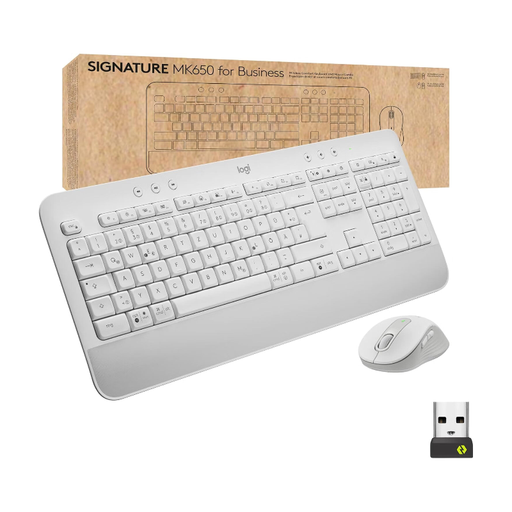
Why it stands out: The Logitech Signature MK650 Combo for Business is designed for reliability and comfort in a professional environment. It combines secure Logi Bolt wireless technology with Bluetooth connectivity. The full-size keyboard features an integrated palm rest, while the mouse is equipped with SilentTouch technology for quiet clicks. Its long battery life makes it a low-maintenance solution for businesses and demanding individual users.
Pros:
- Dual connectivity via secure Logi Bolt USB receiver and Bluetooth Low Energy
- Full-size keyboard with an integrated palm rest for enhanced comfort
- Quiet keys and clicks thanks to SilentTouch technology
- Long battery life: up to 36 months for the keyboard and 24 months for the mouse, according to the manufacturer
- Compatible with Windows, macOS, Linux, and Chrome OS
Who is it for? This set is an excellent choice for IT departments outfitting a large number of workstations, as well as for professional users in the office or at home who value a secure connection, comfort, and low maintenance.
Logitech MK295 Wireless Keyboard and Mouse Combo
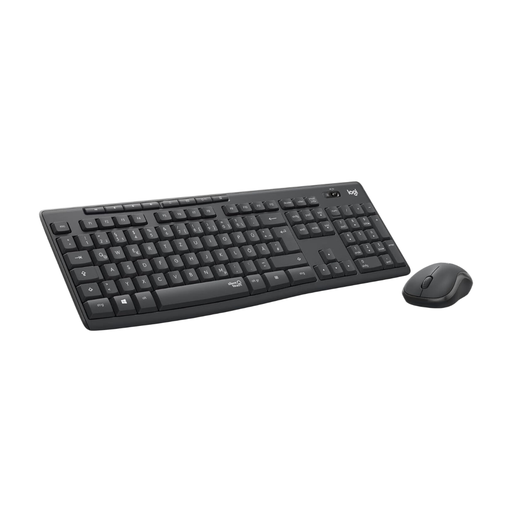
Why it stands out: The Logitech MK295 set focuses on providing the quietest possible operation. According to Logitech, its SilentTouch technology reduces typing and clicking noises by over 90% compared to standard peripherals. The connection is easily established via a 2.4 GHz nano USB receiver, ensuring stable and reliable use. The spill-resistant design and long battery life complete the package.
Pros:
- Extremely quiet typing and clicking thanks to SilentTouch technology
- Stable 2.4 GHz wireless connection with a range of up to 10 metres
- Full-size keyboard with a number pad and 8 hotkeys
- Spill-resistant design and adjustable tilt legs
- Standard QWERTY layout
Who is it for? Ideal for users in open-plan offices, libraries, or home offices who need a distraction-free and quiet work environment. It's a straightforward plug-and-play solution for anyone looking for a reliable and very quiet keyboard and mouse.
Logitech MX Keys S Combo
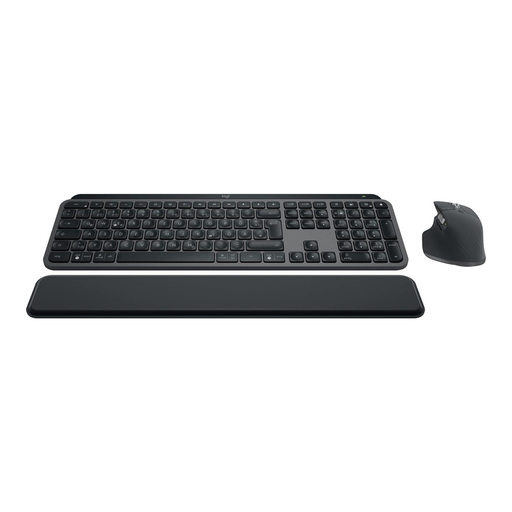
Why it stands out: The Logitech Keyboard and Mouse Combo, the MX Keys S Combo, is aimed at demanding users who require maximum performance and customisation. The keyboard, with its spherically-dished keys and smart backlighting, offers a precise and comfortable typing experience. The accompanying MX Master 3S mouse is equipped with an 8,000 DPI sensor that enables precise tracking even on glass. With the Logi Options+ software, keys can be customised and repetitive tasks automated through "Smart Actions."
Pros:
- Precise mouse with an 8,000 DPI Darkfield sensor for tracking on almost any surface
- Smart key backlighting that adapts to ambient light conditions
- Multi-device capable for up to 3 devices, with easy switching at the touch of a button
- Rechargeable batteries with charging via USB-C
- Customisable keys and workflow automation via the Logi Options+ software
Who is it for? This set is designed for power users, developers, designers, and creative professionals who frequently switch between multiple computers or operating systems and demand the highest standards of precision, comfort, and efficiency.
Didn't Find the Right Set?
The models presented here cover common user profiles. However, the market offers a much wider variety, including compact keyboards for mobile workstations, special ergonomic designs, or sets for left-handed users. If you are looking for other options tailored to your specific needs, it's worth taking a look at our broader selection.
Discover our entire range of Keyboards, Mice & Input Devices and find the perfect solution for your workspace.
Frequently Asked Questions (FAQ)
What is the difference between a Bluetooth and a USB wireless set?
A set with a USB receiver usually offers a very stable, plug-and-play connection that occupies a USB port. A Bluetooth keyboard and mouse set connects directly to the computer and doesn't require a dongle, making it more flexible for devices like tablets. Many modern sets support both technologies.
How long is the battery life of a wireless keyboard and mouse set?
Battery life varies greatly depending on the model and usage. Basic sets without backlighting can last up to three years (keyboard) or two years (mouse) on a single set of batteries, according to manufacturers. Models with features like backlighting have rechargeable batteries, with a runtime ranging from a few days to several weeks, depending on the intensity of use.
Are the keyboards featured here suitable for the English-speaking market?
Yes, the models featured and most keyboards sold in major English-speaking markets are equipped with the standard QWERTY layout. This ensures that all keys, including special characters, are in their familiar positions.