
Wireless Keyboard and Mouse Combo Buyer's Guide
A wireless desk promises a clean setup and flexibility. Yet, when searching for the right wireless keyboard and mouse combo, many users encounter problems: unstable connections, loud keystrokes, and unexpected follow-up costs. An unsuitable set can significantly hinder productivity in the office or at home. This guide will help you identify the crucial features and avoid marketing traps, enabling you to make an informed decision.
The 3 Most Common Pitfalls When Buying a Wireless Keyboard-Mouse Combo
Before you invest, you should be wary of three common problems that often only become apparent after the purchase:
- The "Whisper-Quiet" Promise: Many manufacturers advertise silent keys, but the reality is often different. Loud clicking and typing can quickly become a nuisance in a quiet office environment or home office. The actual noise level depends on the built-in key technology, not the marketing.
- Unstable Wireless Connections: Nothing is more frustrating than input lag or a sudden connection drop in the middle of your work. Budget-friendly sets often cut corners on the quality of their wireless technology, leading to interference and dropouts, especially when other wireless devices are nearby.
- Hidden Costs from Battery Consumption: A low initial price can be deceptive if the set constantly requires new batteries. Models that are not rechargeable incur ongoing costs and are less environmentally friendly. A sudden shutdown due to dead batteries can also interrupt your workflow.
Key Criteria: What to Look for Before You Buy
To avoid these problems, focus on the following technical parameters. These determine the reliability and user comfort of your future desktop set.
Connectivity: Stable 2.4 GHz Wireless or Flexible Bluetooth Pairing?
A wireless keyboard and mouse combo primarily uses two technologies:
- 2.4 GHz Wireless (with USB Receiver): This method typically offers a very stable and lag-free connection. The included USB dongle is simply plugged in (Plug-and-Play) and automatically pairs the keyboard and mouse. This is ideal for a fixed workstation where reliability is the top priority. Look for models with AES-128 encryption for secure data transmission.
- Bluetooth Keyboard and Mouse: This option doesn't require a USB port, making it perfect for laptops with limited ports or for tablets. A major advantage is the multi-device keyboard capability, which allows you to switch seamlessly between multiple devices (e.g., PC, tablet, smartphone).
Typing Feel and Noise Level: The Importance of Key Technology and Ergonomics
The typing feel is crucial for comfort during long periods of use. For a quiet keyboard and mouse set, the scissor-switch mechanism is an excellent choice. It provides a precise, short key travel and a significantly quieter typing sound than conventional membrane or loud mechanical keys.
An ergonomic keyboard and mouse set promotes a natural posture for your hands and wrists. Features like an integrated palm rest, adjustable tilt angles, and a contoured mouse shape can prevent fatigue. For users in Germany, a German QWERTZ layout is also essential for typing umlauts and special characters without issue.
Power Supply: Disposable Batteries or a Rechargeable System?
The choice of power source has a direct impact on convenience and long-term costs.
- Battery-Powered Sets: Models with long battery life (12 months or more) can be a practical solution. They minimize maintenance but require the regular purchase of batteries.
- Rechargeable Sets: A rechargeable set is often the more sustainable and convenient solution. Models that can be charged via a USB-C cable—ideally even while in use—eliminate the risk of a sudden work stoppage and save money in the long run.
Top Keyboard and Mouse Pairings
Based on the criteria above, we have identified several models that are well-suited for specific user profiles.
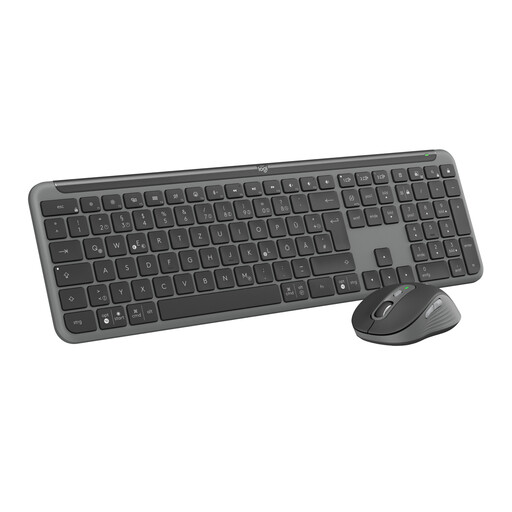
Logitech Signature Slim Keyboard Mouse Combo MK950
Why This Fits Their Persona: Ideal for users who switch seamlessly between a work laptop and a personal PC. Its multi-device capability and customizable keys via the Logi Options+ app boost efficiency in a flexible work environment.
The SilentTouch technology reduces click noise by 90% according to Logitech, solving the problem of loud input devices. The dual connectivity via Bluetooth or the stable Logi Bolt USB receiver prevents connection issues.
Multi-Device Connectivity: Easily switch between up to three devices. Quiet Operation: Silent keys and clicks for a distraction-free work environment.
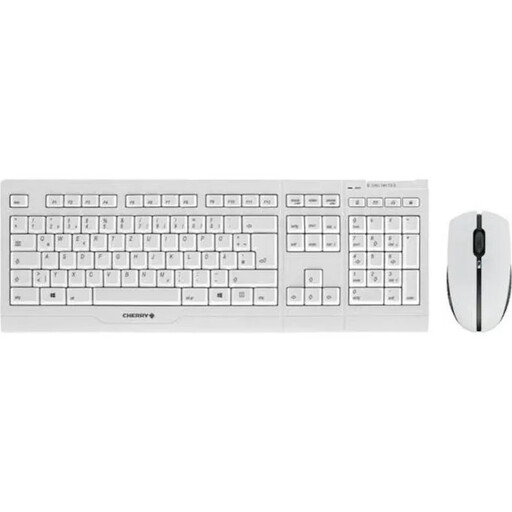
CHERRY B.UNLIMITED 3.0 Wireless Rechargeable Desktop Combo
Why This Fits Their Persona: Designed for continuous professional use. Its robust construction, durable keys, and ability to charge while in operation make it a reliable tool for demanding office environments.
This set is rechargeable and can be charged during use, bypassing the pitfall of battery costs and downtime. The SX scissor technology ensures quiet and precise typing, while AES-128 encryption provides a secure wireless connection.
Rechargeable During Use: No interruptions thanks to the ability to charge while working. Durable Keys: Abrasion-resistant laser-etched keycaps and a robust SX scissor mechanism.
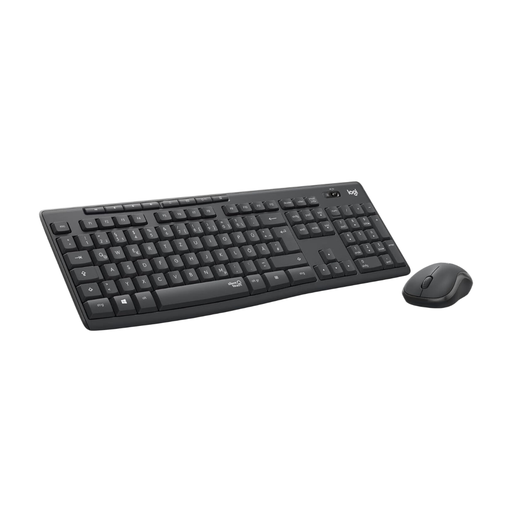
Logitech MK295 Wireless Keyboard and Mouse Combo
Why This Fits Their Persona: An excellent choice for users seeking a reliable and quiet solution for the home office or occasional office use without a large budget.
The SilentTouch technology directly addresses the problem of loud keyboards. The very long battery life (up to 36 months for the keyboard) significantly minimizes follow-up costs and maintenance.
Extremely Quiet Operation: Focused work without distracting typing and clicking noises. Long Battery Life: Reduces operating costs and the hassle of changing batteries.
Looking for more options?
We have compiled a complete, up-to-date list of products that fully meet these strict selection criteria and German safety regulations.
Frequently Asked Questions (FAQ)
How long does the battery last in a rechargeable keyboard-mouse combo?
Battery life varies depending on the model and usage. Many rechargeable sets offer a runtime of several weeks to months on a single charge. Factors like the use of key backlighting can affect the duration. A key advantage is that many models can be used while charging, so there is no downtime.
Is a wireless or Bluetooth keyboard-mouse combo better for the office?
Both technologies have their merits. A 2.4 GHz wireless set with a USB receiver is often the most straightforward and stable solution for a fixed office PC. Bluetooth is more flexible as it doesn't occupy a USB port and allows for easy switching between multiple devices like a laptop and tablet, making it a great choice for a modern office desktop set and home office.
What does QWERTZ layout mean, and why is it important?
The QWERTZ layout is the standard for keyboards in German-speaking regions. The key arrangement is adapted to the German language and includes umlauts (?, ?, ?) as well as important special characters in their customary positions. When making a purchase, it is crucial to look for this layout to ensure a smooth and efficient typing process in German.