
Wireless Headsets with Microphones: Buyer's Guide and Recommendations
A wireless headset with a microphone has become an indispensable tool for many. Whether for long video conferences in the home office, coordinating with teammates in online games, or simply enjoying music without interruption, the demands are diverse. However, the market is saturated with options, and technical specifications can often be confusing.
This article serves as your guide. We'll highlight the most important criteria to consider when making your selection and present a curated list of models for various use cases. Our goal is to provide you with an objective foundation for your purchasing decision.
What to Look for When Choosing a Wireless Headset
Before you decide on a model, it's crucial to define your primary needs. The following three criteria are of central importance.
1. Microphone Quality and Noise Cancellation
Clear voice transmission is critical, especially for a video conferencing headset or professional use. Look for models with noise-cancelling microphones. These use technologies like beamforming or digital signal processors (DSP) to isolate your voice from ambient sounds.
In parallel, many over-ear headphones with noise cancelling (ANC) offer active noise cancellation for the listener. This feature reduces distracting external sounds like keyboard clatter or background conversations, allowing you to fully concentrate on your call or music.
2. Connectivity and Compatibility
The connection type affects both stability and flexibility. A Bluetooth headset with a microphone offers broad compatibility with smartphones, tablets, and laptops. Look for current standards like Bluetooth 5.2 for greater range and a more stable connection. Multipoint connectivity allows you to connect to two devices simultaneously—for example, a PC and a smartphone—making it easy to switch between calls and media playback.
For a wireless PC headset, especially in the gaming realm, a dedicated USB dongle is often the better choice. It uses a 2.4 GHz wireless connection, which offers lower latency (delay) than a standard Bluetooth connection—a critical factor for competitive gaming.
3. Battery Life and Comfort
A headset for the home office or long gaming sessions must remain comfortable for hours on end. Pay attention to a lightweight design, adjustable headbands, and soft ear cushions made from materials like memory foam or protein leather. The form factor (over-ear, on-ear) is also a matter of personal preference. Over-ear models completely enclose the ear and often provide better passive noise isolation.
The battery life should match your usage patterns. Models with 20 hours or more of talk or playback time will typically cover a full workday or an extended gaming night. A fast-charging feature can also be useful for getting the headset ready to go again in a short amount of time.
Top Wireless Headset Recommendations
Based on the criteria above, we have compiled a selection of headsets for different user profiles.
Jabra Evolve2 75 Wireless PC Headset
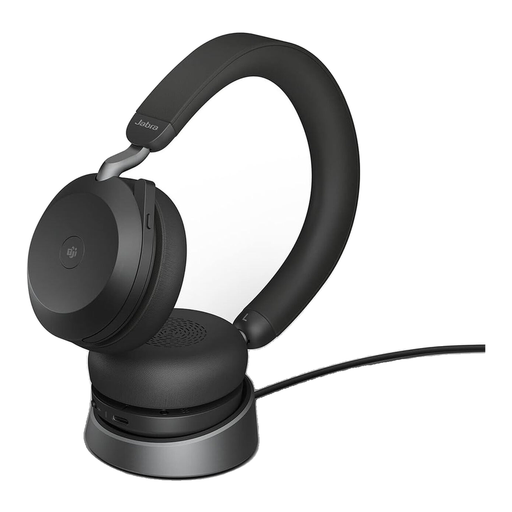
Why it stands out: The Jabra Evolve2 75 is meticulously designed for professional use in noisy office environments or the home office. Its certification for Microsoft Teams ensures seamless integration, while the advanced ANC technology and an eight-microphone system deliver crystal-clear communication. The integrated busylight signals to colleagues that you are on a call.
Pros:
- Advanced ANC: Adjustable Active Noise Cancellation to reduce ambient sounds.
- Exceptional Voice Quality: 8-microphone technology with DSP to filter out background noise.
- Dual Connectivity: Connect simultaneously to two devices via Bluetooth 5.2 and the included Jabra Link 380 USB-C adapter.
- Long Battery Life: Up to 24 hours of talk time, according to the manufacturer.
Who is it for? Professionals who need a reliable, high-performance headset for video conferences, calls, and focused work within a Microsoft Teams environment.
Logitech Zone Vibe 100

Why it stands out: The Logitech Zone Vibe 100 is positioned as a versatile and lightweight headset that strikes a balance between a professional look and a modern design for personal use. Weighing just 185 grams and featuring soft ear cushions, it is designed for all-day comfort. Its multipoint Bluetooth functionality makes it a flexible companion for switching between a laptop and a smartphone.
Pros:
- Lightweight Design: High level of comfort, even during extended use.
- Multipoint Bluetooth: Seamlessly switch between two connected devices.
- Noise-Cancelling Microphone: Ensures clear voice transmission by suppressing background noise.
- Convenient Muting: The microphone mutes automatically when flipped up (flip-to-mute).
Who is it for? Home and office users looking for a lightweight, comfortable, and stylish Bluetooth headset with a microphone for video calls and media consumption who also value flexibility.
Corsair HS80 RGB Wireless Multi-Platform Gaming Headset
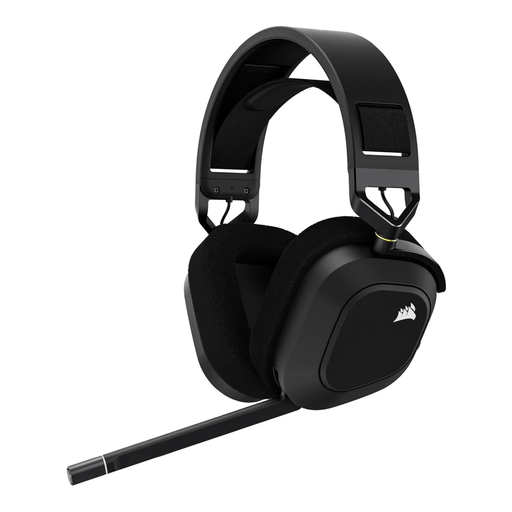
Why it stands out: The Corsair HS80 RGB Wireless is a wireless gaming headset optimised for high-fidelity audio and low latency. Its Slipstream Wireless technology provides an ultra-fast, stable connection to PC, Mac, PS5, and PS4. On PC, Dolby Atmos support enables precise spatial audio, which can provide a competitive advantage in games.
Pros:
- Slipstream Wireless: Ultra-low-latency wireless technology for lag-free gaming.
- Immersive Sound: Custom-tuned 50mm neodymium drivers and Dolby Atmos on PC.
- High-Quality Microphone: Broadcast-grade omni-directional microphone for clear team communication.
- Durable Construction: Built with aluminium components and comfortable fabric ear pads.
Who is it for? Gamers looking for a high-performance wireless PC headset with a focus on sound quality, low latency, and multi-platform compatibility (PC/PlayStation).
Looking for More Options?
If our recommendations don't include the perfect model for you, you can find a wider selection of devices for various budgets and needs in our PC Microphone Headset category.
Frequently Asked Questions (FAQ)
1. What is more important: ANC for the listener or noise cancellation for the microphone? It depends on the use case. For the person you're speaking with, a good noise-cancelling microphone is crucial so they can hear you clearly without interference. For your own concentration in a noisy environment, ANC (Active Noise Cancellation for the listener) is more important. Many high-quality headsets combine both technologies.
2. Can I use a wireless gaming headset for work? Yes, in most cases, this is perfectly fine. A wireless gaming headset often features an excellent microphone and a high degree of comfort. Just ensure that the connection method (e.g., USB dongle) is compatible with your work computer. The design is often more striking (e.g., with RGB lighting), which is a matter of personal preference and office culture.
3. How do I connect a Bluetooth headset to my PC? Ensure your PC has a built-in Bluetooth function, or use an external Bluetooth USB adapter. Put your headset into pairing mode, which is usually done by long-pressing the power button. Then, open the Bluetooth settings on your PC, search for new devices, and select your headset from the list to establish the connection.