
Essential Gaming Accessories Buyer's Guide
Choosing the right gaming accessories can mean the difference between victory and defeat, but the market is saturated with marketing hype and overpriced products. Many gamers invest in gear that fails to improve their performance or breaks down after a short time. This guide will help you identify the most common traps and make informed decisions for your PC or console setup.
The 3 Most Common Traps When Buying Gaming Gear
Before you invest your money, be wary of three widespread marketing tactics and product flaws:
- The DPI Myth: Manufacturers often advertise extremely high DPI (Dots Per Inch) values of 20,000 or more. In practice, such values are unusable for most players and lead to uncontrollable mouse movements. A high DPI figure is not the sole indicator of quality and often doesn't justify the premium price.
- The "Gaming" Tax Trap: Many products are given a higher price tag thanks to flashy RGB lighting and a "Gaming" label, even if they are technically no different from cheaper office peripherals. True esports-grade equipment is defined by low latency, high-quality sensors, and durable switches—not just by its appearance.
- Poor Ergonomics and Build Quality: An aggressive design may look good in pictures, but it can lead to discomfort or fatigue during long gaming sessions. Cheap plastic parts and poor craftsmanship also frequently lead to premature failure of keys, cables, or housing components.
What Really Matters: Key Parameters for Your Setup
Focus on the technical specifications that directly impact your gaming experience. Three core parameters are crucial when selecting a mouse, keyboard, and headset.
Sensor Precision and Polling Rate of a Gaming Mouse
The precision of a gaming mouse depends not just on its DPI, but critically on its internal sensor and polling rate.
- Sensor: A high-quality optical sensor ensures flawless tracking without unwanted acceleration or smoothing. This is crucial for consistent aiming.
- Polling Rate: Measured in Hertz (Hz), this value indicates how often the mouse reports its position to the computer. The standard for gaming mice is 1000 Hz (1-millisecond response time). Higher rates can further reduce latency but are often only noticeable in competitive scenarios. A wireless mouse with a stable 2.4 GHz connection can easily keep up with wired models here.
Keyboard Switches: Mechanical or Membrane?
The choice of the right gaming keyboard heavily depends on the switch type.
- Membrane Keyboards: These are quiet and inexpensive but offer a less precise and often "mushy" typing feel. Their lifespan is shorter compared to mechanical models.
- Mechanical Keyboards: A mechanical keyboard provides tactile and/or audible feedback with every keystroke. Different switch types (e.g., linear, tactile, clicky) allow for customisation to personal preference. They are more durable and register keystrokes more reliably, which is critical during fast-paced gameplay sequences.
Connectivity and Sound Quality in a Gaming Headset
A good gaming headset offers not only clear audio but also a reliable connection and a quality microphone.
- Driver Size: Larger drivers (e.g., 50mm) can often produce a fuller sound with more powerful bass, enhancing in-game immersion.
- Surround Sound: Virtual 7.1 surround sound can help you pinpoint the location of opponents by audio cues. The quality of the implementation is crucial here.
- Microphone: A microphone with noise-cancelling ensures your teammates can hear you clearly without distracting background noise. This is an important feature for any PS5 accessory or Xbox accessory used for multiplayer games.
Recommendations for Player Types
Here are some recommendations tailored to specific needs and use cases.

【Free Gift Mouse】ET 60% Wireless Mechanical Gaming Keyboard
Why This Fits Their Persona: Ideal for gamers looking to enter the world of mechanical keyboards without a large budget. The compact 60% layout saves desk space, and its tri-mode connectivity offers flexibility for PC, laptop, or tablet.
This model bypasses the "gaming" price-hike trap by offering genuine mechanical switches (Blue switches) for tactile feedback, rather than just being a membrane keyboard with RGB lighting.
Key Advantage: Tri-mode connectivity (2.4G, Bluetooth, USB-C) and a rechargeable battery provide a high degree of flexibility that is rare in this price range.
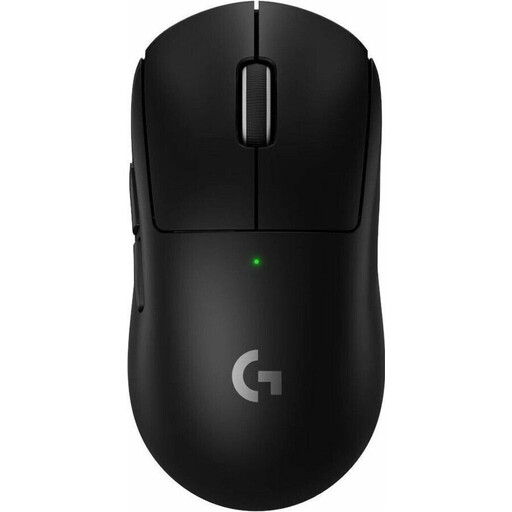
Logitech G PRO X SUPERLIGHT 2 Wireless Gaming Mouse
Why This Fits Their Persona: Designed for esports athletes where every millisecond counts. Its extremely low weight of 60 grams reduces fatigue and enables the fastest reactions. The combination of the HERO 2 sensor and LIGHTSPEED technology delivers top-tier precision.
This mouse debunks the DPI myth. While it offers up to 44,000 DPI, its true value lies in the flawless tracking of the HERO 2 sensor and the high 8 kHz polling rate, which ensure an ultra-responsive connection.
Key Advantage: Weighing just 60 grams, it's one of the lightest mice on the market. The PTFE feet ensure low-friction gliding for maximum control.
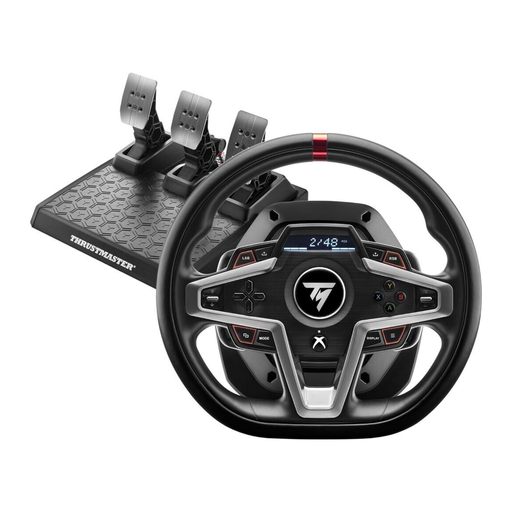
Thrustmaster T248X Racing Wheel
Why This Fits Their Persona: Perfect for fans of racing sims or Farming Simulator. This specialised accessory provides an immersive experience that cannot be matched by a standard controller or a mouse and keyboard. It's a dedicated tool for maximum control and realism.
This wheel avoids the trap of poor ergonomics and cheap materials. Its H.E.A.R.T technology with contactless magnetic sensors prevents wear and ensures long-lasting precision, while the design is built for hours of use.
Key Advantage: The force feedback system realistically simulates the forces acting on a vehicle. The high number of function buttons (33) allows for controlling complex machinery directly from the joystick.
Looking for More Options?
We have compiled a complete, up-to-date list of products that fully meet these strict selection criteria and German safety regulations.
Frequently Asked Questions (FAQ)
Is a mechanical keyboard really worth it for gaming?
For regular gamers, a mechanical keyboard is a worthwhile investment. The advantages lie in the longer lifespan of the switches, the precise and consistent keystrokes, and features like N-Key Rollover, which guarantees the simultaneous detection of multiple keystrokes. This prevents input errors in hectic gaming situations.
How important is the weight of a gaming mouse?
The weight of a lightweight gaming mouse is particularly important in fast-paced games like first-person shooters. A lower weight (under 80 grams) can reduce wrist fatigue during long sessions and enable faster, more precise movements. Ultimately, however, the preference is subjective; some players prefer the feel of a heavier mouse for more stability.
Do I need special software for my gaming accessories?
Most devices work out-of-the-box via plug-and-play. However, to unlock their full potential, the manufacturer's proprietary software is often necessary. It allows you to customise DPI levels, program macros and buttons, configure RGB lighting, and fine-tune audio profiles on headsets. It's optional for casual players but highly recommended for ambitious gamers.