
How to Choose the Right Gaming Mouse
Choosing the right gaming mouse can be a major decision. Factors like response time, precision, ergonomics, and connectivity play a crucial role in the gaming experience. The wrong mouse can not only hamper in-game performance but also lead to fatigue or discomfort during long gaming sessions.
This guide is designed to help you understand the technical specifications and make an informed decision. We will introduce a selection of models for different needs and explain what really matters when making a purchase.
What to Look for When Buying a Gaming Mouse
To find the perfect mouse for your needs, it's helpful to understand a few key features.
1. Connectivity: Wired or Wireless?
The choice between a wired gaming mouse and a wireless gaming mouse is one of the most fundamental.
- Wired models offer a consistently stable connection with no risk of latency from interference and never need to be charged. They are often an affordable and reliable choice for any gaming mouse PC.
- Wireless gaming mice provide maximum freedom of movement without cable clutter. Modern models with 2.4 GHz technology have reduced latency to a level imperceptible to the human eye, making them perfectly suitable for even demanding gaming. Pay attention to battery life and charging options here.
2. Ergonomics and Weight: Comfort for Long Sessions
The shape and weight of the mouse directly impact comfort and handling.
- An ergonomic gaming mouse is contoured to the natural posture of the hand and can help reduce strain during long gaming sessions. The shape should match your grip style (e.g., Palm, Claw, or Fingertip Grip).
- A lightweight gaming mouse (often under 80 grams) allows for faster movements and changes in direction with less effort. This can be particularly advantageous in fast-paced FPS games, while some users prefer a heavier weight for more stability.
3. Sensor Technology: DPI and Polling Rate
The sensor is the heart of every gaming mouse. Two metrics are central here:
- DPI (Dots Per Inch) indicates the sensor's sensitivity. A higher DPI value means the cursor covers more distance on the screen with the same physical movement. Most gamers use values between 400 and 3200 DPI, as extremely high settings often become imprecise.
- Polling Rate (in Hertz) describes how often the mouse reports its position to the computer. A standard value is 1000 Hz (1000 times per second). Higher rates like 4000 Hz or 8000 Hz can further reduce latency, resulting in a more direct translation of your movement.
Top Gaming Mouse Picks
Here is a selection of three models that cover different types of players and needs.
RAPOO VT9Pro 4K Wireless Gaming Mouse
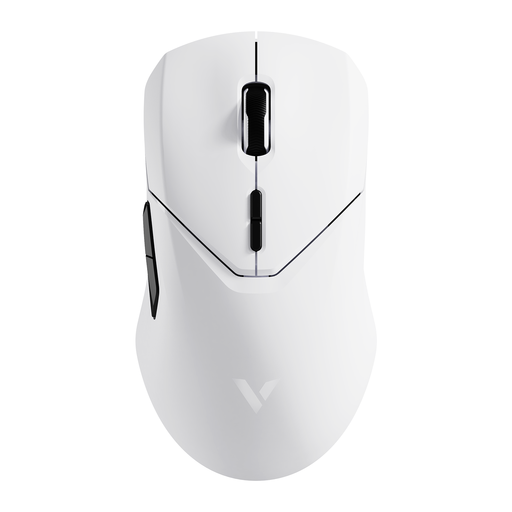
Why It Stands Out The RAPOO VT9Pro is engineered for maximum wireless performance. With a 4000 Hz polling rate via its V+ Wireless technology, it aims to reduce latency to an absolute minimum. Its low weight of just 68 grams and the precise PAW-3398 sensor make it a tool for swift and exact manoeuvres.
Pros
- Extremely low latency: 4K wireless and 8K wired technology for highly responsive control.
- Lightweight design: At only 68g, the mouse is designed for fast, fatigue-free movements.
- Powerful sensor: The PAW-3398 sensor offers a resolution of up to 26,000 DPI and precise tracking.
- Long battery life: The 800 mAh battery provides up to 180 hours of use, according to the manufacturer.
Who It's For For competitive gamers and esports enthusiasts who need an extremely responsive and lightweight gaming mouse without a cable and who value top-tier technical performance.
Razer DeathAdder Essential (2021) - Wired
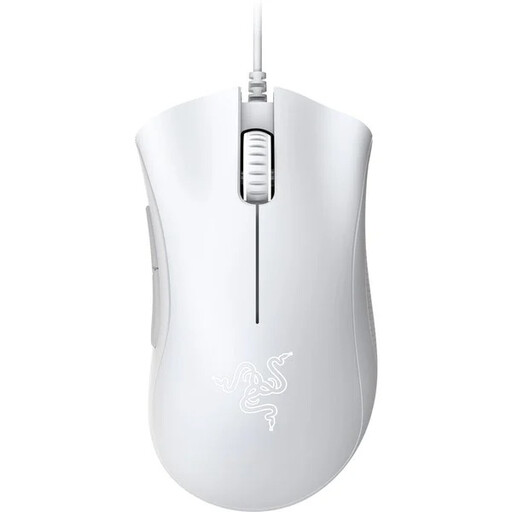
Why It Stands Out The Razer DeathAdder Essential is a classic, renowned for its proven ergonomic gaming mouse shape. This model focuses on the fundamentals: a reliable optical sensor with 6,400 DPI, durable mechanical switches, and a straightforward, wired design.
Pros
- Proven ergonomics: The shape is known for long-lasting comfort and provides optimal hand support.
- Reliable performance: The 6,400 DPI optical sensor offers precise tracking for most gaming applications.
- Durability: The mechanical switches are rated for up to 10 million clicks, according to Razer.
- Focused on the essentials: Five programmable buttons offer basic customisation without superfluous features.
Who It's For Ideal for beginners, casual gamers, or budget-conscious buyers looking for a solid and comfortable wired gaming mouse from an established brand like Razer.
Razer Basilisk V3 Pro - Wireless
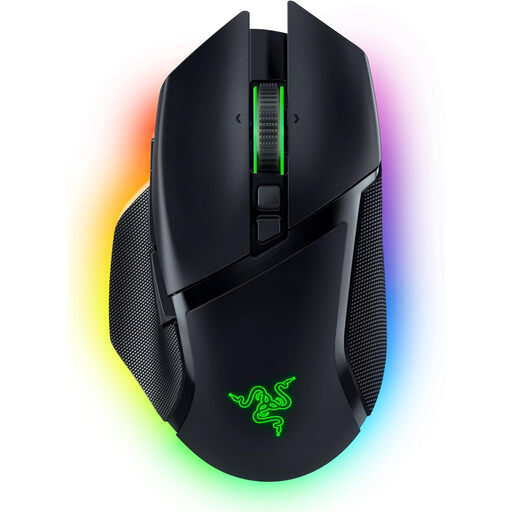
Why It Stands Out The Razer Basilisk V3 Pro is a powerhouse of features and customisation. Its standout feature is the Razer HyperScroll Tilt Wheel, which can switch between tactile and free-spin modes. Paired with the Focus Pro 30K Optical Sensor, tri-mode connectivity, and extensive Chroma RGB lighting, it offers a high degree of versatility.
Pros
- Versatile scroll wheel: The HyperScroll Tilt Wheel adapts to gaming or productivity with its different modes.
- High-precision sensor: The Razer Focus Pro 30K sensor enables extremely accurate tracking.
- Flexible connectivity: Seamlessly switch between low-latency HyperSpeed Wireless (2.4 GHz), Bluetooth, and wired mode.
- Extensive customisation: 10+1 programmable buttons and 13-zone Chroma RGB lighting allow for detailed personalisation.
Who It's For For tech enthusiasts and discerning gamers who want a wireless gaming mouse with a maximum feature set, customisability, and top-class sensor performance for various use cases.
Didn't Find the Right Fit?
Our selection covers a range of needs, but the market offers many more specialised models. If you're looking for other designs, specific features, or different brands, you're sure to find the right device in our broader category.
Frequently Asked Questions (FAQ)
What is a good DPI for a gaming mouse?
Although many mice advertise extremely high DPI values of over 20,000, most gamers in practice use settings between 400 and 3,200 DPI. A lower DPI allows for more precise, controlled movements, while a higher DPI enables quick turns. The ideal setting depends on personal preference, screen resolution, and the game being played. It's advisable to choose a mouse with adjustable DPI steps to find your personal sweet spot.
Is a wireless gaming mouse as responsive as a wired one today?
Yes, with modern high-end models, this is the case. Technologies like Razer HyperSpeed or RAPOO's V+ Wireless use a dedicated 2.4 GHz connection with high polling rates (1000 Hz or more), making the latency so low that it's indistinguishable from a wired connection for humans. For professional and competitive gaming, a wireless gaming mouse is therefore a completely viable option.