
Wireless Gaming Mouse Buyer’s Guide
Published on: July 28, 2026 | By: Joybuy Product Recommendation Officer
The search for the right wireless gaming mouse can quickly become overwhelming. Manufacturers advertise ever-higher DPI counts, ultra-lightweight designs, and a multitude of connectivity options. However, not every advertised feature is relevant to every user or worth the premium. This guide will help you understand the crucial criteria and distinguish marketing hype from genuine performance benefits.
Common Pitfalls When Buying a Wireless Gaming Mouse
Before we dive into the technical details, let's clear up three common misconceptions that often lead to poor purchasing decisions.
- The DPI Trap: Many marketing campaigns highlight extremely high DPI (Dots Per Inch) values, often exceeding 20,000. In practice, however, even professional esports athletes rarely use settings above 1,600 DPI. An extremely high DPI number is not a sole indicator of a precise sensor. More important are the sensor's reliability during fast movements (measured in IPS) and flawless signal processing.
- Underestimating Weight and Ergonomics: A mouse might have impressive technical specs on paper. But if it doesn't fit your hand size and grip style (Palm, Claw, or Fingertip Grip) or is too heavy, it can lead to fatigue and imprecise control. A lightweight gaming mouse isn't always the right choice if it comes at the cost of shape or stability.
- Vague Latency Claims: The term "wireless" is not synonymous with a specific level of performance. A Bluetooth gaming mouse connection is convenient and power-efficient but typically has higher latency than a dedicated 2.4GHz wireless gaming mouse using proprietary technology. For competitive gaming, a stable, low-latency 2.4GHz connection is essential.
Crucial Technical Specs for a 2.4GHz Wireless Gaming Mouse
To make an informed decision, you should understand and consider the following three core parameters in your selection.
Sensor Performance: More Than Just a High DPI Count
The sensor is the heart of any gaming mouse. Instead of focusing solely on the maximum high DPI gaming mouse setting, you should pay attention to these values:
- Sensor Model: Sensors from manufacturers like PixArt (e.g., the PAW3395 or PAW3311 series) are found in many high-end mice and are considered the industry standard for precise tracking.
- Polling Rate: Measured in Hertz (Hz), this value indicates how often the mouse reports its position to the computer. 1,000 Hz (1 ms response time) is the standard for gaming. Some esports mouse models now offer 4,000 Hz or even 8,000 Hz for even smoother cursor movement, though this also requires more processing power.
- IPS (Inches Per Second): This value indicates the maximum speed at which the sensor can still accurately track movement. Values above 400 IPS are more than sufficient for most gaming scenarios.
Connectivity Technology: Focusing on Stability and Latency
Modern wireless mice often offer multiple connection modes. The choice depends on your use case.
- 2.4GHz Wireless: This connection is established via a dedicated USB dongle and offers extremely low latency, comparable to that of wired mice. This is the preferred method for demanding gaming.
- Bluetooth: Ideal for use with laptops or tablets and for office work. The connection is straightforward and doesn't require an extra USB port for a dongle, but it has higher latency.
- Wired Mode: Most rechargeable wireless mice can continue to be used via a USB cable while charging, which prevents downtime.
Shape and Weight: The Foundation for Control and Comfort
The physical characteristics of a mouse are crucial for long-term comfortable use.
- Ergonomics: An ergonomic gaming mouse is specifically shaped for right-handed users and offers a natural hand posture. Symmetrical mice are suitable for both right- and left-handed users and are often preferred by players with a claw or fingertip grip.
- Weight: A lightweight gaming mouse (under 65 grams) allows for quick, fatigue-free movements and is particularly advantageous in fast-paced FPS games like CS:GO or Valorant. For players who prefer more control and stability, a slightly heavier weight (70–90 grams) may be more comfortable.
- Buttons and Lighting: While a customisable RGB gaming mouse is visually appealing, disabling the lighting can significantly extend battery life. For MMO or MOBA players, the number and arrangement of programmable buttons is a far more important criterion.
Top picks for your profile
Here are some models tailored to specific needs that cleverly avoid the pitfalls mentioned.
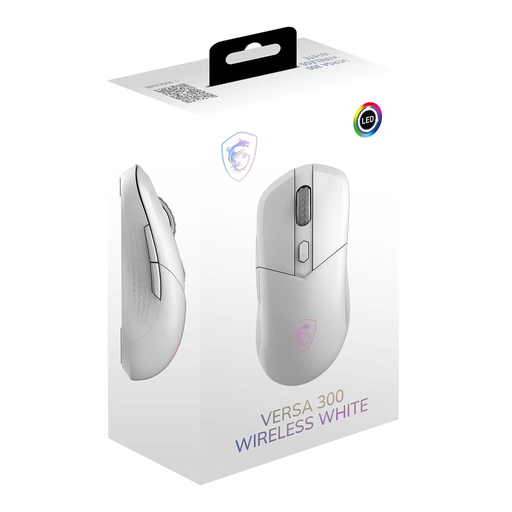
MSI Versa 300 Wireless muis Gamen
Why This Fits Their Persona: This model is ideal for users who want a single mouse for both gaming and work. Its low weight of 60g and symmetrical shape make it agile and versatile, while the tri-mode connectivity allows for seamless switching between a gaming PC (2.4GHz) and a work laptop (Bluetooth).
Instead of focusing on one extreme spec, this mouse offers a balanced combination of low weight, solid sensor performance (up to 8,000 DPI), and flexible connectivity options, making it a practical daily driver.
Tri-Mode Connectivity: 2.4GHz, Bluetooth 5.3, and wired. Lightweight build: Only 60g for quick manoeuvres. Long battery life of up to 50 hours according to the manufacturer.
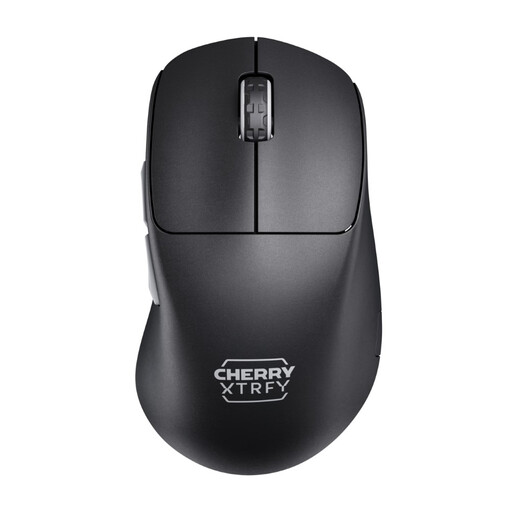
CHERRY XTRFY M64 Pro Wireless Gaming Mouse
Why This Fits Their Persona: For gamers where every millisecond counts. This mouse is engineered for maximum performance. The 8,000 Hz polling rate ensures an extremely smooth and responsive cursor movement that can make a noticeable difference on high-refresh-rate monitors. Its low weight of 55g and ergonomic shape support rapid reactions.
This model focuses on measurable performance advantages like the 8K polling rate and ultra-low latency, rather than just advertising a high DPI number. The shape is functional and designed for control, not flashy gimmicks.
8,000 Hz Polling Rate: For minimal input lag. Pixart 3395 Sensor: A top-tier model for flawless tracking. Ultra-lightweight: Only 55g for maximum agility.
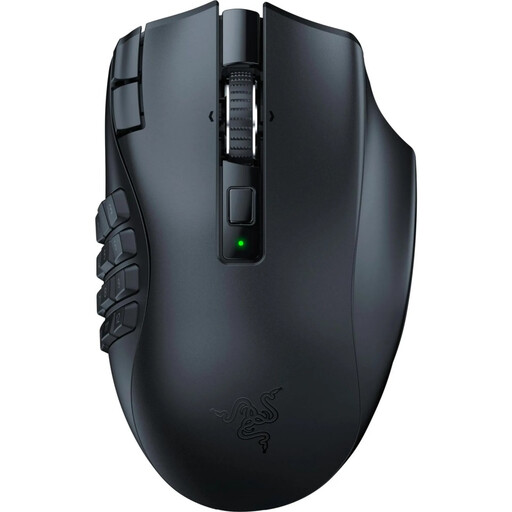
Razer Naga V2 HyperSpeed - Ergonomic Wireless MMO Gaming Mouse
Why This Fits Their Persona: For players of MMOs like World of Warcraft or MOBAs like League of Legends, where quick access to a multitude of abilities and macros is crucial. The 19 programmable buttons offer a high degree of control and customisation.
This model ignores the trend of extreme lightweight construction and instead focuses on high functionality. It solves the core problem for MMO players—a lack of buttons—and combines it with high-performance wireless technology.
19 Programmable Buttons: For maximum control in complex games. Razer HyperSpeed Wireless: Provides a fast and stable connection. Long Battery Life: Up to 250 hours in HyperSpeed mode, according to Razer.
While the models presented here cover a wide range of needs, some genres, like MMOs, require specialised equipment with a multitude of buttons.
Looking for More Options?
Especially for MMO players who need a wide array of programmable buttons, we have curated a special selection that meets strict criteria for functionality and performance.
Frequently Asked Questions (FAQ)
1. How long does the battery of a wireless gaming mouse last?
Battery life varies widely depending on the model, usage, and settings. It can range from around 40 hours to over 250 hours. Factors like activated RGB lighting and a high polling rate can reduce battery life. Many models offer a Bluetooth mode for longer battery life during office tasks and can be used via USB cable while charging.
2. Is a 2.4GHz wireless gaming mouse really as responsive as a wired one?
Yes, modern wireless mice using 2.4GHz technology achieve latencies of 1 millisecond. This value is identical to that of high-quality wired gaming mice. For human perception, there is no discernible difference in responsiveness with these technologies. A Bluetooth connection, on the other hand, tends to be slower and is less suitable for competitive gaming.
3. What does a high DPI count mean on a gaming mouse?
DPI (Dots Per Inch) is a measure of the mouse sensor's sensitivity. A high DPI setting causes the cursor to move a long distance on the screen with only a small physical movement of the mouse. While high maximum DPI values are often used as a marketing tool, most gamers prefer lower settings in the 400 to 1,600 DPI range for precise aiming. The ability to set high DPI values is available, but it is rarely a decisive advantage in practice.