
Comprehensive PC Mouse Selection Guide
Choosing a new PC mouse can quickly become overwhelming given the vast array of models, features, and price points. All too often, marketing buzzwords and exaggerated technical specs lead to the wrong purchase. As your Joybuy Product Recommendation Officer, I'm here to help you understand the crucial criteria and make an informed decision tailored to your actual needs.
Before we dive into the options, let's uncover three common traps that often lead to dissatisfaction:
- The DPI Myth: Many manufacturers tout extremely high DPI (Dots Per Inch) values as a key selling point. However, for most users in an office or browsing the web, values between 800 and 1600 DPI are more than sufficient. An unnecessarily high value can make the cursor uncontrollably fast and offers no practical benefit.
- The Empty "Ergonomics" Promise: The term "ergonomic" is used loosely. A slightly curved shape doesn't automatically make a mouse a true ergonomic mouse. True ergonomics depend on your hand size, grip style, and a specific shape that promotes a neutral wrist posture.
- The Ignored Click Noise: The sound of mouse clicks is rarely mentioned in product descriptions, but it can be a significant distraction in an office or home office. A silent mouse can significantly improve the work atmosphere for you and your colleagues.
What Really Matters in a PC Mouse
To make the right choice, focus on the following three core parameters that directly impact daily use.
Connection: Wired or Wireless Mouse?
The type of connection is a fundamental decision that depends on your workspace and mobility needs.
- Wired Mouse: These models offer a stable, lag-free connection and never need batteries. They are a reliable and often cost-effective choice for a fixed workstation. However, the cable length can restrict movement.
- Wireless Mouse (2.4 GHz): These mice use a small USB receiver (dongle) for a fast and stable connection. They are well-suited for gaming and general use, offering more flexibility than wired models. However, the USB receiver occupies a port.
- Bluetooth Mouse: A Bluetooth mouse connects directly to your computer or laptop mouse, without taking up a USB port. This is ideal for mobile users and minimalist setups. However, the connection can occasionally be more prone to interference than a 2.4 GHz connection.
Sensor and DPI: Precision for Your Use Case
The sensor is the heart of every mouse. Most modern mice use an optical sensor that works well on most surfaces (except glass). The DPI value indicates how sensitive the mouse is to movement.
- For Office and Everyday Use:800–1600 DPI is ideal for precise cursor control on standard screen resolutions.
- For Gaming: A gaming mouse benefits from higher and adjustable DPI values (e.g., up to 30,000 DPI) to enable quick reactions and pixel-perfect aiming.
- For Graphic Design: Adjustable DPI levels are useful for switching between fast movements and fine detail work.
Shape and Function: From Standard to Vertical Mice
The shape of the mouse has a direct impact on comfort during prolonged use.
- Ambidextrous Mice: These are suitable for both left- and right-handed users and are a safe choice for general use.
- Ergonomic Mice: These are shaped for right- or left-handed users and provide a more natural hand posture to reduce strain.
- Vertical Mouse: A vertical mouse positions the hand in a "handshake" position. This can significantly reduce strain on the wrist and forearm and is a great option for users prone to pain or carpal tunnel syndrome.
Our Top Picks for Different User Profiles
Based on these criteria, we have selected a few models for specific user profiles.
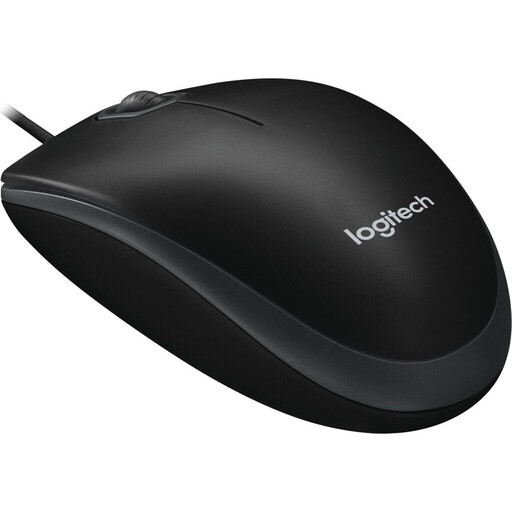
Logitech B100 Wired Mouse, USB Connection, 800 DPI Optical Sensor, 3 Buttons, Ambidextrous, PC/Mac - Black
Why This Fits Their Persona: This model is ideal for users who need a straightforward, reliable, and affordable mouse for everyday office tasks. Its plug-and-play functionality and ambidextrous design make it a practical choice for any workspace.
The B100 avoids exaggerated marketing specs. Its 800 DPI sensor is optimized for office applications, delivering stable performance without unnecessary complexity.
Reliable wired mouse (USB), no software installation required, ambidextrous design for left- and right-handed users.
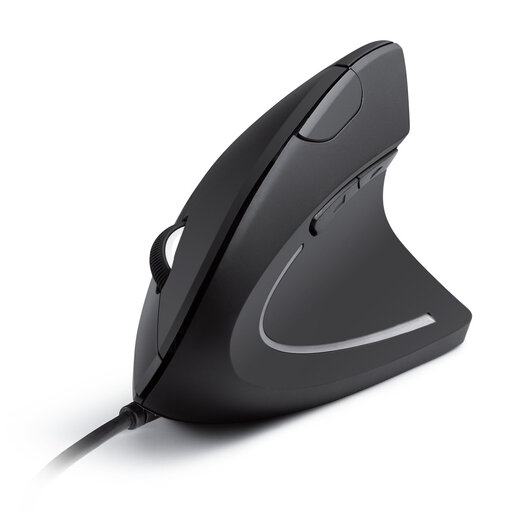
Anker CE100 USB Wired Vertical Mouse, Ergonomic Design Mouse for Computer and Laptop, 5 Buttons, 1000/1600 DPI, Optical Technology - Black
Why This Fits Their Persona: For users who spend many hours at the PC and prioritize a healthy posture, this model is an excellent choice. The vertical design aims to minimize wrist and arm strain.
This is a true vertical mouse, with a design based on biomechanical principles rather than just a vague "ergonomic" promise. The shape actively promotes a neutral wrist position.
Promotes a natural "handshake" posture to reduce muscle strain. Adjustable sensitivity (1000/1600 DPI) and additional forward/back buttons.
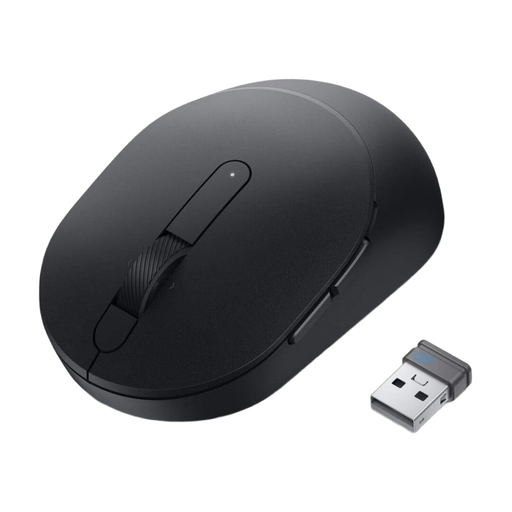
DELL MS5120W-Optical Mouse-7-Button-Wireless-2.4 GHz, Bluetooth 5.0-Black
Why This Fits Their Persona: Perfect for users who switch between multiple devices or prefer a clutter-free desk without cables. The dual-mode connectivity offers maximum flexibility for modern work environments.
This model focuses on practical benefits like long battery life (up to 36 months, according to the manufacturer) and versatile connectivity, rather than just advertising a high DPI value.
Dual wireless mouse connectivity (2.4 GHz and Bluetooth 5.0), seven programmable buttons, and a very long battery life.
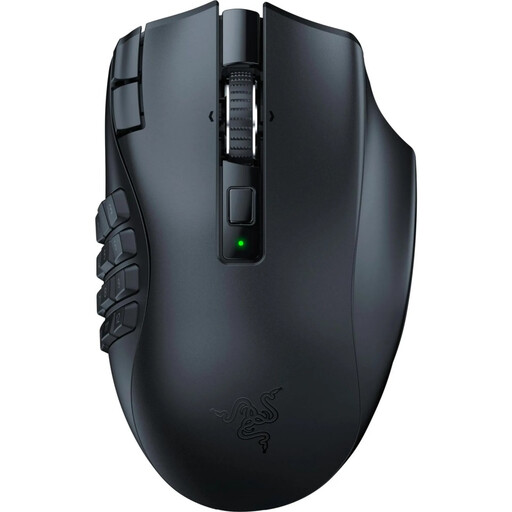
Razer Naga V2 HyperSpeed - Ergonomic Wireless MMO Gaming Mouse
Why This Fits Their Persona: This gaming mouse is specifically designed for players of MMOs and other complex genres who need quick access to a wide range of commands. Its high level of customization and performance are built for competition-grade play.
Here, the high-end Focus Pro 30K Optical Sensor isn't just marketing; it's a functional necessity for gamers who demand the highest precision. The ergonomics are specifically optimized for long gaming sessions.
19 programmable buttons for maximum control, Razer HyperSpeed Wireless technology for ultra-low latency, and a high-precision sensor.
Looking for More Options?
We have compiled a complete, up-to-date list of products that meet these strict selection criteria and comply with German safety regulations.
Frequently Asked Questions (FAQ)
What is the difference between an optical and a laser mouse?
Optical mice use an LED to illuminate the surface, while laser mice use a laser beam. In practice, the differences are minor for most users. Optical mice work very well on most non-reflective surfaces. Laser mice offer slightly higher precision and can also work on glossy surfaces like glass, but they are often more sensitive to dust. For the majority of users, a modern optical mouse is perfectly sufficient.
How long does the battery of a wireless mouse last?
Battery life varies greatly depending on the model, usage, and connection type. Simple models with a 2.4 GHz connection often last several months to over a year on a single AA battery. Bluetooth mice may have similar or slightly shorter battery life. Some models, like the Dell MS5120W, advertise a battery life of up to 36 months, according to the manufacturer. Rechargeable gaming mice need to be charged every few days to weeks, depending on the intensity of use.
Do I need special software for my new PC mouse?
Most standard and office mice are plug-and-play, meaning you can simply connect them to a USB port and they are ready to use immediately. For gaming mice or models with programmable buttons and customizable lighting, manufacturer software (e.g., Razer Synapse) is usually required to access the full range of features. This software allows you to customize DPI levels, button assignments, and other advanced settings.