
WiFi 6 Routers: A 2026 Buyer's Guide and Top Picks
Upgrading to a WiFi 6 router (also known as an AX router) is a technical decision to optimize your network infrastructure at home or in the home office. The standard, technically known as IEEE 802.11ax, primarily addresses efficiency in environments with many simultaneously connected devices. Compared to its predecessor, Wi-Fi 5 (802.11ac), the focus is not just on higher theoretical peak speeds, but more importantly on more stable, lower-latency data distribution. Technologies like OFDMA (Orthogonal Frequency-Division Multiple Access) and an advanced version of MU-MIMO (Multi-User, Multiple Input, Multiple Output) allow the router to send and receive data packets to multiple devices simultaneously, reducing wait times for each individual device.
What to Look for in a WiFi 6 Router
Choosing the right model involves analyzing technical specifications against your individual network requirements.
Speed Classes and Frequency Bands
The "AX" designation followed by a number (e.g., AX1500, AX3000) indicates the combined theoretical maximum speed across all frequency bands.
- Dual-Band Routers: These devices operate on two frequency bands. The 2.4 GHz band offers greater range but is more susceptible to interference and provides lower speeds. The 5 GHz band delivers higher data rates at a shorter range and is ideal for bandwidth-intensive applications like 4K streaming or a gaming router.
- Speed Rating: An AX3000 router, for example, offers up to 2402 Mbps on the 5 GHz band and up to 574 Mbps on the 2.4 GHz band. The actual speed depends on factors like distance from the router, structural obstacles, and the number of connected devices.
Ports and Connectivity
The physical ports determine the network's wired performance and expandability.
- Gigabit Ports: As a standard, a modern Wi-Fi router should have several Gigabit LAN ports (1 Gbps) for connecting computers, game consoles, or NAS systems, as well as a Gigabit WAN port for connecting to the modem.
- USB Ports: A USB 3.0 port allows you to connect external storage media to easily access files across the network or set up a media server.
Security Standards and Management Features
Network security is a critical aspect.
- WPA3: The WPA3 security standard offers enhanced protection against brute-force attacks and more robust encryption compared to WPA2. A WiFi 6 router should support this standard.
- Router with Parental Controls: Parental Controls features allow you to limit online time for specific devices or filter access to inappropriate content.
- Quality of Service (QoS): QoS allows you to prioritize certain applications or devices. This ensures that a video conference or an online game, for example, receives a stable connection even when other devices are active on the network.
Our Top WiFi 6 Router Picks for 2026
The following models represent a selection that covers different user profiles—from basic users to power users.
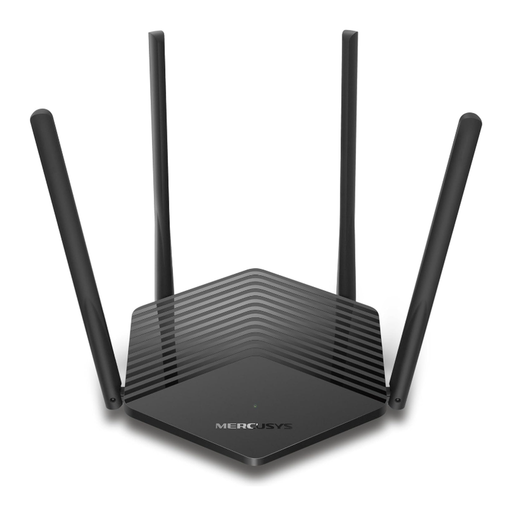
MERCUSYS MR1500X Wi-Fi 6 Router, Dual-Band AX1500
Why We're Featuring This Product
The MERCUSYS MR1500X is an entry-level model into Wi-Fi 6 technology. It combines the key benefits of the AX standard, such as higher efficiency and capacity, with a focus on essential functionality. With its AX1500 speed class, it is designed for standard applications like browsing, HD/4K streaming, and connecting a moderate number of smart home devices.
Technical Specifications
- Wi-Fi Standard: Wi-Fi 6 (802.11ax)
- Speed Class: AX1500 (1201 Mbps on 5 GHz + 300 Mbps on 2.4 GHz)
- Ports: 1x Gigabit WAN, 3x Gigabit LAN
- Security: WPA3
- Additional Features: MU-MIMO, Parental Controls, Guest Network
Best For
Users and small families looking to upgrade their home network to get fast Wi-Fi for everyday tasks without investing in high-end features. This device does not have a built-in DSL modem and connects to an existing modem.
View details for the MERCUSYS MR1500X on Joybuy.de
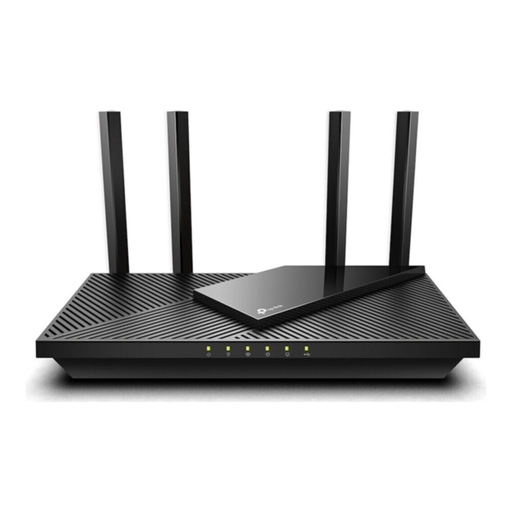
TP-Link Archer AX55 WiFi 6 Router AX3000
Why We're Featuring This Product
The TP-Link router Archer AX55 is positioned in the mid-range performance segment. With AX3000 speed and four Gigabit LAN ports, it provides a solid foundation for more demanding households with multiple users simultaneously streaming, gaming, and working from home. The USB 3.0 port adds flexibility by enabling network storage setup.
Technical Specifications
- Wi-Fi Standard: Wi-Fi 6 (802.11ax)
- Speed Class: AX3000 (2402 Mbps on 5 GHz + 574 Mbps on 2.4 GHz)
- Ports: 1x Gigabit WAN, 4x Gigabit LAN, 1x USB 3.0
- Security: WPA3, HomeShield Security
- Additional Features: OFDMA, MU-MIMO, Parental Controls
Best For
Families and home office users who need a stable and fast connection for a wide variety of devices. The combination of higher speed on the 5 GHz band and the USB port makes it a versatile solution for multimedia applications and data sharing.
View details for the TP-Link Archer AX55 on Joybuy.de
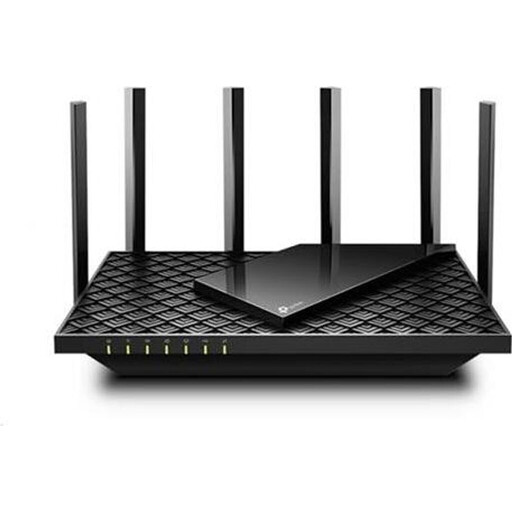
TP-Link Archer AX73 WiFi 6 Router AX5400
Why We're Featuring This Product
The Archer AX73 is designed for high-performance demands. With an AX5400 speed class and six antennas, it aims for maximum coverage and data throughput. The high bandwidth of 4804 Mbps on the 5 GHz band is engineered for the most demanding scenarios, such as simultaneous 8K streaming, intensive online gaming, and connecting numerous smart home devices.
Technical Specifications
- Wi-Fi Standard: Wi-Fi 6 (802.11ax)
- Speed Class: AX5400 (4804 Mbps on 5 GHz + 574 Mbps on 2.4 GHz)
- Ports: 1x Gigabit WAN, 4x Gigabit LAN, 1x USB 3.0
- Security: WPA3, HomeShield Security
- Additional Features: OFDMA, MU-MIMO, Beamforming, 6 Antennas
Best For
Power users, tech enthusiasts, and large households with very high data traffic. Those looking for a future-proof network solution with maximum wireless performance for a large number of devices will find a suitable technical foundation here.
View details for the TP-Link Archer AX73 on Joybuy.de
Other Models and Alternatives
The featured products cover common use cases. For more specific requirements or different performance classes, other models are available. You can find a broader overview of available devices in our Wi-Fi & Networking Devices category.
Frequently Asked Questions (FAQ)
What is the main advantage of Wi-Fi 6? The primary advantage is increased network efficiency, especially when many devices are active simultaneously. Technologies like OFDMA enable parallel data transmission to multiple clients, which reduces latency and stabilizes the overall network performance. This leads to a smoother experience for video conferencing, online gaming, and streaming.
Is a WiFi 6 router compatible with older devices? Yes, the Wi-Fi 6 standard is fully backward compatible with older Wi-Fi standards (Wi-Fi 5/ac, Wi-Fi 4/n). Older devices can connect to a WiFi 6 router without any issues, but they will only use the standard they support and will not benefit from the specific advantages of Wi-Fi 6.
Do I need a new modem for a WiFi 6 router? Generally, no. A Wi-Fi router, like the models presented here, connects to your existing internet modem (cable, fiber, or DSL) via an Ethernet cable. The routers themselves do not include a modem function. They are responsible for distributing the internet signal within your home network.