
USB-C SD Card Reader Buyer's Guide
For photographers, videographers, and anyone who regularly moves large amounts of data, a reliable USB-C SD card reader is an indispensable tool. However, the market is flooded with models whose performance claims often don't hold up in practice. Making the wrong choice not only leads to frustration from slow transfers but can, in the worst-case scenario, even cause data loss due to overheating or unstable connections. Before you make a decision, you should be aware of the most common pitfalls.
Common Mistakes When Buying Card Readers
- Misleading Speed Claims: Many manufacturers advertise high transfer rates that are only achievable under ideal conditions. A reader marketed as "fast" can turn out to be a bottleneck if it internally uses an outdated USB 2.0 controller, despite having a USB-C port. This limits the speed to around 40 MB/s, even if your memory card and computer are much faster.
- Overheating with Large Data Volumes: Particularly budget-friendly models with plastic casings are prone to overheating when transferring several gigabytes of data—such as 4K video files or RAW photos. This can lead to sudden connection drops, interrupting your workflow and increasing the risk of corrupted files.
- Lack of Compatibility with Modern Standards: A card reader is useless if it doesn't support your memory card standards. Many models are not compatible with the fast UHS-II standard or cannot read high-capacity memory cards (SDXC over 2 TB). The result is drastically reduced performance, even though you've invested in high-speed storage media.
What to Look For When Making Your Selection
To avoid a bad purchase, you should check three core technical parameters. These are crucial in determining the performance and reliability of your card reader.
1. Ports and USB Protocol (USB 3.0 vs. USB 2.0)
A modern SD card to USB adapter should offer more than just the right connector. Pay attention to the combination of ports and the underlying protocol:
- Port Versatility: A USB-C and USB-A card reader offers the greatest flexibility. This allows you to use it on new laptops and tablets with USB-C as well as on older PCs or hubs with the classic USB-A port.
- USB Standard: The USB-C port alone does not guarantee high speed. Check if the reader supports at least the USB 3.0 standard (also known as USB 3.2 Gen 1), which allows for theoretical speeds of up to 5 Gbit/s (approx. 625 MB/s). A reader with USB 2.0 is unsuitable for transferring large files.
- OTG Support: If you want to use the reader with a smartphone or tablet, it must support USB On-The-Go (OTG).
2. Supported Card Formats and Speed Classes
A good memory card reader for cameras must be able to handle common formats and speed classes.
- Card Slots: Most models offer slots for standard SD cards and microSD cards (also known as a TF card reader). Check if both slots can be used simultaneously if you need this feature.
- Capacity: Ensure that the reader supports SDXC (Secure Digital Extended Capacity) cards, which allow for capacities from 32 GB up to 2 TB.
- Speed Standard (UHS): For professional users, support for UHS-II (Ultra High Speed II) is crucial. While UHS-I is limited to 104 MB/s, UHS-II reaches up to 312 MB/s. Only with a UHS-II-capable reader can you unlock the full potential of your high-performance cards.
3. Material and Build Quality
The physical construction has a direct impact on durability and stability. A housing made of aluminum dissipates heat much more effectively than one made of plastic. This prevents speed throttling or connection drops during long copy processes and protects the internal electronics.
Recommendations for varied users
Based on these objective criteria, we have identified a few models that represent a suitable solution for specific user groups.
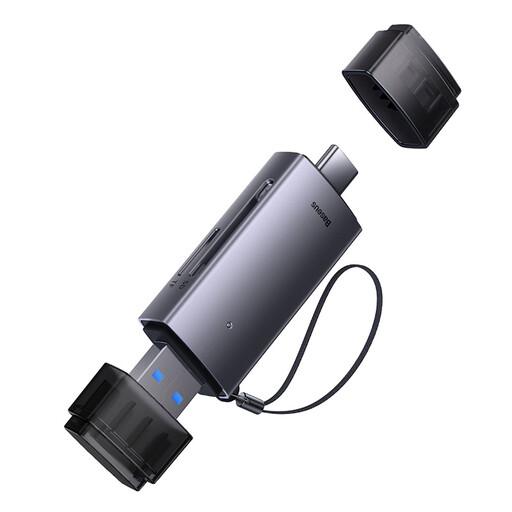
Baseus Lite Series USB-A & Type-C to SD/TF Card Reader Grey
Why This Fits Their Persona: Ideal for users seeking a flexible and straightforward solution for occasional data transfers between different devices (laptop, PC, tablet) without a large investment.
Thanks to its dual connector (USB-A and USB-C), it bypasses the incompatibility trap. You won't need an extra adapter to use the reader on both old and new devices.
Supports SD and TF (Micro SD) cards. The compact design with a protective cap makes it a practical companion for on-the-go use.
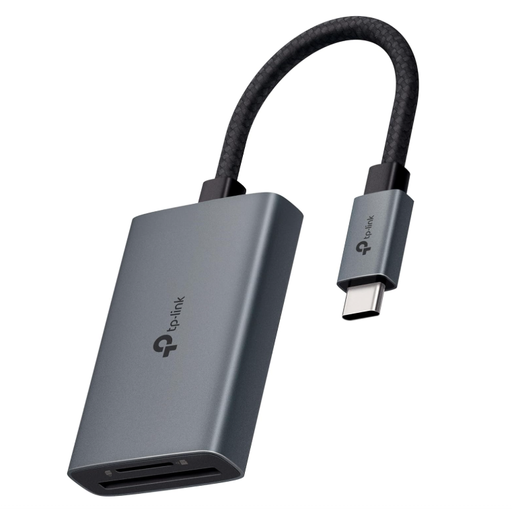
TP-Link UA440C USB Type-C to SD Card Reader
Why This Fits Their Persona: Designed for photographers and videographers who regularly transfer large 4K/8K video files and high-resolution photos and depend on maximum speed.
This model bypasses the speed bottleneck with explicit UHS-II compatibility. According to TP-Link, it achieves transfer rates of up to 312 MB/s, preventing long waits.
Simultaneous reading and writing of SD and microSD cards doubles productivity. The aluminum housing ensures good heat dissipation.
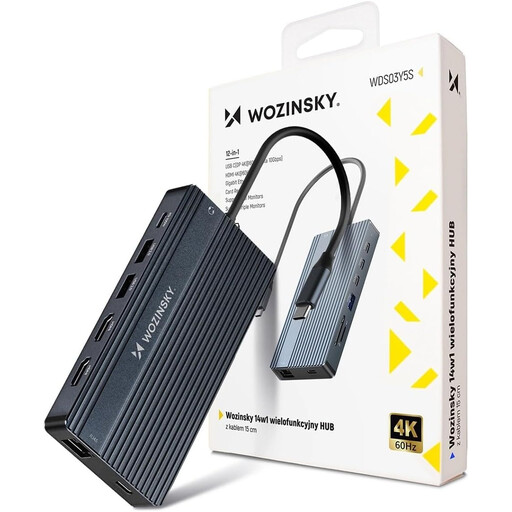
WOZINSKY USB-C Hub Adapter 14 in 1
Why This Fits Their Persona: Perfect for power users in a home or office setting who want to create a full-fledged workstation with monitors, peripherals, and storage media from their port-limited laptop.
This hub solves the problem of port scarcity and replaces multiple single, potentially unstable adapters. The robust aluminum housing effectively counteracts the overheating trap.
Offers 14 ports, including SD/TF readers, HDMI, DisplayPort, Ethernet, and USB-A. The Power Delivery (PD) function with up to 100W charges the laptop while in use.
Looking for More Options?
We have compiled a complete, up-to-date list of products that fully meet these strict selection criteria and safety regulations.
Frequently Asked Questions (FAQ)
Can I use a USB-C SD card reader with my smartphone or tablet?
Yes, this is generally possible, provided that both the card reader and your mobile device support the USB On-The-Go (OTG) standard. This allows the smartphone or tablet to act as a host and access external devices. Check the technical specifications of both devices to confirm. Many modern Android devices and iPads with a USB-C port are OTG-capable.
Why is my fast UHS-II card reader slow?
The actual transfer speed is always determined by the slowest link in the chain. To achieve maximum performance, three components must be aligned: your memory card must be a UHS-II card, the card reader must support UHS-II, and the USB-C port on your computer must be at least USB 3.0 (5 Gbit/s) or faster. If any of these components uses an older standard (e.g., a UHS-I card or a USB 2.0 port), the speed will be limited to its level.
Do I need to install drivers for a USB-C card reader?
No, the vast majority of modern USB-C SD card readers operate on a plug-and-play basis. This means they are immediately recognized by common operating systems like Windows, macOS, or Linux upon connection and are ready to use without any manual driver installation.