
USB Stick Buyer's Guide 2026: How to Find the Right Flash Drive
A USB stick is an indispensable tool in our digital lives. Whether for backing up important documents, transporting presentations for work, or quickly sharing photos with friends – a reliable storage drive offers a simple and portable solution. But the selection can be overwhelming: What storage capacity is sufficient? Is a USB 3.0 stick really necessary? And which connector fits my devices?
This guide will help you understand the technical features and make an informed decision. We will introduce objective criteria and present a selection of models suitable for various use cases.
What to Look for When Buying a USB Stick
To find the right flash drive for your needs, three key factors are crucial: storage capacity, connector type, and transfer speed.
1. The Right Storage Capacity: 32GB, 64GB, or More?
The required storage capacity depends directly on your usage habits.
- 32GB USB Stick: This size is a solid choice for everyday use. It offers enough space for thousands of documents, a large collection of photos, or several hours of music. For students and office workers who mainly transport text files and presentations, a 32GB USB stick is often perfectly adequate.
- 64GB USB Stick: If you regularly back up larger files like high-resolution videos, extensive software installations, or complete photo albums, a 64GB USB stick is the better option. This capacity offers more flexibility and ensures you won't run out of space too quickly.
2. Connector and Speed: USB 2.0, USB 3.0, and USB-C
The USB connector determines not only compatibility with your devices but also the data transfer speed.
- USB 2.0: This is an older standard that is still sufficient for transferring smaller files like documents or MP3s. However, its transfer speeds are significantly slower compared to newer standards.
- USB 3.0 Stick: A USB 3.0 stick (also known as USB 3.2 Gen 1) offers considerably higher speeds. Copying a large video file, which could take several minutes with USB 2.0, is often done in under a minute with USB 3.0. These sticks are backwards compatible, so they also work in older USB 2.0 ports, albeit at a reduced speed.
- USB-C Stick: The USB-C stick is the modern standard for new laptops, tablets, and smartphones. The connector is symmetrical and can be plugged in either way. A USB stick for your phone and PC with a dual connector (USB-C and the classic USB-A) offers maximum flexibility between different devices.
Our Selection of USB Sticks for 2026
Here is a selection of USB sticks that are well-suited for different user groups due to their specific features.
Intenso Alu Line 2x 32GB USB 2.0 Flash Drive
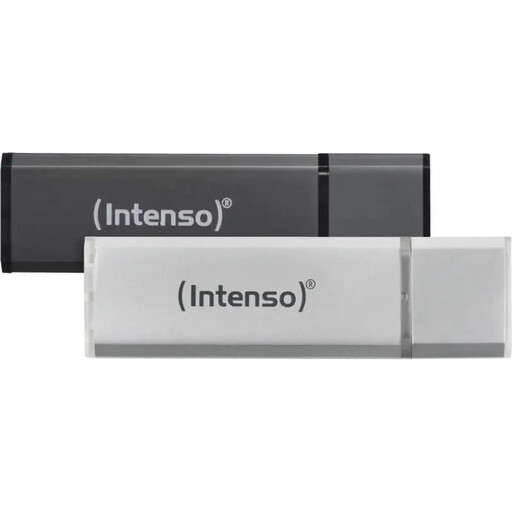
What makes this model stand out The Intenso Alu Line set is an especially practical solution for organising data. With two separate 32GB sticks, you can neatly separate personal and professional files or use one stick as a dedicated backup medium. The sturdy aluminium casing protects the sticks in daily use.
Advantages:
- Convenient twin-pack: Two sticks with 32GB capacity each for easy data separation.
- Durable material: The aluminium casing is lightweight and resilient.
- Protective cap: A removable cap protects the USB connector from dust and dirt.
- High compatibility: Works on all common operating systems without driver installation.
Who is it for? This set is ideal for budget-conscious users, students, and professionals who need a reliable solution for transporting documents and smaller files and who value clear organisation.
SanDisk Ultra USB 3.0 Flash Drive 32GB
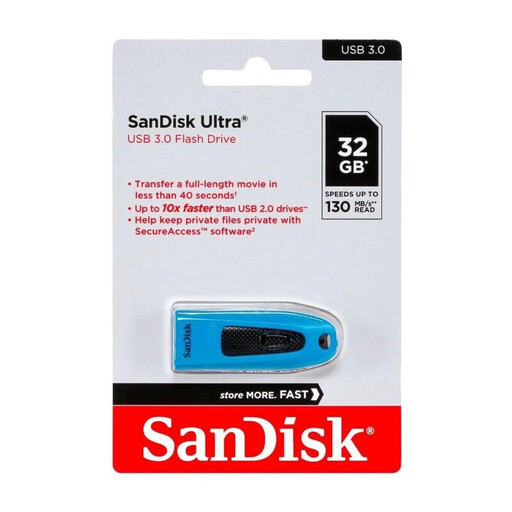
What makes this model stand out The SanDisk Ultra combines a solid storage capacity with the significantly higher speed of USB 3.0. According to the manufacturer, it achieves read speeds of up to 130 MB/s, which greatly accelerates the transfer of large files. An added benefit is the included SanDisk SecureAccess software, which creates a password-protected folder on the stick.
Advantages:
- High transfer speed: Thanks to USB 3.0, large files like movies or backups are copied quickly.
- Password protection: The SecureAccess software allows for the encryption of confidential data.
- Backwards compatibility: The stick can be used seamlessly with USB 2.0 ports.
Who is it for? This storage drive is a great choice for users who regularly move large amounts of data and want to protect sensitive information. It is suitable for professional use as well as for private users who value speed and security.
SANDISK Ultra Dual Drive Luxe USB Type-C Flash Drive 64 GB
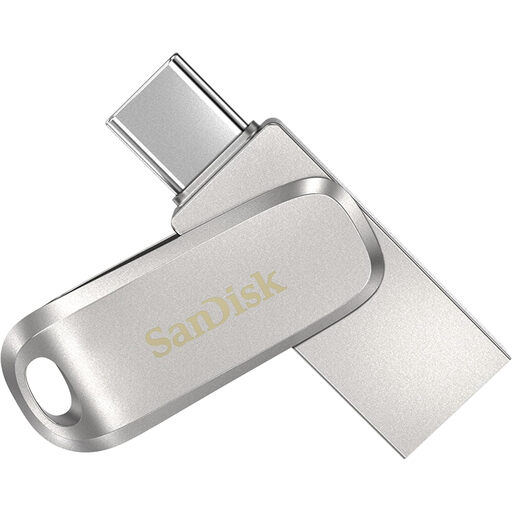
What makes this model stand out This flash drive is a prime example of flexibility. With its dual connector – one USB-C and one USB-A plug – it bridges the gap between modern smartphones, tablets, and traditional PCs. The durable all-metal casing with a swivel design protects the connectors. With 64GB of capacity and very high transfer rates (up to 400 MB/s read speed thanks to USB 3.2 Gen 1, according to SanDisk), it is equipped for demanding tasks.
Advantages:
- Dual connector: A USB-C and a USB-A plug for maximum compatibility.
- High performance: Very fast read and write speeds for efficient work.
- Large capacity:64GB provides ample space for photos, videos, and backups from your smartphone.
- Premium design: The metal casing is durable, and the swivel mechanism protects the connectors.
Who is it for? Ideal for anyone looking for a high-performance USB stick for phones and computers. Owners of modern laptops without USB-A ports and smartphone users who want to quickly free up space or back up data will find this a perfect solution.
Discover More Options
Are your requirements more specific? Perhaps you need a different storage capacity, a special design, or additional security features. Explore our entire range and find the right solution for your data.
️ Discover more models in the USB Sticks category here
Frequently Asked Questions (FAQ)
What is the difference between USB 2.0 and USB 3.0?
The main difference is speed. A USB 3.0 stick can transfer data up to ten times faster than a USB 2.0 stick. This is most noticeable when copying large files like videos, extensive photo collections, or software. For saving text documents, USB 2.0 is sufficient, but for everything else, USB 3.0 is the recommended standard today.
Can I use a USB stick with my phone?
Yes, this is possible. Modern Android smartphones typically have a USB-C port. To use a USB stick for your phone, you either need a model with a direct USB-C connector or a stick with a dual connector (USB-C and USB-A), like the SanDisk Ultra Dual Drive Luxe. For iPhones, a special stick with a Lightning connector or a corresponding adapter is required.
How much storage space do I really need?
As a rule of thumb: for documents, presentations, and a moderate number of photos, a 32GB USB stick is sufficient. If you regularly save videos, edit large RAW files as a hobby photographer, or use the stick for system backups, you should opt for a model with 64GB or more. It's best to check the average size of the files you plan to store to better estimate your needs.