
USB Network Adapter Buyer’s Guide: Find the Right Connection
A missing or faulty network port on your laptop or PC can severely disrupt your home office productivity or interrupt your evening stream. A USB network adapter is often the quickest and most straightforward solution. However, the market is confusing and full of technical promises that don't always deliver. Before you make a decision, it's crucial to understand the most common pitfalls to avoid paying for unused performance or incompatible technology.
As your Joybuy Product Recommendation Officer, I'll help you define objective criteria for your selection and find a suitable solution for your specific use case.
The 3 Most Common Traps When Buying Network Adapters
Many buyers are drawn to the big numbers on the packaging, but an adapter's true performance depends on other factors. Here are three typical issues that can lead to a bad buy:
- Exaggerated Speed Claims: Manufacturers often advertise theoretical maximum speeds of 1,800 Mbps or more. In practice, however, this speed is limited by your internet plan, your router, and the connection on the other end. An expensive high-speed adapter offers no benefit if your internet connection only provides 100 Mbps.
- Poor Driver Support: A cheap adapter is useless if it's not recognised by your operating system (e.g., Windows 11, macOS, or Linux). A lack of plug-and-play capability or outdated drivers for systems like the Nintendo Switch leads to frustration and wasted time.
- Overheating and Performance Throttling: Particularly compact and budget-friendly models tend to overheat under sustained heavy load—such as during large downloads or online gaming. This results in unstable connections, sudden dropouts, and a shortened device lifespan.
Key Selection Criteria: What You Need to Look For
To find the right adapter, you should focus on the technical features that are relevant to your use case.
Connection Type: Wired (LAN) or Wireless (WLAN)?
Your first decision is choosing between a wired and a wireless connection.
- USB LAN Adapter (USB-to-Ethernet Adapter): These adapters create a physical connection to your router via a network cable. They are the top choice for maximum stability and low latency, making them ideal for online gaming, video conferencing, and transferring large amounts of data. A laptop LAN adapter is a standard solution for replacing a missing RJ45 port.
- WLAN Stick (Wi-Fi Dongle): A Wi-Fi stick allows you to connect a device to your network wirelessly. This is especially useful for positioning a desktop PC flexibly or for upgrading an older laptop's outdated Wi-Fi module (upgrading Wi-Fi).
Speed and Network Standard
Speed is a key factor, but it must be evaluated in the context of your needs.
- Fast Ethernet (100 Mbps): Sufficient for basic internet tasks like browsing, email, and HD video streaming.
- Gigabit Ethernet (1,000 Mbps): A Gigabit Ethernet adapter is a smart choice if you have a fast internet connection (over 100 Mbps), frequently move large files on your local network, or want a future-proof solution.
- Wi-Fi 5 (802.11ac) vs. Wi-Fi 6 (802.11ax): Wi-Fi 6 not only offers higher theoretical speeds but, more importantly, better efficiency and lower latency in networks with many devices. A TP-Link adapter with Wi-Fi 6 is a good investment if you already own a compatible router.
Port and Compatibility
The physical port and software compatibility are crucial for smooth operation.
- USB-A vs. USB-C: Check which ports your device has. Modern ultrabooks and MacBooks often rely exclusively on USB-C, making a USB-C to LAN adapter necessary. Older PCs and laptops typically use the classic USB-A port.
- USB 2.0 vs. USB 3.0: A USB 3.0 port (or higher) is mandatory for speeds above 480 Mbps. A Gigabit adapter connected to a USB 2.0 port will not be able to reach its full potential.
- Operating System: Make sure the adapter is officially compatible with your operating system (Windows 10/11, macOS, Linux). For special devices like the Nintendo Switch, explicitly stated compatibility is advisable.
Recommended Picks for Different Users
Here are some recommendations tailored to specific user needs that take the aforementioned pitfalls into account.
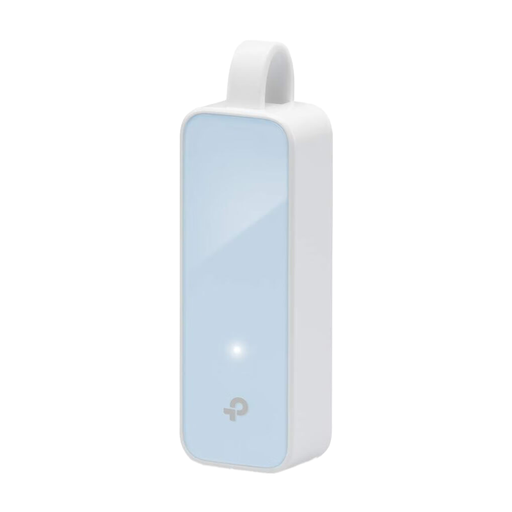
TP-Link UE200 Network Adapter 100Mbps USB 2.0
Why this model is a good fit: Ideal for users who need a simple and reliable wired internet connection for everyday tasks like browsing, email, or video calls. Its compact design makes it a practical companion for laptops without a LAN port.
The adapter doesn't promise exaggerated speeds. The 100 Mbps is an honest rating for standard applications. Thanks to broad plug-and-play support for Windows, macOS, and Linux, there's no need for complicated driver searches.
Very high compatibility and easy setup without additional software. The foldable design protects the USB plug during transport.
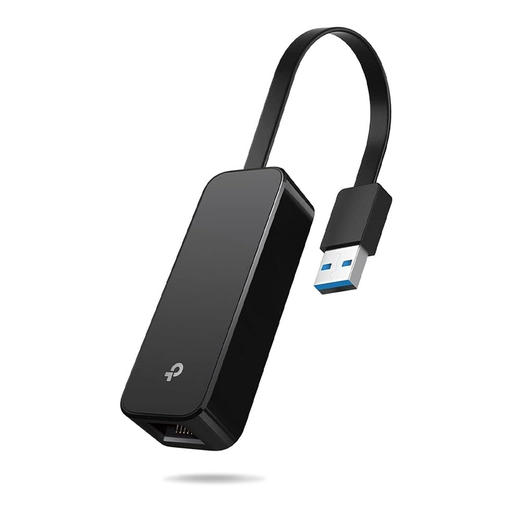
TP-LINK UE306 USB 3.0 to Gigabit Ethernet Adapter
Why this model is a good fit: Perfect for users with high-speed internet connections who need a stable Gigabit connection for 4K streaming, online gaming, or large downloads. Its explicit plug-and-play compatibility with the Nintendo Switch also makes it interesting for console gamers.
This adapter delivers true Gigabit Ethernet performance, which makes a noticeable difference for demanding applications. It avoids the driver trap with driver-free installation on modern systems (Windows 10/11, Linux, Switch).
Offers maximum wired speed for modern devices. The foldable, portable design is ideal for mobile use with an ultrabook.
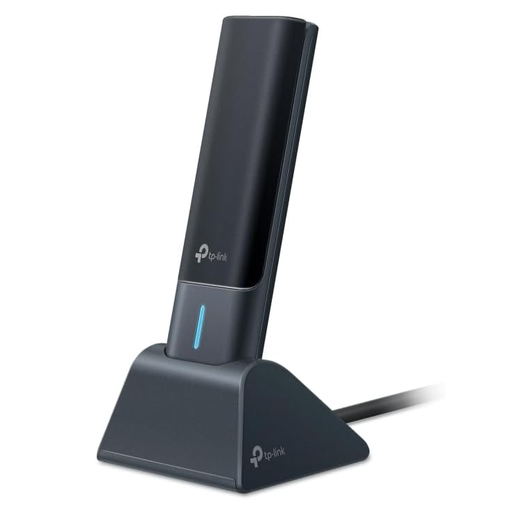
TP-Link Archer TXE70UH Wi-Fi 6E USB Adapter
Why this model is a good fit: For tech enthusiasts and gamers who want to get maximum Wi-Fi performance from their Wi-Fi 6E router. Access to the exclusive 6 GHz band drastically reduces interference and latency, which is a decisive advantage in densely populated residential areas.
The high speed here is justified by Wi-Fi 6E technology, which offers real-world advantages. The external antennas and USB docking station counteract the overheating and weak-reception pitfalls common with compact, high-performance dongles.
Supports the low-interference 6 GHz frequency band for an extremely stable and fast connection. WPA3 encryption also provides an enhanced security standard.
Looking for more options?
We have compiled a complete, up-to-date list of products that fully meet these strict selection criteria and German safety regulations.
Frequently Asked Questions (FAQ)
Do I need to install drivers for a USB network adapter?
On most modern operating systems like Windows 10/11 and recent macOS versions, many common adapters are "plug and play". This means you plug the adapter in, and it works immediately. However, for very new technologies (e.g., Wi-Fi 6E) or when using older operating systems, it may be necessary to download and install the appropriate driver from the manufacturer's website.
Is a USB LAN adapter faster than Wi-Fi?
As a rule, a wired connection via a USB LAN adapter offers a more stable data rate and lower latency (ping) than a connection via a Wi-Fi stick. This is particularly advantageous for online gaming, video conferencing, or downloading very large files. However, the absolute speed depends on the adapter's standard (e.g., Gigabit Ethernet) and the speed of your internet connection.
Can I upgrade my old laptop's Wi-Fi with a USB adapter?
Yes, this is one of the most common use cases. A modern PC Wi-Fi adapter that supports Wi-Fi 6, for example, can significantly improve connection speed and stability compared to an older, built-in Wi-Fi card. It is a cost-effective and efficient method for upgrading your Wi-Fi without having to open up the device.