
USB Flash Drive Buyer's Guide: How to Choose the Right Drive
A USB flash drive is an indispensable tool for transporting data and backing up files. But the market is overwhelming: deceptive deals with unrealistic speed claims and incompatible connectors often lead to bad purchases. This guide will help you avoid the typical pitfalls and find a flash drive that is perfectly tailored to your needs.
The 2 Most Common Mistakes When Buying a USB Drive
Before we dive into the technical details, let's look at two common problems that frequently cause frustration when choosing a USB drive.
Pitfall 1: Misleading Speed Claims
Many manufacturers advertise high read speeds (e.g., "up to 150 MB/s") but fail to mention the significantly slower write speed. A high read speed is useful when you're copying files from the drive to your computer. However, for saving data to the drive—the most common use case—the write speed is what matters. A fast USB drive should therefore offer balanced read and write speeds that are clearly stated in the product datasheet.
Pitfall 2: The Wrong Connector for Your Devices
With the growing prevalence of USB-C on laptops, tablets, and smartphones, choosing the right connector is more important than ever. A classic USB-A drive won't fit into a modern USB-C port without an adapter. Anyone who frequently transfers data between different device types, such as between a PC and a mobile phone, should opt for a Dual USB Drive with both connectors to ensure maximum compatibility.
What Really Matters: The Key Features
To find the right flash drive, you should base your decision on four objective criteria: storage capacity, speed, connector type, and security features.
Storage Capacity: How Much Space Do You Need?
The required capacity depends directly on your use case:
- 16 GB - 32 GB: Sufficient for text documents, presentations, and a small number of photos. Ideal for students or for sharing smaller files.
- 64 GB USB Drive: A good all-rounder for most personal users. Offers space for extensive photo collections, music libraries, or a few high-resolution videos.
- 128 GB USB Drive and up: Necessary for professional users who need to store large amounts of data, such as 4K video footage, extensive software backups, or entire project archives.
Speed: The Difference Between USB 2.0 and USB 3.x
The USB standard is a direct indicator of potential speed:
- USB 2.0: An outdated standard with theoretical transfer rates of up to 480 Mbit/s (approx. 60 MB/s). In practice, the rates are often much lower. Only suitable for very small files where waiting time is not a concern.
- USB 3.0 / 3.1 Gen 1 / 3.2 Gen 1: These standards all offer speeds of up to 5 Gbit/s (approx. 625 MB/s). A USB 3.0 drive is the recommended minimum for most users, as it significantly speeds up the process of copying larger files.
- USB 3.2 Gen 2 and higher: Offer even higher speeds (10 Gbit/s and more) and are primarily relevant for professional users who require SSD-like performance for external workflows.
Connector Type: USB-A, USB-C, or Both?
The choice of connector determines which devices your drive is compatible with:
- USB-A: The classic, rectangular connector found on most PCs, laptops, and older devices.
- USB-C Drive: The new, oval, and reversible connector. It is standard on modern laptops (MacBooks, Ultrabooks), tablets, and Android smartphones. A USB drive for a phone should ideally have this connector today.
- Dual USB Drive: The most flexible solution. These drives have both a USB-A and a USB-C connector, bridging the gap between old and new devices.
Extra Features: Security Through Encryption
If you transport sensitive or business data, a USB drive with encryption is an important consideration. Security can be implemented through software (password protection) or hardware (e.g., a fingerprint sensor). Hardware-based encryption is considered more secure because it operates independently of the OS.
Picks for Different User Profiles
Here are a few models tailored to specific user profiles that avoid the pitfalls mentioned above.
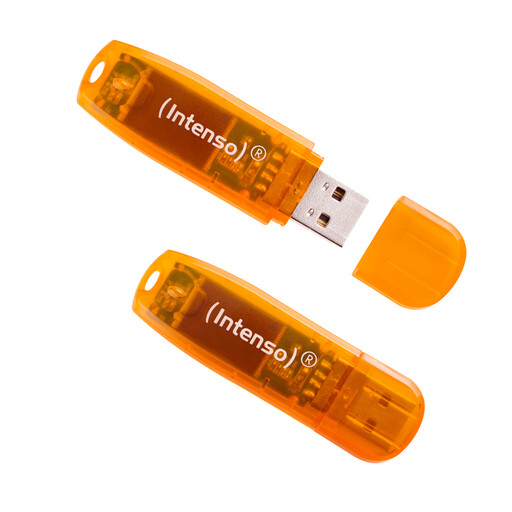
Intenso 3502492 Rainbow Line USB 2.0 - 2 x 64GB
Why This Fits Their Persona: Ideal for documents, school projects, and occasional photo backups. The two-pack offers excellent value for money and allows for separate data storage or an easy backup copy.
Although it's a USB 2.0 drive, the manufacturer clearly states the speeds and avoids misleading promises. As a product from a well-known brand, it prevents data loss from counterfeit capacities.
Two separate 64 GB drives for organizational flexibility and backups at a very accessible price. The plug-and-play functionality ensures hassle-free use.
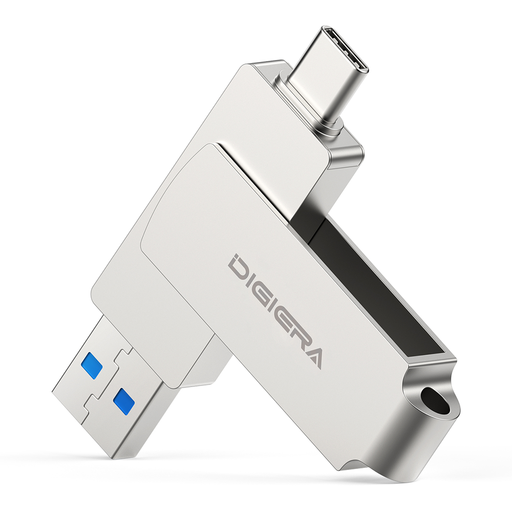
DigiEra USB Flash Drive – 128GB, USB 3.2 Dual Interface (USB-A & Type-C)
Why This Fits Their Persona: Perfect for users who need to move files between a new USB-C laptop or smartphone and an older USB-A computer without needing an adapter. A typical example is the well-known SanDisk USB Stick, but this model offers high performance.
The dual-interface design directly solves the "wrong connector" problem, offering maximum flexibility for a modern, cross-device workflow.
Combines high USB 3.2 speed (up to 500 MB/s read, per the manufacturer) with both USB-A and USB-C connectors in a durable metal casing with a swivel protector.

MOVESPEED USB Flash Drive – 256GB Thumb Drive, Fingerprint Encryption
Why This Fits Their Persona: Indispensable for professionals or individuals who transport confidential information (contracts, personal documents, financial data) and require uncompromising protection.
It offers hardware-based AES-256 encryption that is unlocked via fingerprint. This is a far more robust security solution than simple software protection, which is often overlooked.
Combines biometric security with very high transfer speeds (up to 550 MB/s read, per the manufacturer) and a flexible dual connector (USB-A & USB-C).
Looking for More Options?
We've compiled a complete, up-to-date list of products that fully meet these strict selection criteria and German security regulations.
Frequently Asked Questions (FAQ)
How can I identify a fast USB drive?
A fast USB drive is characterized by the USB 3.0 standard (or higher, like USB 3.1/3.2) and high, clearly stated read and write speeds. Look explicitly for both values in the datasheet. A high read speed alone is not a meaningful indicator.
Can I use a USB drive directly with my phone?
Yes, this is possible if you have a USB-C drive or a Dual USB Drive with a USB-C connector. Your smartphone or tablet must also support the "OTG" (On-The-Go) function, which is the case for most modern Android devices and iPhones with a USB-C port.
How long does a USB drive last?
The lifespan of a USB drive is measured in write cycles and depends heavily on the quality of the memory chips and the frequency of use. Flash memory is not intended for long-term archival. It is recommended to regularly back up particularly important data on a second medium (e.g., an external hard drive or in the cloud).