
USB Ethernet Adapter Buying Guide for Stable Wired Connections
By: Joybuy Product Recommendation OfficerDate: July 10, 2026
Modern laptops and tablets are becoming increasingly thin and light, but this minimalism often comes at a cost: the absence of a LAN port (RJ45). While Wi-Fi is convenient for everyday tasks, it quickly reaches its limits with data-intensive applications like home office video conferences, online gaming, or streaming 4K content. Connection drops, high latency, and fluctuating speeds are common problems.
A USB Ethernet Adapter is a simple and effective solution for establishing a stable, wired network connection for devices without a native LAN port. This guide explains the key criteria for selecting the right adapter and presents several models for different use cases.
What to Look for When Choosing a USB Network Adapter
Choosing the right adapter depends on your devices and your speed requirements. Three main factors are crucial.
1. The Right Connector: USB-A or USB-C?
First, check the available USB ports on your device.
- USB-A: This is the classic, rectangular USB port found on most laptops, PCs, and the Nintendo Switch docking station. If your devices have this port, an adapter with a USB-A plug is the right choice.
- USB-C: This newer, oval, and reversible connector is standard on modern ultrabooks (e.g., MacBooks), tablets (e.g., iPad Pro/Air), and many current smartphones. For these devices, you will need a USB C LAN Adapter.
2. The Required Speed: Gigabit or 100 Mbps?
The adapter's transfer rate should match your internet connection and usage patterns.
- 100 Mbps (Fast Ethernet): This speed is sufficient for basic internet activities like browsing, email, and streaming videos in HD quality. Such adapters are often a cost-effective solution for everyday use.
- 1000 Mbps (Gigabit Ethernet): A Gigabit network adapter is recommended if you regularly download or upload large amounts of data, stream 4K videos, or play competitive online games. It ensures you can leverage the full speed of a fast fiber or cable connection.
3. Compatibility with Your Device
Most modern adapters are "plug-and-play," meaning they work on common operating systems like Windows 10/11, macOS, and Linux without manual driver installation. Nevertheless, it's advisable to check the product description for compatibility, especially for more specialized devices. A good example is the Nintendo Switch LAN Adapter, which ensures a stable connection for online gaming and should be explicitly designated for the console. Such a LAN adapter for a laptop or tablet is generally universally compatible, as long as the port and operating system are supported.
Top USB Ethernet Adapter Picks
Based on the criteria above, we have compiled a selection of adapters for various needs.
1. UGREEN External Network Card RJ45 - USB 2.0 100 Mbps (CR110)
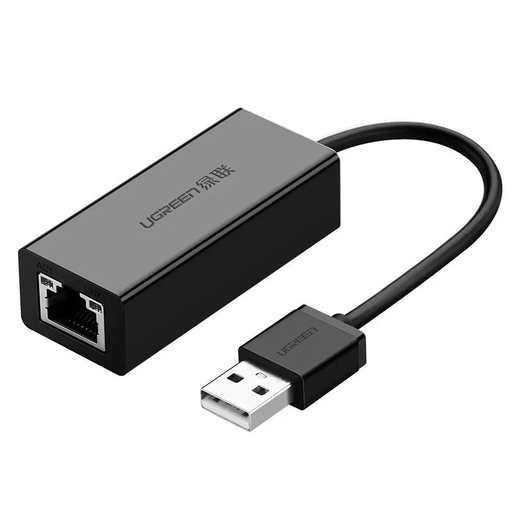
Why It Stands Out: The UGREEN CR110 is a straightforward and reliable solution for users who need a stable wired connection for everyday tasks. Its strength lies in its broad compatibility and ease of use.
Advantages:
- Plug-and-Play: According to the manufacturer, the adapter is driver-free for most current operating systems (Windows, macOS, Chrome OS).
- Compact Design: Its small footprint and integrated cable make it easy to transport.
- Stable Connection: Provides a consistent 100 Mbps Fast Ethernet connection, which is sufficient for environments with unstable Wi-Fi.
Who Is This Model For? This RJ45 USB adapter is ideal for users with laptops that have USB-A ports and who are looking for a simple, stable connection for the home office, browsing, or video calls. It's a great choice if your internet connection doesn't exceed 100 Mbps or if you don't require Gigabit speeds.
2. TP-LINK UE306 USB 3.0 to Gigabit Ethernet Adapter
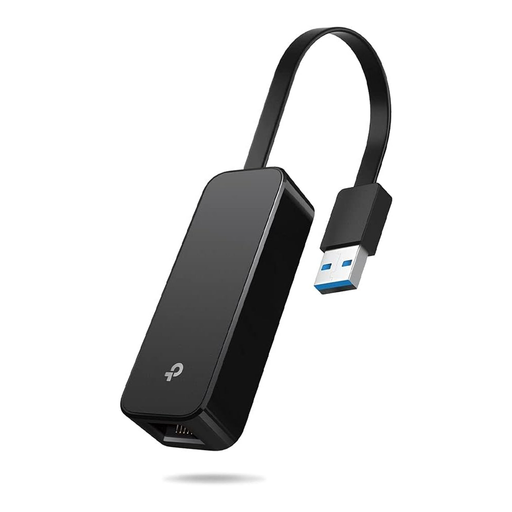
Why It Stands Out: The TP-Link UE306 combines high speed with portability and is explicitly designed for use with the Nintendo Switch. Its foldable design makes it a practical travel companion.
Advantages:
- Gigabit Speed: Thanks to USB 3.0, the adapter achieves a transfer rate of up to 1000 Mbps, ideal for fast downloads and low-latency gaming.
- Nintendo Switch Compatibility: According to TP-Link, the adapter is plug-and-play with the Nintendo Switch, enabling a significantly more stable online gaming experience.
- Foldable Design: The connector can be folded, which protects the adapter and makes it very compact for transport.
Who Is This Model For? This adapter is the top choice for gamers, especially Nintendo Switch owners who want to minimize lag and connection drops. It is also an excellent fit for users of laptops with a USB-A port who want to harness the maximum performance of their high-speed internet connection for demanding tasks.
3. TP-Link UE300C USB-C to Gigabit Ethernet Adapter
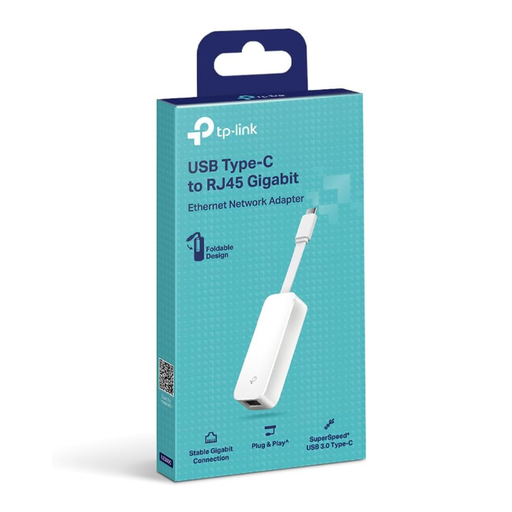
Why It Stands Out: The TP-Link UE300C is the modern answer to the missing LAN port on current devices. It provides Gigabit speed via the universal USB-C port.
Advantages:
- Modern Connectivity: Specifically designed for devices with a USB-C port, including MacBooks, ultrabooks, and modern tablets.
- High Speed: Delivers a stable Gigabit Ethernet connection for fast data transfers and smooth streaming.
- Broad OS Support: The manufacturer states it is plug-and-play compatible with Windows, macOS, iPadOS, Chrome OS, and Linux.
Who Is This Model For? This USB C LAN adapter is intended for all users whose devices exclusively feature USB-C ports. It is ideal for professionals with modern laptops, creatives transferring large files, and tablet users who need a more reliable connection than Wi-Fi.
Looking for More Options?
The models presented here cover the most common use cases. However, if you are looking for adapters with additional features, such as integrated USB hubs or other specific properties, you will find a wider selection in our main category.
Discover All USB Network Adapters on Joybuy.de
Frequently Asked Questions (FAQ)
1. Is a USB Ethernet adapter faster than Wi-Fi? A wired connection via a USB Ethernet adapter is generally more stable and offers lower latency (ping) than Wi-Fi. Whether it is also faster depends on several factors: the adapter's speed (100 Mbps vs. 1 Gbps), your internet plan, and the standard and signal strength of your Wi-Fi. For gaming and video conferencing, the stability of the wired connection is often the decisive advantage.
2. Do I need drivers for a USB LAN adapter? Most modern adapters designed for Windows 10/11, recent macOS versions, and common Linux distributions are "plug-and-play." This means the operating system automatically detects the adapter and installs the necessary software on its own. With very old operating systems, you may need to download a driver from the manufacturer's website.