
USB Drive Buyer’s Guide: Avoid Common Purchase Mistakes
A USB drive is an indispensable tool for quickly transporting data and backing up important files. But the market is overwhelming, and many buyers invest in products that don't meet their needs. Misleading speed claims, incompatible connectors, or a lack of security often lead to frustration. This guide will help you correctly interpret technical specifications and find a flash drive that precisely fits your use case.
The 3 Most Common Pitfalls When Buying a USB Drive
Marketing promises can be misleading. Watch out for these three common issues to make an informed decision.
- The One-Sided Speed Claim Trap: Many manufacturers prominently advertise high read speeds (e.g., "up to 400 MB/s"). However, for everyday use, such as saving documents or copying photos onto the drive, the write speed is what truly matters. If it's low, transferring data takes a disproportionately long time, even if the product was marketed as "fast."
- The Incompatibility Trap from Wrong Connectors: A classic USB-A connector won't fit into modern ultrabooks, MacBooks, or Android smartphones, which often exclusively use USB-C. Buying a drive with the wrong connector makes it useless without an adapter and severely limits its flexibility.
- The Security Gap in Unencrypted Drives: Standard flash drives offer no protection for your data. If the drive is lost, third parties can easily access all the private photos, financial documents, or trade secrets stored on it. For sensitive information, a USB drive with encryption is a necessity, not an option.
What Really Matters: The Key Parameters
To avoid these pitfalls, you should carefully examine three technical features. These define the performance and utility of a USB drive in daily life.
1. USB Standard and Real-World Transfer Rates
The USB standard designation provides information about the theoretical maximum speed. Pay attention to the following standards:
- USB 2.0: An outdated standard with a maximum transfer rate of 480 Mbit/s (approx. 60 MB/s). In practice, the rates are often significantly lower and unsuitable for large files.
- USB 3.2 Gen 1 (formerly USB 3.0): Offers speeds of up to 5 Gbit/s (approx. 625 MB/s). A USB 3.0 drive represents a good balance of price and performance for most users.
- USB 3.2 Gen 2 and higher: Reach 10 Gbit/s or more and are intended for professional users who move extremely large amounts of data (e.g., 4K video files).
Pro Tip: Look specifically for the write speed in the product's data sheet. A fast USB drive for general use should have a write speed of at least 50–70 MB/s. For power users, speeds over 200 MB/s are recommended.
2. Connector Types: USB-A, USB-C, and Dual-Connector Models
Choosing the right connector is crucial for compatibility with your devices.
- USB-A: The classic, rectangular connector found on most desktop PCs and older laptops.
- USB-C: The new, oval, and reversible connector. It is standard on current laptops, tablets, and on a USB drive for mobile phone use.
- Dual USB Drive: These models feature both a USB-A and a USB-C drive connector. They offer maximum flexibility for data exchange between old and new devices without needing an adapter.
3. Storage Capacity and Data Security
The required capacity depends directly on your usage patterns.
- 32 GB to 64 GB: Sufficient for documents, presentations, and a moderate number of photos. A 64GB USB drive is a popular choice for students and everyday office tasks.
- 128 GB to 256 GB: Suitable for larger media collections, software installations, or as a backup medium. A 128GB USB drive offers good value for money for more demanding users.
- 512 GB and more: Necessary for professional photographers, videographers, or as an external hard drive alternative.
For protecting sensitive data, you should choose a model with integrated hardware or software encryption. AES 256-bit encryption is considered the industry standard and reliably protects your files from unauthorized access.
Top Picks for Every User
Here are some recommendations tailored to specific user profiles and the criteria mentioned above.
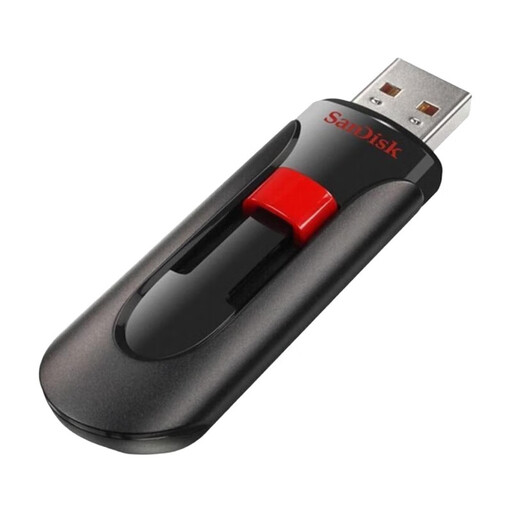
SanDisk Cruzer Glide 2.0 USB Flash Drive 32GB 3-Pack
Why This Fits Their Persona: Ideal for users who need multiple reliable flash drives for everyday tasks like sharing documents, homework, or photos. The 3-pack offers excellent value for families or a home office.
With SanDisk SecureAccess software, it provides basic password protection (128-bit AES encryption), thus avoiding the pitfall of completely unsecured data transport.
An economical 3-pack for various purposes. The sliding mechanism protects the USB-A connector without a separate cap that can be lost.
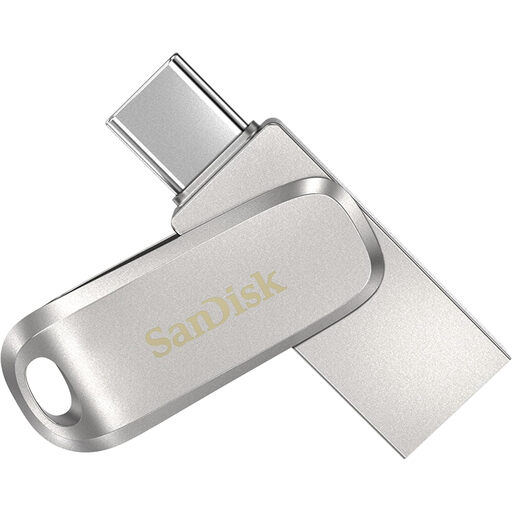
SANDISK Ultra Dual Drive Luxe USB Type-C 64 GB
Why This Fits Their Persona: Perfect for users who need to seamlessly transfer data between their USB-C smartphone, tablet, or MacBook and a PC with a classic USB-A port. The durable metal casing is ideal for mobile use.
Solves the incompatibility trap with its dual interface. The USB 3.2 Gen 1 standard also ensures solid transfer rates, avoiding the frustration of slow write processes.
Features both a USB-A and a USB-C connector in one device. The swivel design protects the connector not in use. Manufacturer claims read speeds of up to 400 MB/s.

MOVESPEED USB Flash Drive – 256GB with Fingerprint Encryption
Why This Fits Their Persona: Designed for professionals, creatives, and anyone transporting sensitive business or personal data. The combination of high speed and biometric security is ideal for large files and confidential information.
Directly addresses the security and speed pitfalls. The AES-256 encryption, combined with fingerprint authentication, offers high-level protection. Its SSD-like speeds (up to 500 MB/s write, according to the manufacturer) prevent long waits.
Combines biometric security with hardware encryption. The dual interface (USB-A/C) and robust zinc alloy casing make it a versatile and durable tool.
Looking for More Options?
We have compiled a complete, up-to-date list of products that fully meet these strict selection criteria and security standards.
Frequently Asked Questions (FAQ)
1. How do I choose the right storage capacity for my USB drive? This depends on your intended use. For text documents and a few photos, 32 GB is often enough. If you regularly save music, high-resolution images, or short videos, a 64GB or 128GB USB drive is a good choice. For backing up large amounts of data, extensive video projects, or as a portable game library, 256 GB or more is recommended.
2. What is the difference between USB 3.0, 3.1, and 3.2? The naming can be confusing. Essentially, older standards have been consolidated under the new name. USB 3.2 Gen 1 is technically identical to USB 3.1 Gen 1 and the original USB 3.0. All offer a maximum data rate of 5 Gbit/s. USB 3.2 Gen 2 doubles this rate to 10 Gbit/s. For most users, a drive with USB 3.2 Gen 1 (or labeled as a USB 3.0 drive) is perfectly sufficient.
3. Do I need to "safely eject" a USB drive before removing it? Yes, this is strongly recommended. Operating systems often use a write cache to improve performance. This means that data may not have been fully written to the drive, even if the copy process appears finished on screen. "Safely ejecting" ensures that all write operations are complete, thus preventing data loss or file system corruption.