
USB Desk Fans: Our 2026 Recommendations for the Office and Home
Rising temperatures in the office or at home can be a major distraction. A large standing fan is often too loud and impractical for personal use at a workstation. A USB desk fan offers a targeted and efficient solution. These compact devices provide a pleasant breeze without cooling the entire room or disturbing colleagues.
This article serves as your guide. We will introduce various models and explain the key features you should consider when making your choice. Our goal is to provide you with an informed basis for your decision, so you can find the perfect small fan for your specific needs.
What to Look for in a USB Desk Fan
Before you make a decision, there are several technical specifications to consider. These will determine how well the device fits into your daily life.
Battery Capacity and Charging Options
A key advantage of many modern models is the built-in battery. A cordless desk fan offers maximum flexibility, as it doesn't need to be permanently connected to a power source. The battery's capacity, measured in milliampere-hours (mAh), indicates how long the fan can run without recharging. Models with 3000 mAh or more typically offer a runtime of several hours, which is sufficient for a workday or overnight. Most devices are rechargeable via a standard USB port, making it easy to charge them using a laptop, power bank, or wall adapter.
Noise Level and Airflow
A quiet mini fan is essential, especially in an office or bedroom. The noise level depends on the motor design, the shape of the rotor blades, and the selected speed setting. Many manufacturers optimise the blade design to produce a gentle yet effective airflow with minimal noise. Look for models with multiple speed settings to adjust the intensity of the breeze to your environment and personal preference.
Portability and Design
A portable fan should be lightweight and compact. Some models are designed as a foldable fan, which makes transport and storage even easier. This feature is particularly useful if you plan to use the device not only in the office but also on the go, for example, while travelling or as a camping fan. Design also plays a role: a sleek, modern fan blends unobtrusively into any workspace or home decor.
Our Top USB Desk Fan Picks for 2026
Here is a selection of models that stand out for their specific features and functions.
Aigostar Portable USB Fan – Quiet Cooling for Your Desk
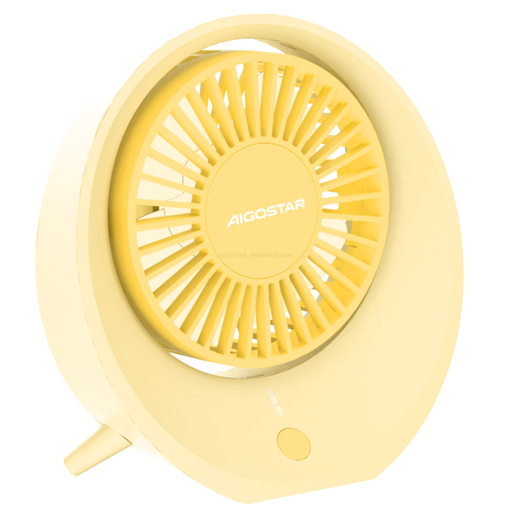
Why it stands out: This model from Aigostar focuses on the essentials: quiet operation and a gentle, natural airflow. The 4-blade design is engineered to minimise noise, making it a great choice for quiet environments. Its simple, beige housing is understated and modern.
Pros:
- Quiet Operation: Designed for a low-noise airflow, ideal for offices and bedrooms.
- Three Speed Settings: Allows you to adjust the air circulation from a light breeze to stronger cooling.
- Compact Design: With a fan head diameter of 104 mm, it is very space-saving and easy to transport.
- USB Rechargeable: The integrated battery can be conveniently charged via various USB sources.
Who is it for? Users looking for a straightforward, quiet, and stylish fan for their desk or nightstand who appreciate a subtle design.
Aigostar Portable USB Desk Fan – Flexible and Long-Lasting
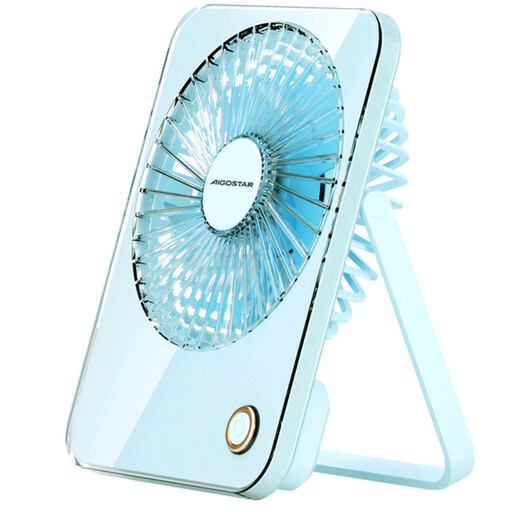
Why it stands out: This foldable fan is distinguished by its high flexibility and powerful battery. The base can be tilted 180 degrees, allowing the device to be not only placed on a surface but also hung up. The 3600 mAh battery ensures long, cordless operation.
Pros:
- Large Battery: The 3600-mAh battery allows for extended use without constant recharging.
- Flexible Design: The 180-degree foldable base allows it to be placed on a table or hung from a hook.
- 5-Blade Design: Provides a soft and pleasant airflow.
- High Portability: Lightweight and compact, ideal for use at home, in the office, or as a camping fan.
Who is it for? Users who need maximum flexibility and are looking for a cordless desk fan for various locations—from the office to a camping trip.
Luxaid Foldable Desk Fan – Feature-Rich with Remote Control
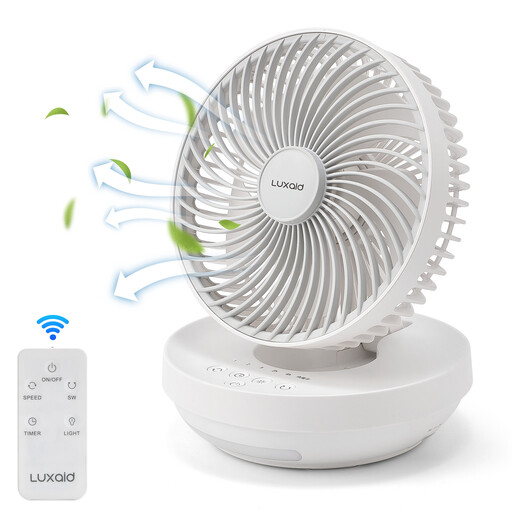
Why it stands out: This model from Luxaid offers an expanded feature set for maximum convenience. It includes a 4000 mAh battery, a remote control, a timer function, and an integrated night light. It can also be wall-mounted, making it a versatile solution for different rooms.
Manufacturer's Note: The actual battery capacity is 4000 mAh. Due to a printing error, the outer packaging states 2000 mAh. The product's performance is not affected.
Pros:
- Very Large Battery Capacity: With 4000 mAh, this model offers an exceptionally long runtime.
- Remote Control: All functions can be conveniently controlled from a distance.
- Additional Features: A 4-hour timer and an integrated night light enhance user comfort.
- Flexible Mounting: Can be used as a desk fan or mounted on the wall.
- Type-C Charging Port: A modern and robust charging connection.
Who is it for? Users looking for a feature-rich device with high ease of use who appreciate extra functions like a timer, night light, and remote control.
Looking for More Options?
If you're searching for other innovative products to optimise your workspace, you can find more useful solutions in our category for portable desks and accessories.
Frequently Asked Questions (FAQ)
1. How long does the battery of a USB desk fan last? The battery life depends heavily on the battery's capacity (mAh) and the selected speed setting. Models with a capacity of 3000–4000 mAh can often run for 10 hours or more on the lowest setting, while the runtime may drop to just a few hours on the highest setting.
2. Are USB fans loud? Modern USB desk fans are designed to be as quiet as possible. Especially on the lower speed settings, the operating noise of many models is barely perceptible and won't disturb you while working or sleeping. Making a quiet mini fan is a key development goal for manufacturers today.
3. Can you use a USB fan while it's charging? Most models can be operated while charging. This is known as "pass-through charging." However, it is recommended to check the specific instructions in the user manual of the respective device, as there may be differences between models.