
USB Charger Buyer's Guide: Smart Selection Tips
A new USB-C charger might seem like a simple purchase. After all, the USB-C port is now the standard for almost all modern devices, from smartphones to laptops. But the market is crowded and confusing, and not every power adapter delivers on its promises. Misleading power ratings, poor compatibility, and hidden safety risks can lead to more than just slow charging times—in the worst-case scenario, they can damage your expensive devices.
As your Joybuy Product Recommendation Officer, I'm here to help you identify the common pitfalls and make an informed decision.
The 3 Most Common Pitfalls When Buying a USB-C Charger
Before you spend money on a new power adapter, you should be aware of these three common issues that often lead to frustration:
- The Wattage Trap with Multi-Port Chargers: Many manufacturers advertise a high total wattage (e.g., 65W). What they often don't make clear is that this power is split across all ports when multiple devices are charging simultaneously. A multi-port USB charger that's supposed to power your laptop at 65W might only deliver 45W when a smartphone is also connected. The result is a much slower charging speed than you expected.
- Missing Safety Certifications: A cheap charger without a CE marking is a significant risk. This mark confirms that the product meets the EU's essential health and safety requirements. Without it, there's an increased danger of overheating, short circuits, or overvoltage, which can permanently damage your device's battery.
- Incompatible Fast-Charging Protocols: USB-C is just the connector—not the charging standard. Technologies like Power Delivery (PD) and Programmable Power Supply (PPS) determine the charging speed. For example, an iPhone charger needs Power Delivery for fast charging. A Samsung charger also benefits from PPS for even more efficient charging. If you buy a power adapter that doesn't support your device's protocol, you'll be stuck charging at the slowest possible speed.
What to Actually Look For: The Key Parameters
To avoid these traps, focus on three objective criteria. These will help you find a suitable and safe fast charger.
1. Power (Watts) and Charging Protocols
The required wattage depends directly on your device:
- Smartphones: 20W to 30W is ideal for fast-charging most models.
- Tablets and small laptops: 30W to 45W is a good benchmark here.
- High-performance laptops: A laptop power adapter should be able to deliver at least 65W to 100W from a single port.
Always check the wattage recommended by your device's manufacturer. Also, make sure the charger supports the Power Delivery (PD) standard. This is the universal standard for fast charging over USB-C and ensures the broadest compatibility.
2. Ports and GaN Technology
Consider how many devices you want to charge at the same time. A multi-port USB charger with a combination of USB-C and USB-A ports offers flexibility for both new and older devices.
This is where GaN technology comes in. A GaN charger uses Gallium Nitride instead of traditional silicon. The advantages are significant:
- Smaller footprint: For the same power output, GaN chargers are often up to 50% smaller.
- Higher efficiency: They convert power with less heat loss, making the charger cooler and safer.
- Lighter weight: Ideal for travel and use on the go.
3. Safety Features and Certifications
A reliable charger must have built-in protection mechanisms. Look for features like:
- Overheating protection
- Overvoltage protection
- Short-circuit protection
The CE mark is a minimum requirement in the EU. Additional certification marks from independent institutes like T?V or GS (Geprüfte Sicherheit / "Tested Safety") are another indicator of verified safety and quality.
Recommendations By User Need
Based on these objective criteria, we have identified a few models that represent an ideal solution for specific user profiles.
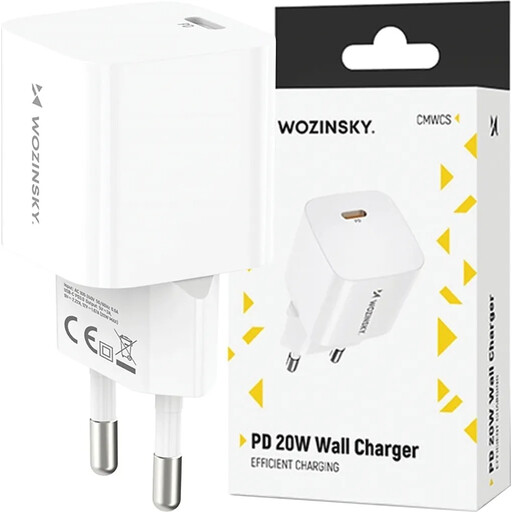
Wozinsky CMWCS 20W USB-C PD Wall Charger - White
Why it's a good fit: Ideal for users looking for a reliable and affordable charging solution for their smartphone. It focuses on the essentials: fast-charging a single device.
With a single USB-C port, there's no confusion about power distribution. The full 20W Power Delivery output is dedicated to your device and is compatible with the fast-charging standards of modern smartphones.
Compact design and support for Power Delivery (PD) make it a perfect fit as an iPhone charger or for other modern smartphones. Features integrated overheating and overload protection.
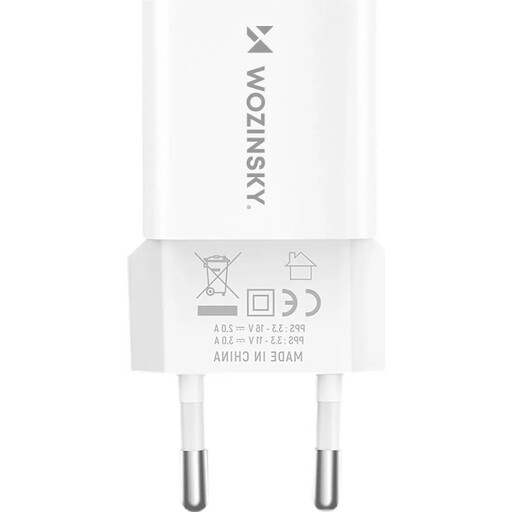
Wozinsky WWCEAC 33W GaN Wall Charger (USB-A & USB-C) - White
Why it's a good fit: Perfect for everyday office use or for commuters who need to charge their smartphone and headphones simultaneously. The combination of USB-A and USB-C offers maximum flexibility.
GaN technology ensures less heat generation and a more compact design compared to conventional multi-port chargers. This counteracts the risk of overheating under full load.
A GaN charger with 33W of total power and two ports (USB-A/C) in a very compact form factor. Includes integrated protection against overvoltage and overheating.
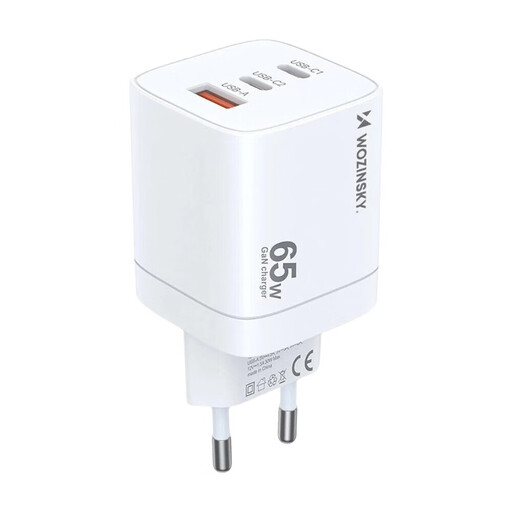
Wozinsky CGWCW 65W USB-A / 2 x USB-C GaN Wall Charger – White
Why it's a good fit: For anyone who needs a powerful laptop power adapter and wants to charge a smartphone and tablet at the same time. Its high power output and three ports make it the all-in-one solution for your desk or travel bag.
This charger addresses the wattage trap by offering a high total output of 65W, which is enough to fast-charge a laptop (e.g., at 45W) and a smartphone (e.g., at 18W) simultaneously. The power distribution is designed for these exact scenarios.
Three ports (2x USB-C, 1x USB-A) and GaN technology deliver maximum power in a compact form factor. It can serve as a fully-fledged laptop power adapter while also powering other devices.
More Than Just Charging: The World of USB-C Adapters
The USB-C port isn't just for charging. It's a universal interface that can unlock many other functions with the right USB-C adapter. Whether you want to connect older accessories or add a missing feature, there's often a simple solution.
- For audio devices: Many modern smartphones no longer have a 3.5mm headphone jack. An Apple USB-C to 3.5 mm Headphone Jack Adapter easily restores this connection.
- For a stable internet connection: If your Wi-Fi is unreliable, a TP-Link UE300C USB-C to Ethernet Adapter provides a stable Gigabit LAN connection for your laptop. In buildings with poor Wi-Fi reception, a Powerline adapter can also be an alternative, distributing the network signal through your electrical wiring.
For on the go, a car charger with a USB-C port is a smart addition to keep your devices powered up while driving.
Looking for more options?
We have compiled a complete, up-to-date list of products that fully meet these strict selection criteria and EU safety regulations.
Frequently Asked Questions (FAQ)
1. Can I use any USB-C charger for my laptop? Not necessarily. You must check the minimum wattage recommended by your laptop's manufacturer. A 65-watt laptop requires a laptop power adapter that can deliver at least 65W from a single USB-C port to charge efficiently, especially under load. A weaker charger (e.g., 30W) may charge the battery very slowly or not at all while the device is in use.
2. What is the difference between Power Delivery and Quick Charge?Power Delivery (PD) is the universal fast-charging standard for the USB-C connector, used by a wide range of manufacturers like Apple, Google, and Nintendo. Quick Charge (QC) is a proprietary standard from Qualcomm, found primarily in Android smartphones with Qualcomm processors. Many modern chargers support both protocols to ensure maximum compatibility.
3. How can I identify a safe USB-C charger? Always look for the CE marking on the product or its packaging. This is legally required in the EU and confirms compliance with essential safety standards. Additional certification marks like T?V or GS (Geprüfte Sicherheit / "Tested Safety") are voluntary and signal an even higher level of product quality verified by independent bodies. Reputable manufacturers will also always list the built-in protection mechanisms (e.g., against overheating, overvoltage) in the product description.