
USB-C Cable Buyer’s Guide: Find the Right Cable for Your Needs
The search for a new USB-C cable can quickly become overwhelming. While the connectors may look identical, the technical differences in charging power, data transfer, and video functionality are significant. The wrong cable can not only slow down charging times but also limit data transfer speeds or prevent a connection to an external monitor.
This guide is designed to bring clarity. We'll explain the crucial features you should look for and present a selection of cables for various use cases—from simple charging cables to high-performance solutions for professional demands.
What to Look for When Buying a USB-C Cable
To find the right cable for your devices, three technical aspects are of central importance: charging power, data transfer speed, and additional features like video output.
1. Charging Power: Not Every Cable is a Fast-Charging Cable
The maximum charging power of a cable is specified in watts (W). While basic cables are often designed only for charging smartphones at lower power, laptops like a USB-C cable for MacBook require a much higher energy supply.
Pay attention to Power Delivery (PD) support. A 100W USB-C charging cable, thanks to PD technology, can charge laptops, tablets, and smartphones at the maximum possible speed. Always check the cable's power rating and ensure it matches the requirements of your device and power adapter to take full advantage of a fast-charging USB-C cable.
2. Data Transfer: The Difference Between Mbit/s and Gbit/s
The speed at which a USB-C data cable transfers files varies greatly. Most standard charging cables are based on the USB 2.0 standard and achieve speeds of up to 480 Mbit/s. This is sufficient for syncing music or photos.
For professional users who move large files like 4K videos or extensive project data between a computer and an external hard drive, a higher speed is necessary. This is where cables with USB 3.2 or Thunderbolt 4 come into play. A Thunderbolt 4 cable can transfer data at up to 40 Gbit/s—that's more than 80 times faster than a standard USB 2.0 cable.
3. Additional Features: Video Transfer and Compatibility
Not every USB-C cable can send a video signal to an external monitor or TV. For this function, the cable must support what is known as "DisplayPort Alternate Mode." This is typically the case with higher-quality USB-C cables (from USB 3.1 Gen 2 onwards) and especially with Thunderbolt cables. If you want to connect your laptop to a screen, checking for this capability is essential.
Recommended USB-C Cables
Based on the criteria mentioned, we have compiled a selection of cables that cover different requirements.
UGREEN US300 USB-C to USB-C Cable 100W
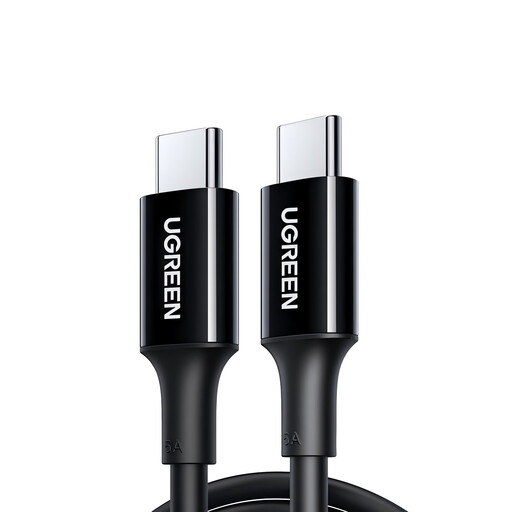
Why it stands out: This cable is a pragmatic solution for anyone whose main priority is fast and reliable charging. With support for up to 100W Power Delivery, it's a solid choice for powerful laptops and other devices.
Pros:
- Charging Power: Supports fast charging up to 100W (PD3.0, QC4.0, FCP).
- Construction: Multiple internally shielded cores made of tinned, oxygen-free copper for stable power transmission.
- Data Transfer: Supports USB 2.0 with up to 480 Mbit/s for basic data synchronisation.
- Material: Flexible and durable TPE outer jacket.
Who it's for: Users who need a powerful and cost-effective 100W USB-C charging cable for daily use in the office, at home, or on the go, and who do not require high-speed data transfer.
Apple Official Thunderbolt 4 Pro Cable (3m)
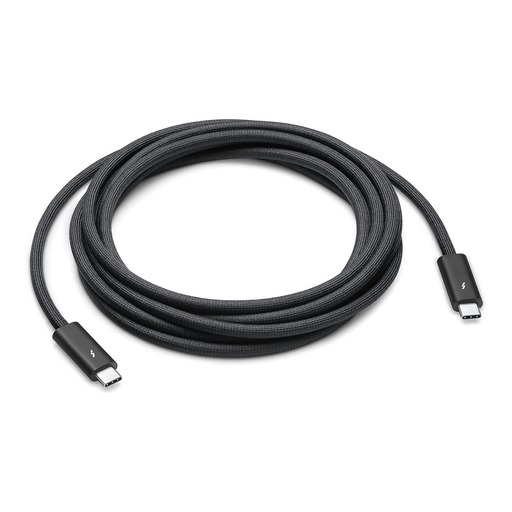
Why it stands out: This cable is the high-performance solution for professional workflows. It combines maximum data transfer speed, high charging power, and video output in a single cable, making it ideal for demanding setups.
Pros:
- Data Transfer: Extreme speeds of up to 40 Gbit/s via Thunderbolt 4 and up to 10 Gbit/s via USB 3.1 Gen 2.
- Video Output: Supports DisplayPort video output (HBR3) for connecting to high-resolution monitors.
- Charging Power: Delivers up to 100W of power for charging laptops and other devices.
- Compatibility: Versatile for use with Thunderbolt 3, Thunderbolt 4, USB-C, and USB-enabled devices.
Who it's for: Creative professionals, video producers, and power users who need a Thunderbolt 4 cable for maximum performance. It's the top choice for connecting docks, external GPUs, high-speed storage, and 4K/5K monitors to a MacBook Pro or another high-performance computer.
To the Apple Thunderbolt 4 Pro Cable
Apple Official USB-C Charge Cable (1m, 60W)
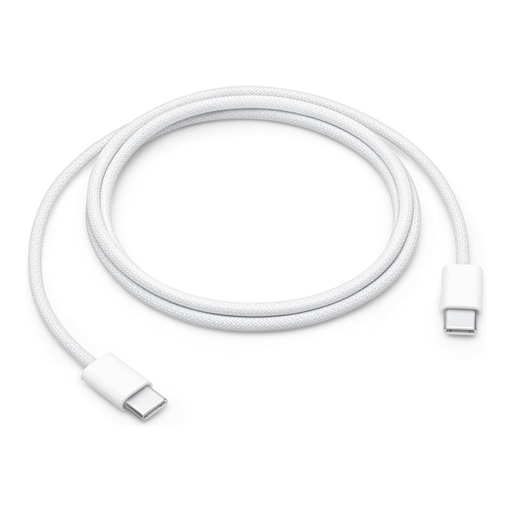
Why it stands out: This official Apple USB-C cable is distinguished by its robust, braided design and seamless integration into the Apple ecosystem. It is a reliable choice for charging and syncing Apple devices.
Pros:
- Design: High-quality braided design for enhanced durability and tangle resistance.
- Charging Power: Supports charging up to 60W, ideal for MacBook Air, iPad Pro, and iPhone models with USB-C.
- Functionality: Designed for charging, syncing, and data transfer between USB-C devices.
- Length: The 1-meter length offers flexibility for use at a desk or on the go.
Who it's for: Apple users looking for a durable and officially supported cable for their MacBook, iPad, or iPhone, who value manufacturer-guaranteed compatibility and material quality.
To the Apple USB-C Charge Cable
Looking for More Options?
Our selection covers the most common use cases. However, if you are looking for a cable with a specific length, a different connector type, or for special purposes such as connecting external hard drives, you will find more models in our broader product category.
Discover more data transfer cables for hard drives
Frequently Asked Questions (FAQ)
What is the difference between a USB-C cable and a Thunderbolt 4 cable? Although both use the same physical USB-C connector, Thunderbolt 4 is a technology that runs over the USB-C port and offers significantly higher capabilities. A Thunderbolt 4 cable supports data rates of up to 40 Gbit/s, video output, and high charging power. A standard USB-C cable is often limited to slower data rates (e.g., 480 Mbit/s) and is primarily focused on charging. However, a Thunderbolt 4 port is backward compatible and can also be used with standard USB-C cables, but only at their respective maximum performance.
Can I use any USB-C cable as a fast-charging cable for my MacBook? No. To fast-charge a MacBook or another laptop, you need a cable that explicitly supports high charging power (e.g., 60W or 100W) via Power Delivery (PD). A simple cable rated for only 15W will charge the laptop very slowly, or not at all, even when connected to a powerful adapter.
Is an original Apple USB-C cable required for my iPhone or MacBook? An original Apple USB-C cable is not strictly necessary. High-quality cables from third-party manufacturers that meet the required specifications (e.g., MFi certification for Lightning cables or correct PD ratings for USB-C) will also work reliably. However, original cables offer the assurance of manufacturer-tested compatibility and quality.