
Avoid Bad USB-C Accessories: Hubs, Headphones, Adapters
The USB-C port has established itself as the universal standard for laptops, smartphones, and tablets. This standardisation promises simplicity: one cable for everything. However, when choosing USB-C accessories, there are common pitfalls that often lead to frustration and unnecessary expense. Many products fail to deliver on their marketing promises. This guide will show you what to look for to find functional and durable accessories.
The most common problems arise from three widespread misconceptions:
- The fallacy of universal compatibility: Just because the plug fits doesn't guarantee functionality. Many users buy a USB-C hub to connect an external monitor, only to find their laptop doesn't support video output.
- Overheating and performance degradation in cheap adapters: Low-quality materials, typically plastic casings on multiport adapters, can't effectively dissipate the heat generated during data transfer and power delivery. This results in unstable connections, slow transfer rates, or, in the worst case, damage to your device.
- Disappointing audio quality: Especially with wired USB-C headphones, products often advertise "Hi-Fi sound". However, without a high-quality internal Digital-to-Analogue Converter (DAC), the sound quality falls far short of expectations, as the audio signal is transmitted digitally.
What to Look for Before You Buy: The Decisive Factors
To avoid these issues, it's crucial to look beyond the price and focus on technical specifications and build quality. Three criteria are of central importance.
Compatibility: More Than Just a Connector
The USB-C port is just the physical shape. The protocols that run over it determine its functionality. Before buying, check which standards your device (e.g., MacBook, PC, Android smartphone) and the accessory support.
- Power Delivery (PD): This standard governs charging via USB-C. A laptop typically requires a charger and a hub with at least 65W PD, while 20W is often sufficient for a smartphone. An underpowered USB-C adapter will charge your device slowly or not at all.
- DisplayPort Alternate Mode (DP Alt Mode): This feature is mandatory for outputting a video signal to a monitor or TV via a USB-C port. Not every USB-C port supports this. Check the technical specifications of your laptop or smartphone. A USB-C hub for MacBook & PC can only drive displays if the host port allows it.
- Data Transfer Rate: USB 3.1 Gen 1 (also known as USB 3.2 Gen 1) offers up to 5 Gbps, while USB 3.1 Gen 2 (USB 3.2 Gen 2) reaches up to 10 Gbps. A higher rate is advantageous for connecting fast SSDs. Thunderbolt 3 or 4 offer the highest speeds at up to 40 Gbps.
Audio Transmission: The Role of the Digital-to-Analogue Converter (DAC)
Since modern smartphones often lack a 3.5mm headphone jack, the digital audio signal must be converted into an analogue signal directly within the USB-C headphones or in an adapter. A Digital-to-Analogue Converter (DAC) is responsible for this. The quality of this chip has a direct impact on the listening experience. Products from established audio brands typically integrate higher-quality DACs than no-name products, resulting in clearer, more detailed sound. This applies to a simple USB-C headset as well as to more sophisticated audio accessories for smartphones.
Material and Heat Dissipation
A USB-C hub that powers multiple devices and transfers data simultaneously generates heat. A housing made of aluminium dissipates this heat much more effectively than one made of plastic. This not only ensures more stable performance and protects the internal electronics but also increases the product's longevity and the safety of connected devices. Therefore, look for a metal housing on high-performance accessories.
Top Picks for Your Needs
Based on these criteria, we have compiled a selection of products that offer a sophisticated solution for specific use cases.
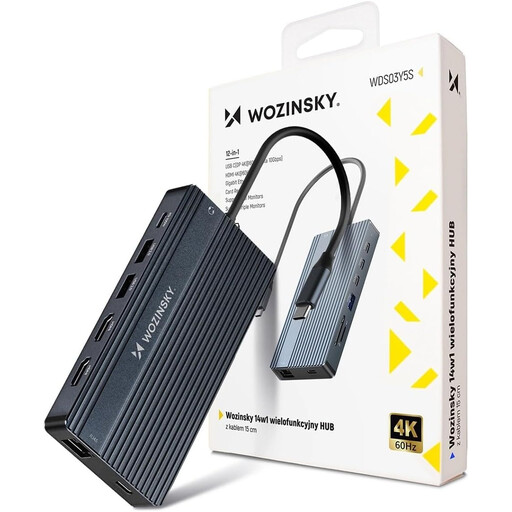
WOZINSKY USB-C Hub Adapter 14 in 1
Why This Fits Their Persona: Ideal for users who want to transform their laptop (MacBook or PC) into a full-fledged workstation at a fixed desk. With ports for up to three monitors, Gigabit Ethernet, and 100W Power Delivery, this hub covers all the requirements of a modern workspace.
The aluminium housing ensures effective heat dissipation, preventing performance throttling under full load. Its wide variety of ports minimises the risk of incompatibility with existing peripherals.
Comprehensive connectivity with 14 ports, support for multi-monitor setups (incl. 4K@60Hz), and powerful 100W Power Delivery for charging the laptop.
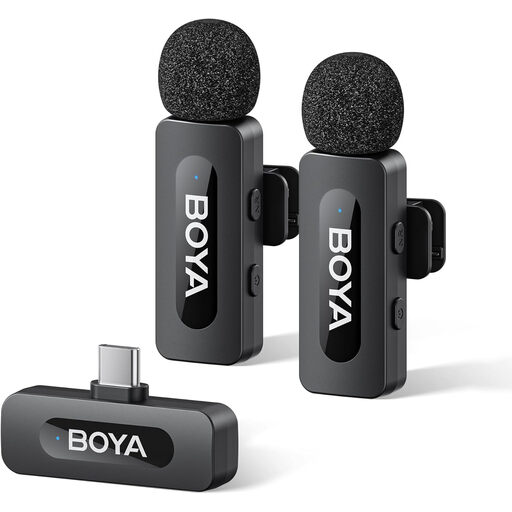
BOYA BY-V20 V2.0 USB-C Wireless Microphone
Why This Fits Their Persona: Perfect for vloggers and journalists who need to capture high-quality audio on the go with a smartphone (e.g., iPhone 16, Android). The set, consisting of two transmitters and one receiver, is compact, easy to use, and ideal for interviews or videos with multiple speakers.
This USB-C wireless microphone is a specialised solution that bypasses the problem of unreliable audio adapters. The direct digital connection and active noise cancellation ensure clear audio quality that is unattainable with the phone's internal microphone.
Plug-and-play functionality with no app required, effective one-touch noise cancellation, and a battery life of up to 9 hours. The set with two transmitters (TX) offers great flexibility.
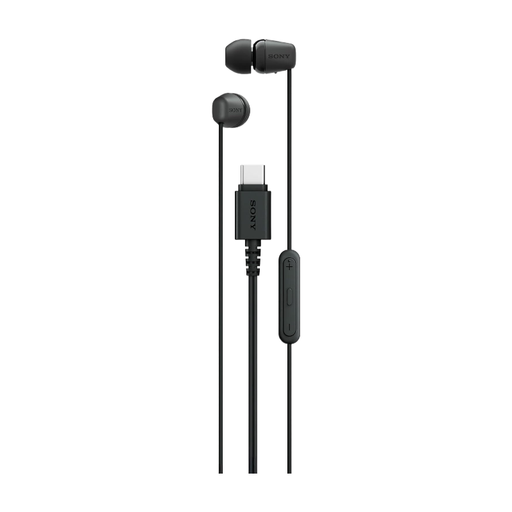
Sony IER-EX15C USB-C Wired Earbuds (Black)
Why This Fits Their Persona: For commuters and music lovers looking for a reliable, hassle-free audio solution. These headphones require no charging and no Bluetooth pairing—just plug in and listen to music, take calls, or enjoy podcasts.
As a product from an established audio brand, these wired USB-C headphones avoid the trap of poor audio quality from an inferior DAC. The sound is tuned for a balanced listening experience.
Instantly ready to use with no battery. Integrated remote and microphone for full control. The tangle-free cable and various eartip sizes ensure everyday comfort.
Looking for More Options?
If you need a specific solution like a dedicated audio adapter or other cable types, we have a curated selection for you.
Frequently Asked Questions (FAQ)
Does every USB-C accessory work with every USB-C port?
No. Compatibility depends on the supported protocols. For example, a USB-C port on a laptop must support DisplayPort Alternate Mode to output a video signal. Similarly, for fast charging, both the charger and the device must support the Power Delivery (PD) standard at the required wattage. Always check the technical specifications of both devices.
Why does my USB-C hub get hot?
A certain amount of heat is normal for multiport hubs, as signal conversion and power distribution consume energy. However, excessive heat is often a sign of a poor design or inadequate heat dissipation, especially with plastic casings. Models with an aluminium housing can better transfer heat to the surroundings, leading to more stable performance and greater safety.
Do I need special USB-C headphones for my iPhone 16?
Since the iPhone 15, Apple has used the USB-C port. Therefore, any USB-C headset or USB-C headphones that adhere to the universal standard for USB-C audio will be compatible with the iPhone 16. You do not need a special adapter from Apple, as long as the headphones have a built-in DAC, which is the case for most models. For optimal integration into the Apple ecosystem, models with MFi (Made for iPhone) certification may offer additional features but are not mandatory.