
USB and Bluetooth Adapters: A Buyer's Guide to Avoid Costly Mistakes
Connecting modern smartphones to older hardware like car stereos or wired headphones presents a challenge for many users. A suitable USB and Bluetooth adapter promises a simple solution, but the market is confusing. Misleading claims and technical flaws often lead to frustration and unnecessary expenses. This guide will help you navigate the common pitfalls and make an informed decision.
As your Joybuy Product Recommendation Officer, I'll filter the relevant information for you and highlight which technical features truly matter.
The Most Common Pitfalls When Buying Connectivity Adapters
Many budget-friendly adapters quickly turn out to be a poor investment. Pay close attention to these three common problems to avoid disappointment:
- Outdated Bluetooth Standards and Incompatibility: A frequent annoyance is adapters that operate on outdated Bluetooth versions (e.g., 4.x). The consequences are noticeable audio lag (latency), an unstable connection with frequent dropouts, and poor sound quality. Software compatibility is just as critical: an adapter not optimised for the latest iOS or Android versions can become useless after a system update.
- Limited Functionality: This shortcoming is especially apparent in adapters for smartphones. A USB-C to 3.5mm jack adapter that doesn't allow for simultaneous charging and music listening is impractical for daily use. For car adapters, the charging ports often have insufficient power output (e.g., only 5W), which can only charge modern smartphones very slowly, if at all.
- Unstable Signal Transmission and Poor Range: A Bluetooth adapter for PC whose signal drops after just a few metres makes wireless headphones or mice unusable. With a wireless CarPlay adapter, a weak signal leads to constant interruptions in navigation or music playback, which is not only annoying but can also be a safety hazard.
What Really Matters: Key Criteria for Your Selection
To avoid these issues, you should base your choice on objective technical parameters. The following three points are crucial for reliable performance.
Bluetooth Version: The Standard for a Stable Connection
Look for adapters that support at least the Bluetooth 5.0 standard. Newer versions like 5.2, 5.3, or 5.4 offer significant advantages:
- Lower Latency: Important for lip-synced video playback and immediate response during control inputs.
- Longer Range: Ensures a stable connection even when the transmitting device is not right next to the receiver.
- More Efficient Power Consumption: Conserves the battery of your smartphone or laptop.
- Improved Connection Stability: Reduces the risk of sudden dropouts.
Compatibility: The Key to Seamless Performance
Compatibility is the most important criterion. Carefully check the manufacturer's specifications before purchasing:
- For Wireless CarPlay/Android Auto Adapters: Your vehicle must have a factory-installed wired CarPlay or Android Auto system. Also, check the adapter manufacturer's compatibility list for vehicle models and model years. For wireless Android Auto, Android 11 or newer is often required.
- For Audio Converters: There are special considerations for USB-C to 3.5mm jack adapters. Some smartphone manufacturers (e.g., Samsung, Google) require specific chipsets in the adapter for full functionality.
- For PC Adapters: Ensure the adapter is compatible with your operating system (e.g., Windows 10/11, macOS). Modern adapters are often "plug-and-play," but older systems may require manual driver installation.
Ports and Extra Features: From Simple Converter to All-Rounder
The right adapter solves a specific problem. Therefore, define your use case:
- Audio Converter: Purely for converting signals, e.g., from USB-C to a 3.5mm jack.
- FM Transmitter: A solution for older car stereos without Bluetooth or an AUX input. It receives the Bluetooth signal from your smartphone and transmits it to the radio on an open FM frequency. Good models also offer charging ports and a hands-free calling function.
- OBD2 Diagnostic Tool: A special Bluetooth adapter for the car that connects to the vehicle via the OBD2 port. It sends vehicle data to an app on your smartphone, enabling error diagnostics.
Recommended Products by Use Case
Instead of a one-size-fits-all recommendation, we present solutions tailored to clearly defined user profiles and their requirements.

OTTOCAST Mini Dongle Wireless CarPlay Adapter
Why it's a good fit: Ideal for drivers whose vehicles already have a wired CarPlay or Android Auto system and who want the convenience of a wireless connection without cockpit cable clutter. After the initial setup, the smartphone connects automatically when the vehicle starts.
Avoids the incompatibility trap with clear requirements (factory-installed wired system, iOS 10+/Android 11+). The use of 5.8GHz Wi-Fi ensures stable, high-speed data transfer and prevents signal issues.
Offers a 2-in-1 solution for both Apple CarPlay and Android Auto in a single device. Over-the-air (FOTA) firmware updates ensure future compatibility.
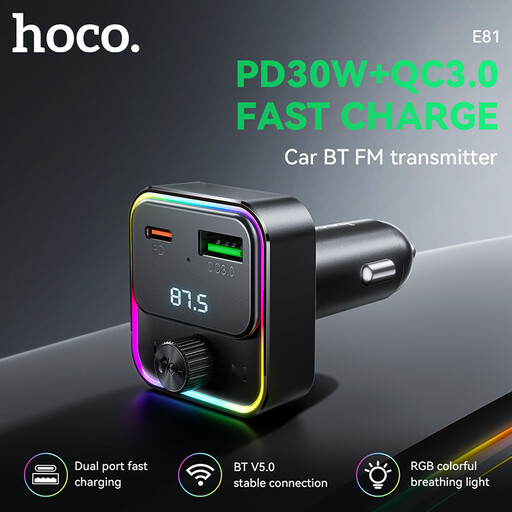
HOCO E81 Fantasy PD30W+QC3.0 car BT FM transmitter
Why it's a good fit: A practical all-in-one solution for vehicles without built-in Bluetooth or an AUX port. The adapter streams music from your smartphone to the car stereo via an open FM frequency and doubles as a powerful charger.
Solves the limited functionality problem by offering not just music streaming but also fast charging via PD30W and QC3.0. This allows modern smartphones to be charged efficiently while driving.
Combines three functions in one compact device: FM transmitter, hands-free calling, and a fast charger for both USB-C and USB-A.
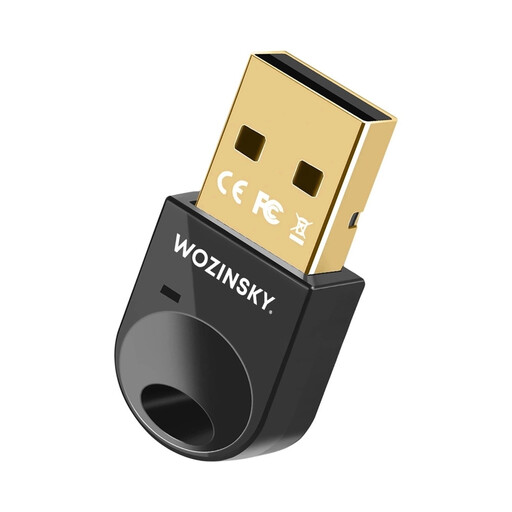
Wozinsky WUSB54YS Mini Bluetooth 5.4 Adapter
Why it's a good fit: Perfect for users looking to upgrade a desktop PC or an older laptop with modern wireless technology. It enables a stable connection for headphones, keyboards, mice, and other peripherals.
Directly counters the problem of outdated standards by using the latest Bluetooth 5.4 technology. This ensures a future-proof, low-latency, and stable connection for up to seven devices simultaneously.
Simple plug-and-play installation for Windows 10/11. Its compact design with an integrated antenna is unobtrusive and practical for mobile use with a laptop.
Looking for more options?
We have compiled a complete, up-to-date list of products that fully meet these strict selection criteria and comply with rigorous safety standards.
Frequently Asked Questions (FAQ)
How do I set up a wireless CarPlay adapter?
Setup is usually straightforward. Plug the adapter into your vehicle's USB port designated for wired CarPlay/Android Auto. Enable Bluetooth on your smartphone and pair it with the adapter. Follow the on-screen instructions on your car's display. Future connections will then be automatic.
Does a Bluetooth adapter degrade sound quality?
Modern Bluetooth standards (5.0 and higher), combined with advanced audio codecs like aptX, minimise any loss in quality during transmission. For most listeners, the difference compared to a wired connection in a car or with standard headphones is barely noticeable. The quality of the car stereo or headphones themselves often has a greater impact on the sound experience.
Will any USB Bluetooth adapter work with my computer?
Not necessarily. Compatibility depends on the operating system. Most modern adapters are designed as plug-and-play devices for Windows 10 and 11, requiring no manual driver installation. However, for older systems like Windows 7 or 8.1, you may need to download and install the appropriate driver from the manufacturer's website. Therefore, always check the system requirements in the product description.