
USB-A to USB-C Cable Buyer's Guide
Finding the right USB-A to USB-C cable can be a challenge given the countless options on the market. Many users are familiar with the problem: a newly purchased cable charges your smartphone slowly, fails to support fast charging, or starts showing signs of wear and tear after just a few weeks.
This article serves as a practical guide. It's designed to help you understand the technical specifications and find a cable that is perfectly tailored to your needs for charging performance, durability, and functionality.
By: Joybuy Product Recommendation Officer
What to Look For When Buying
To make an informed decision, a few technical aspects are crucial. The following points will guide you on what matters most when making your selection.
Charging Performance and Fast Charging
Charging power, measured in watts (W), is a key criterion. Modern smartphones and tablets, such as those from Samsung, support fast-charging technologies that require high wattage. A 60W charging cable can significantly reduce charging time compared to a standard cable, provided your power adapter and device are also compatible. Pay attention to the cable's maximum power delivery to ensure it can fully leverage your charger's capabilities.
Material Quality and Durability
A durable charging cable is distinguished by high-quality materials and a well-engineered design. Cables with a braided nylon jacket are often more resistant to abrasion, kinks, and fraying than conventional PVC cables. Reinforced connectors and solid strain relief at the points where the cable meets the plug also contribute to a longer lifespan. Specifications on bend lifespan (e.g., "tested for over 10,000 bends") can be an indicator of durability.
Specific Features for Your Use Case
Depending on your usage scenario, special features can significantly enhance convenience. An angled charging cable (90-degree connector) is ideal for mobile gaming or watching videos, as the cable doesn't get in the way when you hold the device horizontally. For tech enthusiasts who want to monitor the charging process closely, a charging cable with a display offers an integrated LED screen that shows the current charging power in watts in real time.
Our Selection of USB-A to USB-C Cables
Based on the criteria mentioned above, we have compiled a selection of cables that cover a range of different needs.
Spigen EB6010AC USB-A / USB-C 60W Cable 100 cm - White
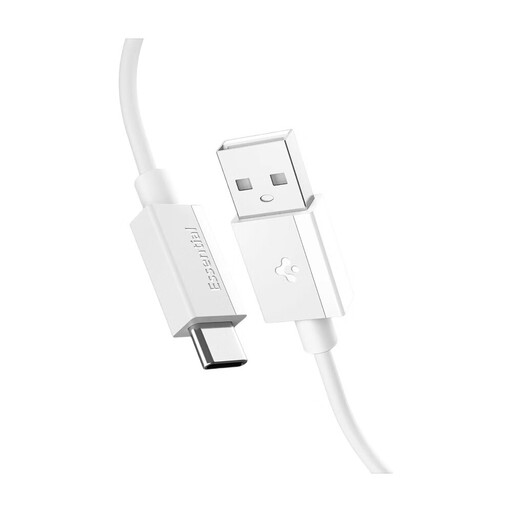
What makes it stand out: The Spigen ArcWire Essential cable combines reliable charging performance with the brand's proven quality. It is designed for a wide range of devices and focuses on safety and durability. The IntelligentSafety technology developed by Spigen helps protect connected devices.
Pros:
- 60W fast charging power for swift charging
- 480 Mbps data transfer for efficient file transfers
- High durability, rated for over 10,000 bends according to the manufacturer
- Flexible design with EZ Plug for easy connection
- Standard 1m cable length for use at a desk or bedside table
Who is it for?: Users looking for a reliable and durable all-round cable from an established brand for daily use, who also value certified safety features.
JOYROOM S-A16 Pro Prism Series 66W USB-A to USB-C Cable with Display 1.2m - Black
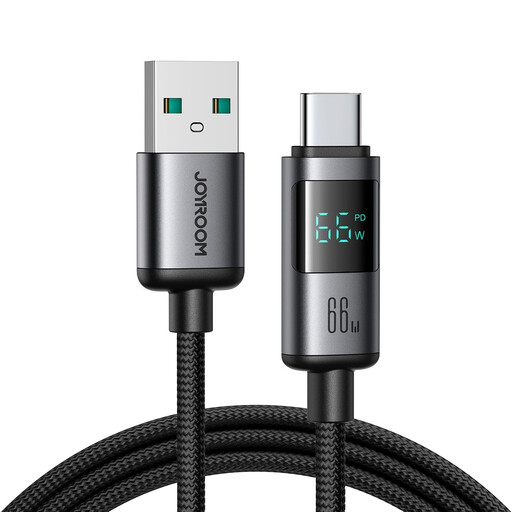
What makes it stand out: This cable from JOYROOM is aimed at users who want full control and transparency over their charging process. The integrated LED display, which shows the charging power in real time, is the key feature of this model.
Pros:
- High maximum charging power of 66W
- Integrated charging cable with a display to monitor performance
- Durable construction with an aluminium alloy and nylon braid
- Practical 1.2m cable length
- Simultaneous charging and data transfer at up to 480 Mbps
Who is it for?: Tech-savvy users who want to optimise and monitor their device's charging performance and are looking for a powerful cable with an informative extra feature.
JOYROOM S-A56 EnjoyX Series 90° USB-A to USB-C 3A Cable 1.2m - Black

What makes it stand out: The JOYROOM S-A56 is specially designed for comfortable use of your device while charging. The 90-degree angled USB-C connector prevents the cable from getting in the way, making it an ideal USB-C gaming cable.
Pros:
- Angled charging cable (90°) for comfortable handling while gaming or streaming
- Supports charging currents of up to 3A for fast charging
- Abrasion-resistant nylon jacket and reinforced aluminium connectors
- Supports data transfer speeds of up to 480 Mbps
- A length of 1.2m offers plenty of flexibility
Who is it for?: Users who frequently use their smartphone or tablet while it's charging, especially for gaming, video calls, or watching movies, and who value comfort and a robust design.
Didn't Find the Right Cable?
The selection of charging cables is vast, and everyone's needs are different. If the models presented here don't exactly match your requirements, you may find a suitable alternative in our wider range.
Discover more models in our Type-C to USB category.
Frequently Asked Questions (FAQ)
How can I identify a good USB-A to USB-C cable?
You can identify a good cable by a combination of three factors: its charging power (in watts), which should match your device and power adapter; its material quality (e.g., braided nylon, reinforced connectors) for high durability; and its data transfer rate, if you also plan to use it for syncing.
Does every USB-C charging cable support fast charging?
No, not every cable supports fast charging for USB-C. The ability to fast charge depends on the maximum current and power output the cable is designed for. Additionally, both the charger (power adapter) and the end device (e.g., smartphone) must support the same fast-charging standard.
What is the difference between a USB-C charging cable and a USB-C data cable?
Most modern USB-C cables function as both a charging and a USB-C data cable. The difference lies in their capabilities. Pure charging cables might only have the wires necessary for charging and support no or very slow data transfers. High-quality cables support both, with the data transfer speed (e.g., 480 Mbps for USB 2.0) being an important quality indicator.