
Universal Stylus Pen: The Complete Buyer's Guide
By: Joybuy Product Recommendation OfficerDate: August 30, 2026
A universal stylus pen promises to bridge the gap between creativity and digital efficiency across all your devices. However, the market is flooded with models whose promises often fall short in practice. Many users invest in a pen only to find that it lags on their tablet, the battery drains unreasonably fast, or the advertised "universal" compatibility has significant gaps.
This guide is designed to bring clarity. We'll highlight the most common pitfalls and show you which technical features truly matter, ensuring you choose a tool that actually boosts your productivity instead of hindering it.
The 3 Most Common Pitfalls When Buying a Tablet Stylus
Before you make a decision, you should be aware of the typical problems that often only become apparent after the purchase.
- Misleading "Universal" Compatibility: Many styluses are marketed as universal but only work reliably on basic capacitive screens. Advanced features like palm rejection or pressure sensitivity often require specific protocols (e.g., USI or MPP) that not every tablet supports. The result is a stylus that's adequate for simple navigation but unsuitable for precise writing or drawing.
- Hidden Input Lag (Latency): A budget-friendly price can come at the expense of performance. High latency—the noticeable delay between the pen's movement and the digital line—makes precise work impossible. This leads to frustration and inaccurate results, especially during fast note-taking or detailed drawing.
- Impractical Power Supply and Short Battery Life: An active stylus needs power. Models with proprietary charging cables, short battery lives, or no battery level indicator will interrupt your workflow. A pen that constantly needs charging or whose cable is easily lost quickly becomes a burden.
What Really Matters: The Decisive Features
To avoid the problems mentioned above, focus on the following three core aspects. These determine whether a stylus for your touchscreen is a worthwhile investment.
1. Active vs. Passive Stylus: The Technological Difference
The first fundamental choice is between an active and a passive stylus.
- Passive Styluses: These require no battery and essentially just simulate the touch of a finger. They are suitable for simple navigation and tapping but offer no advanced features.
- Active Styluses: An active stylus contains electronics and communicates directly with the device. This enables features like pressure sensitivity (thicker lines with firmer pressure), tilt recognition, and palm rejection, allowing you to rest your hand on the screen while writing. For notes, drawings, or as an Apple Pencil alternative, an active model is the far better choice.
2. Compatibility Protocols: More Than Just "For iOS & Android"
The claim "compatible with iPad and Android" is often only half the truth. While most active styluses work on standard capacitive displays, many devices require specific protocols for advanced functions.
- Universal Stylus Initiative (USI): An open standard used primarily by many Chromebooks and some Android tablets. A USI stylus offers high precision and pressure level detection on a USI-compatible device.
- Microsoft Pen Protocol (MPP): Used by Microsoft Surface devices and other Windows tablets.
- Apple-Specific Protocols: The Apple Pencil only works with compatible iPads.
Before buying, check if your device requires a specific protocol or if a general stylus for iPad and Android is sufficient for your needs.
3. Battery and Charging Port: Everyday Practicality
An active stylus is only as good as its power source. Look for models with a USB-C port. This standard is widespread, so you likely already own the right cable. A battery life of 8–10 hours of active use is a good benchmark. Features like an automatic shut-off after a few minutes of inactivity also help conserve energy.
Our Favorite Option Per Person
Here are some recommendations tailored to different needs and budgets that take the above criteria into account.
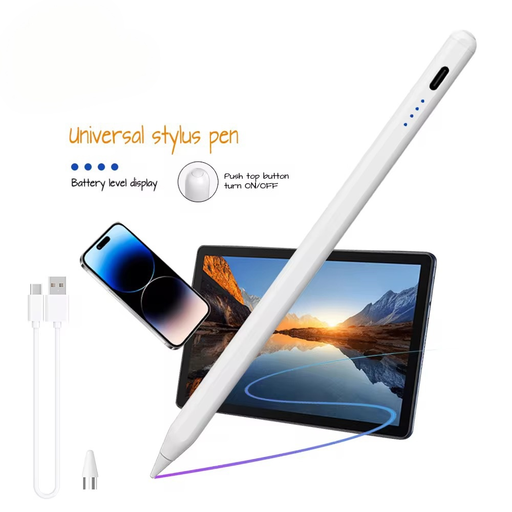
VoxorAI HL-U05 White Pen, Stylus, Active Stylus, Tablet Pen for iOS, iPad, Android, and Microsoft Universal.
Why This Fits Their Persona: Ideal for students and professionals seeking a reliable and cost-effective Apple Pencil alternative for notes, PDF annotations, and general device control. It covers the basic needs without the high price of a brand-name product.
This stylus avoids the false compatibility trap by being clearly designed for standard capacitive touchscreens on iOS and Android devices, without requiring specific, often confusing, protocols.
Broad compatibility with popular tablets and smartphones. Quick start-up without a pairing process. The description highlights a lag-free input experience.
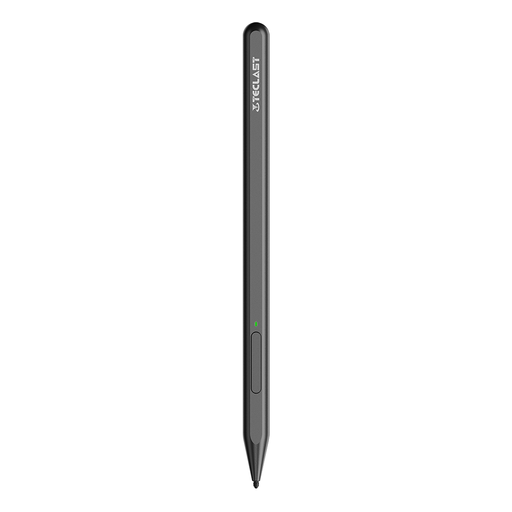
Teclast T-Pen USI2.0 Protocol 4096-Level Pressure Sensitivity Active Srylus Pen
Why This Fits Their Persona: Perfect for digital artists and advanced users whose device (e.g., certain Chromebooks or the Teclast Artpad Pro) supports the USI 2.0 standard. The high pressure sensitivity allows for nuanced drawing and shading.
This pen is not a misleading "universal stylus" but a specialized tool. It bypasses the compatibility trap by clearly targeting the USI 2.0 protocol, thus offering guaranteed functionality for users with matching devices.
Supports 4096 levels of pressure sensitivity for precise creative work. Utilizes the open USI 2.0 standard. Type-C charging port for modern and convenient charging.
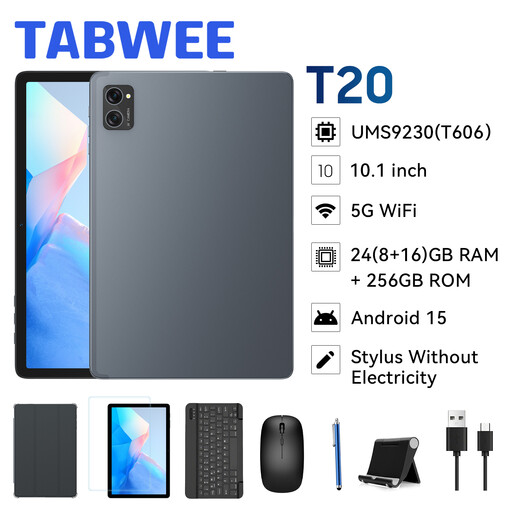
TABWEE T20 Tablet 10.1 inch Incell Display, 2-in-1 Tablet with Keyboard/Mouse/Stylus
Why This Fits Their Persona: For users who need a new device and don't want to deal with compatibility issues. This bundle offers a tablet, keyboard, mouse, and stylus—all matched and ready to use out of the box.
This package completely eliminates the compatibility risk. Since the stylus is specifically designed for the included tablet, smooth operation and the use of all features are guaranteed from the start.
Cost-effective all-in-one package. No compatibility research required. The set is ideal for getting started with digital productivity or as a gift.
Looking for More Options?
We've compiled a complete, up-to-date list of products that fully meet these strict selection criteria and UK safety regulations.
Frequently Asked Questions (FAQ)
1. Do I need to pair a universal stylus pen with my device?
That depends on the stylus. Simple active styluses often just need to be turned on and will then work on any capacitive screen without pairing. Models with advanced features like programmable buttons or specific pressure sensitivity may require a Bluetooth connection or an app installation. Read the product description carefully.
2. How long does the tip of an active stylus last, and can it be replaced?
The lifespan of the tip depends on the frequency of use and writing pressure. With daily use, a tip can last from several months to over a year. On most high-quality styluses, the tips are replaceable. Often, replacement tips are included in the package or can be purchased separately.
3. Does a "stylus for iPad" also work with Android tablets?
A stylus explicitly advertised as a "stylus for iPad" with no other compatibilities mentioned is often designed for general use on capacitive screens and will therefore also work on Android devices for basic tasks. However, advanced features offered by the Apple Pencil are exclusive to iPads. A true universal tablet stylus will explicitly state compatibility with both operating systems (iOS and Android) in its product description.