
Swivel & Tilt TV Wall Mount Buyer’s Guide: What to Know
A swivel and tilt TV wall mount promises the perfect viewing experience: no glare from the sun, always the right viewing angle from the sofa or dining table, and a clean, modern living space. But the market is flooded with products whose marketing claims often don't hold up in practice. Before you make a decision, it's crucial to know the most common pitfalls that can lead to frustration and, in the worst case, an unsafe installation.
This guide will show you what to look for to find a functional and durable TV wall mount that perfectly matches your requirements.
The 3 Most Common Traps When Buying a TV Mount
Many buyers focus on price or vague marketing terms. This often leads to three typical problems that are easy to avoid.
- The "Full-Motion" Trap: A product is advertised as "full-motion," but the actual swivel range is only a few degrees. The result: The TV can barely be adjusted to avoid reflections from windows or lamps. The advertised flexibility exists only on paper.
- The Compatibility Gap: The mount is purchased and the drill is ready—but the screw holes on the back of the TV don't match the mounting plate. This problem arises from ignoring the VESA standard, a critical but often overlooked detail.
- The Sagging Problem: Especially with budget-friendly models, the articulating arms may start to give way under the TV's weight after a few months. The screen slowly tilts forward, and the mount can no longer be held precisely in the desired position. The cause is often inferior materials or a weak construction.
What Really Matters: The Decisive Parameters
To avoid these traps, you should focus on three core technical features. These determine the safety, compatibility, and functionality of your future wall-mounted TV.
1. VESA Standard and Weight Capacity: The Foundation of Safety
Every TV has a standardized screw hole pattern on its back. The distance between these holes is called the VESA standard and is specified in millimetres (e.g., 200 x 200 mm or VESA 400x400).
- Check Before You Buy: Compare your TV's VESA specification (found in the manual or on the manufacturer's website) with the supported VESA standards of the wall mount. A match is absolutely essential.
- Maximum Weight Capacity: The mount must be rated for your TV's weight. Choose a mount whose maximum weight capacity is significantly higher than your device's weight. This creates a safety margin and prevents sagging.
2. Range of Motion: What Do "Swivel," "Tilt," and "Extend" Mean?
These terms define your mount's flexibility. Pay attention to specific degree and centimetre measurements instead of generic descriptions.
- Swivel: Refers to horizontal movement to the left and right. A wide swivel range (e.g., ±90°) is ideal for rooms with multiple seating areas.
- Tilt: Describes the vertical movement up and down. A tilt of -10° to -15° is useful for reducing glare from ceiling lights or when the TV is mounted higher than eye level.
- Extend: An extendable TV wall mount features an articulating arm that increases the distance from the wall. This is practical for pulling the TV around a corner for a better view or for easily accessing the ports on the back.
3. Material and Wall Type
A robust steel construction is the basis for a durable and secure mount. Equally important is the wall where it will be installed. Solid concrete or brick walls are ideal. For drywall (plasterboard), the mount must be screwed directly into the wood or metal studs behind it. Most manufacturers explicitly state which wall types their products are suitable for.
Top Picks for Different Needs
Not every mount suits every user. Here are three recommendations tailored to different needs and devices.
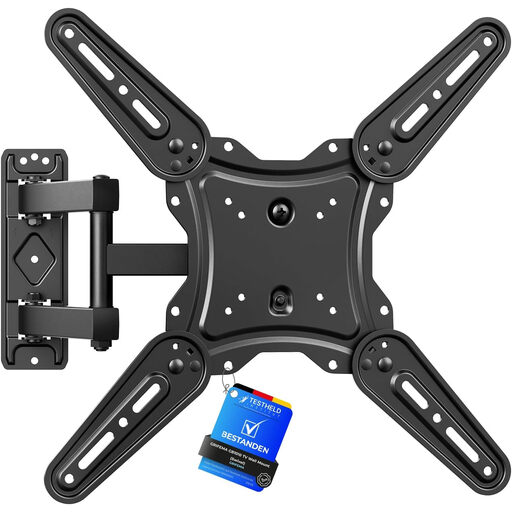
Grifema TV Wall Mount for 26-65 Inch Flat and Curved Screens
Why This Fits Their Persona: Ideal for users with mid-sized TVs (up to 65 inches) who need a true full-motion TV mount for various seating positions in the living room or to avoid glare in the bedroom. It is also suitable as a mount for a curved TV.
The product description provides exact figures: ±90° swivel, +6°/-12° tilt, and an extension up to 425 mm. This avoids the trap of vague "full-motion" promises. The alloy steel construction counteracts the sagging problem.
Broad VESA compatibility (75x75 to 400x400 mm) and a large, clearly defined range of motion. Suitable for flat and curved screens.
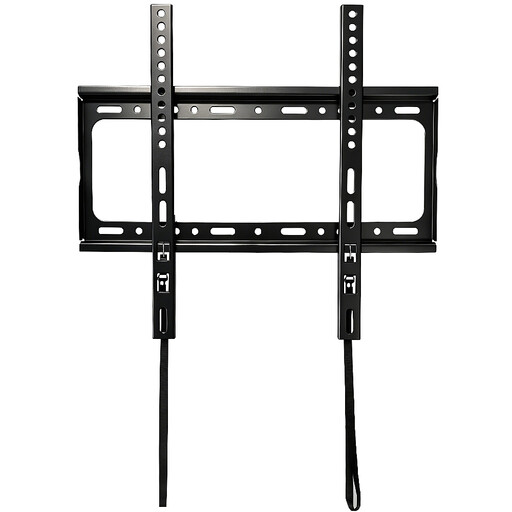
Fixed TV Wall Mount for 32-65 Inch TVs
Why This Fits Their Persona: Perfect for users who have a fixed, unchangeable viewing position and value a minimalist aesthetic. The focus here is not on flexibility, but on an extremely low profile against the wall.
This model sidesteps the trap of false promises by being honestly declared as "fixed." It specifically targets users who consciously forego swivel and tilt functions to achieve maximum stability and a clean look.
Very space-saving design for flush wall mounting. A high weight capacity of up to 45 kg ensures a secure installation, even for a wall mount for a 65-inch TV.
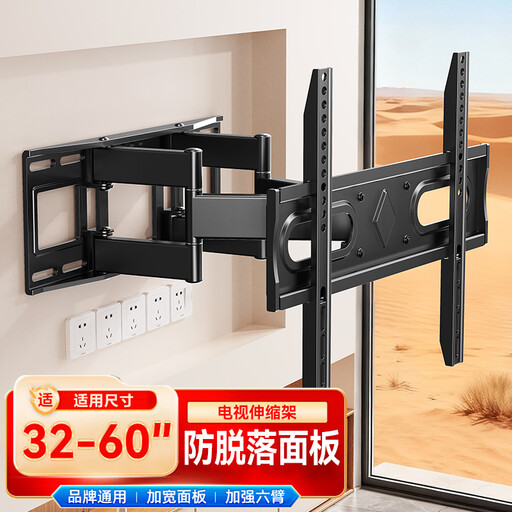
CNTSLNB TV Extension and Telescopic Wall Mount, 32-65 inch
Why This Fits Their Persona: Suitable for owners of larger TVs who are looking for a stable, extendable solution. The telescopic arm makes accessing the rear ports significantly easier—an often-underestimated advantage when managing cables.
The "Extension and Telescopic" designation clearly describes its main function—extending. The safety notice recommending a two-person installation for heavy TVs indicates a robust construction that prevents the sagging problem with large devices.
The extendable design offers a good balance of stability and port accessibility, which is particularly beneficial for installations close to the wall.
Looking for More Options?
We have compiled a complete, real-time list of products that fully satisfy these strict selection criteria and UK safety regulations.
Frequently Asked Questions (FAQ)
Does every TV wall mount fit every TV?
No. Compatibility depends on two factors: the VESA standard (the hole pattern on the back of the TV) and the weight of the TV. Both values must match the wall mount's specifications. Always check this data before purchasing.
What type of wall is suitable for installing a TV wall mount?
The most secure installation is on solid walls made of concrete or solid brick. For drywall (e.g., plasterboard), it is essential to anchor the mount in the load-bearing substructure (wood or metal studs). Using special cavity wall anchors alone is generally not sufficient for the heavy weight of a TV and is not recommended by most manufacturers.
How do I find the right tilt angle to avoid glare?
This depends on the light source. If light from a ceiling lamp is shining on the screen, it helps to tilt the TV slightly downwards. If the distracting light comes from a side window, you can slightly turn the screen away from the light source by using the swivel function. A swivel and tilt mount offers the necessary flexibility to react to changing light conditions.