
Insta360 Flow 2 Buyer’s Guide: Avoid Bad Smartphone Gimbal Buys
Creating smooth, professional-looking videos with a smartphone is a key goal for many content creators, vloggers, and travel enthusiasts. A smartphone gimbal promises just that, but the market is flooded with devices whose marketing claims often fall short in practice. Before you make a purchasing decision, it's crucial to understand the typical pitfalls that can lead to frustration and unusable footage.
This guide focuses on the objective criteria that define a good gimbal, helping you make the right choice for your needs. We'll highlight three common problems that arise when selecting a gimbal:
- Unreliable AI Tracking: Many models advertise intelligent tracking that fails during fast movements, in low-light conditions, or when the subject is briefly obscured. The result is jerky or lost shots.
- Complicated Setup: A foldable gimbal should be ready to use quickly. However, some devices require cumbersome manual calibration every time you use them, which negates the advantage of portability.
- Poor Software Integration: The best hardware is useless if the companion app is buggy, lacks essential features, or isn't compatible with the latest gimbal for iPhone and Android operating systems.
What Really Matters in a Smartphone Gimbal
To avoid these problems, you should focus on three core technical parameters that significantly determine a gimbal's performance and user-friendliness.
1. The Precision of the 3-Axis Stabilizer
A 3-axis smartphone stabilizer is the foundation for shake-free videos. It compensates for unwanted movements on three axes: pan, tilt, and roll. What's crucial here is not just the presence of the three motors, but the quality of their algorithms and their reaction speed. A high-performance system can compensate for even fast walking or running movements, keeping the video image smooth and stable. Pay attention to specifications on motor torque and the gimbal's ability to handle larger and heavier smartphones without losing performance.
2. The Reliability of AI Tracking
An advanced AI tracking gimbal goes beyond simple face tracking. Relevant performance features include:
- Subject Re-identification: The ability to continue tracking a subject even after it temporarily disappears from the frame (e.g., behind a tree or a person).
- Multi-Person Tracking: The option to keep a whole group of people in the frame and automatically adjust the shot composition.
- Zoom Tracking: The ability to keep the subject precisely in focus even while actively zooming, which is particularly useful for sports footage or stage events.
These features separate basic gimbals from professional tools for vlogging.
3. Portability and Integrated Features
A modern smartphone gimbal should be more than just a stabilizer. A foldable gimbal is standard today, but the added value lies in the details. An integrated tripod and an extendable selfie stick eliminate the need for extra accessories and reduce what you have to carry. Some models, like the Insta360 Flow 2, even offer a built-in power bank function to charge the smartphone during recording. These all-in-one solutions are a major advantage for travelers and mobile content creators.
Picks for Every User Profile
Based on the criteria above, we have compiled a selection of products suitable for different user groups and their specific requirements.
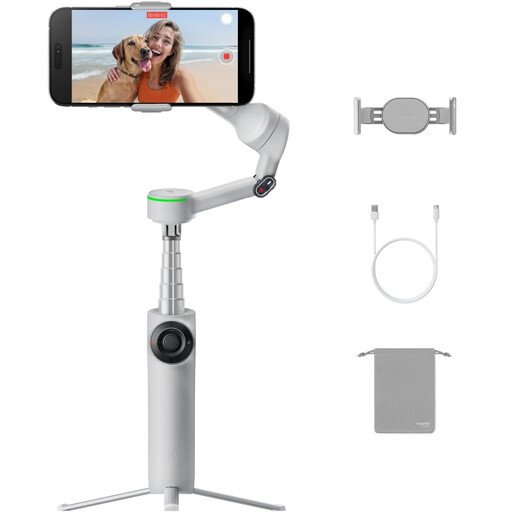
Insta360 Flow 2 Pro Bundle Gray - Foldable AI Smartphone Gimbal
Why This Fits Their Persona: This bundle is aimed at users who don't want to compromise. It includes additional accessories like a spotlight and offers advanced tracking functions required for professional vlogs, interviews, or demanding social media content.
The advanced AI tracking, featuring Active Zoom Tracking and Multi-Person Recognition according to the manufacturer, directly addresses the weakness of many basic gimbals in subject tracking.
All-in-one tool with a tripod, selfie stick, and power bank. Advanced tracking features for complex shooting scenarios.
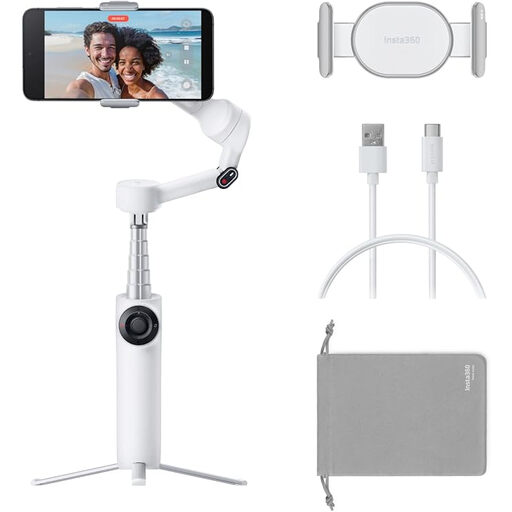
Insta360 Flow 2 White, Gimbal for Smartphones
Why This Fits Their Persona: Ideal for users looking for a straightforward yet powerful device for on-the-go use. Its compact, foldable design and long battery life make it the perfect travel companion for capturing experiences in high quality without carrying heavy gear.
The quick, uncomplicated unfolding and magnetic phone mount bypass the complicated setup trap. It's ready to use in seconds.
Compact all-in-one design. The battery life of up to 10 hours (according to the manufacturer) is designed for a full day of shooting.
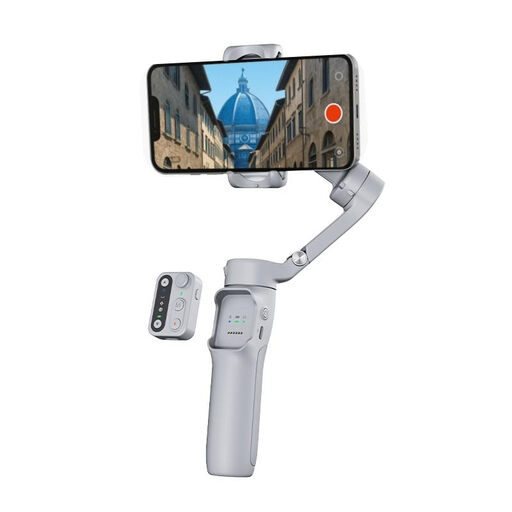
hohem Smartphone Gimbal Stabilizer – 3-Axis Anti-Shake
Why This Fits Their Persona: For users who want solid core stabilization for their smartphone videos without paying for advanced AI features they may not need. It's a great option for significantly improving video quality for social media or personal recordings.
This model focuses on its core competency: reliable 3-axis stabilization (iSteady 8.0 system). It avoids exaggerated marketing claims in the AI department and delivers solid baseline performance.
Solid price-to-performance ratio. The detachable remote control allows for flexible shooting from up to 10 meters away.
Looking for More Options?
We have compiled a complete, up-to-date list of products that fully meet these strict selection criteria and UK safety regulations.
Frequently Asked Questions (FAQ)
Is the Insta360 Flow 2 compatible with all iPhone and Android models?
The Insta360 Flow 2 is designed to be compatible with most common iPhone and Android smartphones. However, compatibility depends on the phone's dimensions (width, thickness) and weight. It is recommended to check the compatibility list provided by the manufacturer, Insta360, on their official website before purchasing to ensure your specific model is supported.
How long does the battery last on a smartphone gimbal with continuous use?
Battery life varies depending on the model and intensity of use. The Insta360 Flow 2 offers a battery life of up to 10 hours, according to the manufacturer. This duration can be reduced if the motors are under greater strain from a heavy smartphone, an unbalanced mount, or intensive movements. Using the power bank feature to charge the smartphone will also reduce the gimbal's operating time.
Do I need prior technical knowledge to set up an AI tracking gimbal?
Modern gimbals like the Insta360 Flow 2 are designed for ease of use. The initial setup is typically guided by an app. Thanks to magnetic mounts and a design that doesn't require manual balancing, the device is ready to use in seconds. The basic stabilization and tracking functions can be used without in-depth technical knowledge. For more advanced creative modes, the app often provides guided tutorials and templates.