
Wi-Fi Smart Plugs 2026: A Technical Selection Guide
A Wi-Fi smart plug, also known as a smart socket, is an adapter that fits between a standard electrical outlet and an appliance. Its primary function is to remotely control the power supply to the connected device via a Wi-Fi network. This enables the automation and smart management of appliances that were not originally designed for such control. Selecting the right model depends on specific technical requirements, including maximum electrical load, compatibility with smart home ecosystems, and the desired control method.
Buyer's Guide: Technical Selection Criteria for Smart Plugs
The decision for a specific Wi-Fi smart plug should be based on an analysis of objective parameters. The following criteria are crucial for most use cases.
1. Maximum Load: 10 A vs. 16 A
The maximum current, specified in amperes (A), defines the plug's load capacity. This value is critical for operational safety.
- 10 A (Amperes): These models are designed for a maximum power output of approximately 2300 watts (W) at a 230-volt (V) mains voltage. They are suitable for low to medium-power devices such as lamps, fans, televisions, or coffee machines.
- 16 A (Amperes): These more robust models can handle a load of up to 3680 W. They are required for high-power consumers like washing machines, tumble dryers, dishwashers, or portable air conditioners. Operating such an appliance on a 10 A plug can lead to overheating and, in the worst-case scenario, a fire. Look for relevant safety certifications such as CE and TÜV.
2. Smart Home System Compatibility
Seamless integration into an existing system is a core aspect of user-friendliness.
- Amazon Alexa & Google Home: Most commercially available smart plugs offer compatibility with these voice-controlled assistants. Setup is typically done through the manufacturer's app, followed by linking (as a Skill/Action) within the respective ecosystem. This allows for voice control (e.g., "Alexa, turn on the coffee machine").
- Home Assistant & Open Systems: For tech-savvy users who prefer centralised and local control, compatibility with platforms like Home Assistant, ioBroker, or OpenHAB is crucial. Such integrations are often achieved through protocols like MQTT or direct APIs.
3. Control: Cloud-Based vs. Local (Tasmota)
The control architecture has a direct impact on data privacy and reliability.
- Cloud-Based Control: The command from your smartphone is sent to a manufacturer's server, which then relays it to the smart plug on your home Wi-Fi network. This allows for easy remote control from anywhere in the world but creates a dependency on the manufacturer's server and an active internet connection.
- Local Control: Here, the control device (e.g., a smartphone or Home Assistant server) and the smart plug communicate directly on the local network (LAN). A popular solution for this is the open-source firmware Tasmota. A Tasmota plug offers maximum privacy, as no data is sent to external servers, and high reliability, as control works even without an internet connection.
4. Energy Monitoring Function
A Wi-Fi smart plug with energy monitoring includes an additional chip to measure voltage (V), current (A), and power (W). This enables:
- Real-Time Monitoring: Track a device's current energy consumption live.
- Consumption Analysis: Analyse historical data to identify energy-intensive appliances.
- Automation: Create rules based on power consumption (e.g., send a notification when the washing machine cycle is finished and it enters standby mode).
Our Top Picks for 2026
Based on the technical criteria mentioned, we present three models that cover different user profiles.
For an Easy Start: Tapo P100 Smart Plug Mini
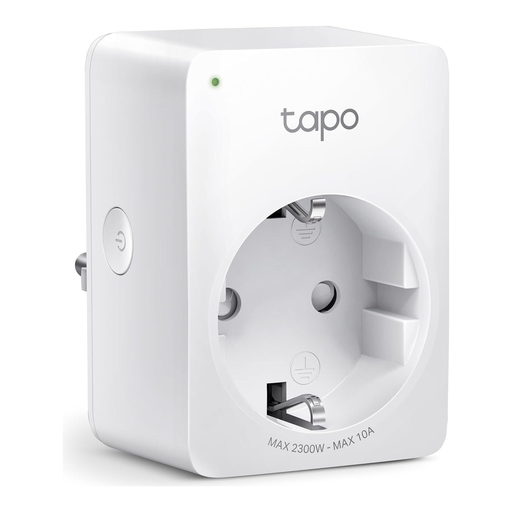
- Product Feature Analysis: The Tapo P100 from TP-Link is designed for maximum simplicity and reliability. It requires no separate hub and connects directly to your 2.4 GHz Wi-Fi network via the Tapo app. Its compact design ensures that adjacent sockets are not blocked.
- Pros:
- Simple, hub-free setup
- Control via app, timer functionality, and Away Mode
- Compatible with Amazon Alexa and Google Home
- Compact design
- Maximum load of 2300 W / 10 A
- Who It's For: Users looking for a straightforward solution to remotely control lamps, fans, and similar devices, who value a quick and easy setup process.
Best Value All-Rounder: EIGHTREE Wi-Fi Smart Plug with Energy Monitoring
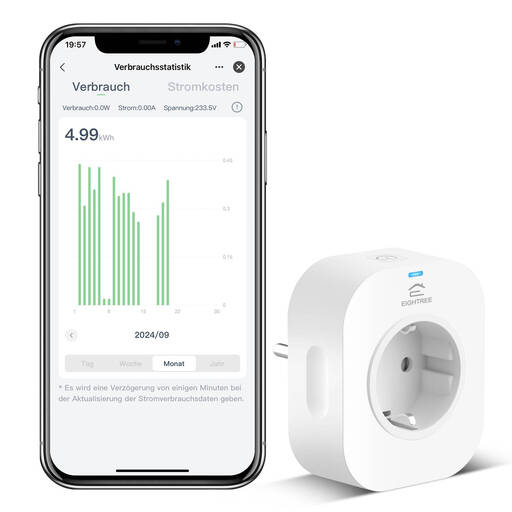
- Product Feature Analysis: This model combines a high load capacity of 16 A (3680 W) with a precise energy monitoring function. Setup is simplified with Bluetooth assistance, while control is managed through the widely-used Tuya/Smart Life platform.
- Pros:
- High maximum load of 3680 W / 16 A, suitable for major appliances
- Detailed energy consumption display (real-time, daily, monthly)
- Broad compatibility: Alexa, Google Assistant, and SmartThings
- Casing made of V0 flame-retardant material
- Who It's For: Users who want to actively monitor and reduce their energy consumption and need a smart plug for more powerful household appliances.
For Tech Enthusiasts and Privacy Advocates: EIGHTREE Tasmota Smart Plug
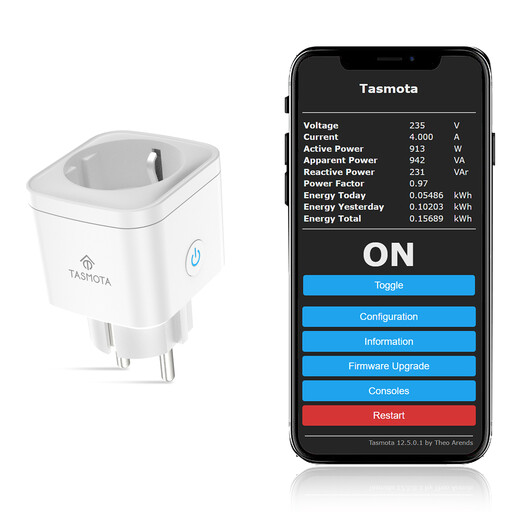
- Product Feature Analysis: This Tasmota plug comes with the open-source firmware pre-installed, saving you the manual flashing process. It is designed for 100% local control and operates without any cloud dependency. All data and commands remain on your home network. The ESP8685 chip ensures stable and responsive performance.
- Pros:
- Pre-flashed with Tasmota firmware for immediate local control
- No cloud dependency, ensuring maximum privacy and reliability
- Seamless integration with Home Assistant (via MQTT), Domoticz, ioBroker, etc.
- High-precision local energy monitoring
- Maximum load of 3680 W / 16 A
- Who It's For: Home Assistant users, privacy advocates, and smart home hobbyists who demand full control, customisation, and independence from manufacturer clouds.
Other Options and Accessories
The models presented here cover specific use cases. However, the market offers a variety of other solutions, including smart power strips, in-wall relays, or models for outdoor use. You can find a broader overview of available products in our Socket Accessories category.
Frequently Asked Questions (FAQ)
1. Does every Wi-Fi smart plug need a bridge or a hub? No, most modern Wi-Fi smart plugs do not require a separate hub. They connect directly to the 2.4 GHz frequency band of your Wi-Fi router. Systems like Zigbee or Z-Wave, on the other hand, do require a central control unit (bridge/hub).
2. Can I measure energy consumption with a smart plug? Only if the model is explicitly designated as a Wi-Fi smart plug with energy monitoring. Basic models only offer switching functions (on/off, schedules), while models with energy monitoring include additional hardware to measure power and consumption.
3. What does the 10 A or 16 A rating on a Wi-Fi smart plug mean? This rating refers to the maximum current (in amperes) that the plug can safely handle. A 10 A plug is designed for devices up to 2300 watts (e.g., lamps, TVs). A 16 A plug is mandatory for high-power devices up to 3680 watts (e.g., washing machines, dryers) to prevent overload.