
SD Card Reader Buyer's Guide
Transferring photos and videos from a memory card to a computer is a daily task for photographers, videographers, and many home users. But as file sizes continue to grow, especially with 4K or 8K footage, built-in card slots are disappearing from modern laptops and tablets. An external SD card reader has therefore become an indispensable tool.
This article serves as a practical guide. It explains the key technical features to consider when making your choice and presents a selection of models with different characteristics. Our goal is to provide you with a solid basis for making an informed decision when purchasing a suitable card reader.
What to Look for When Buying a Memory Card Reader
Choosing the right device depends on your individual needs. The following three criteria are crucial for most users.
1. The Right Connection Type: USB-A, USB-C, or Both?
The connector is the first thing you should check. Modern laptops, MacBooks, and tablets rely almost exclusively on the compact USB-C port. Older PCs and laptops, on the other hand, typically feature the classic USB-A ports.
- USB-C Card Readers: Ideal for current devices. They often allow for higher transfer rates, and the connector is reversible.
- USB-A SD Card Readers for PC: The right choice for desktop computers or older notebooks.
- Combination Models: Some readers offer both a USB-A and a USB-C connector, providing maximum flexibility for use across different devices.
2. Transfer Speed: The Difference Between UHS-I and UHS-II
The speed at which data is transferred is largely determined by the supported SD card standard. The most common standards are UHS-I and UHS-II.
- UHS-I (Ultra High Speed I): Offers theoretical speeds of up to 104 MB/s. This is generally sufficient for everyday use, such as transferring holiday photos or Full HD videos.
- UHS-II (Ultra High Speed II): With an additional row of pins on the card, this standard enables significantly higher speeds of up to 312 MB/s. A UHS-II card reader is particularly relevant for professional users who regularly need to transfer large amounts of data, such as high-resolution RAW images or 4K/8K video files.
Important: To achieve full UHS-II speeds, both the memory card and the external card reader must support this standard.
3. Compatibility: Card Formats and Operating Systems
Most modern card readers are versatile. Nevertheless, you should check for compatibility.
- Card Formats: Almost all readers have slots for standard SD cards and microSD cards (also known as TF cards). This covers most cameras, drones, action cams, and smartphones.
- Operating System: Most models are "Plug and Play," meaning they work without driver installation on common systems like Windows, macOS, Linux, and even iPadOS and Android. A quick look at the manufacturer's specifications will confirm this.
Top SD Card Readers
Here is a selection of three models that cover different use cases—from flexible everyday use to professional demands.
Baseus Lite Series USB-A & Type-C to SD/TF Card Reader
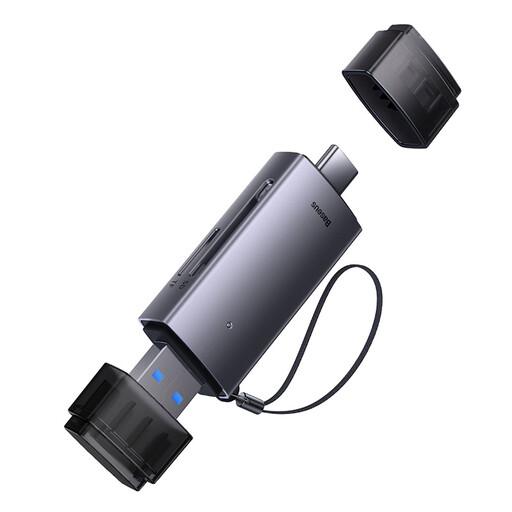
What makes this model stand out This reader's strength lies in its dual-connector design. It features both a USB-A and a USB-C plug, protected by a cap. This makes it an extremely flexible companion for users who switch between different devices.
Pros
- Dual connector for USB-A and USB-C
- Simultaneously supports SD and TF (microSD) cards
- Compact and lightweight design for on-the-go use
- Plug-and-play compatibility with Windows, Apple OS, Linux, etc.
Who is it for? Ideal for users who own both an older PC with USB-A and a modern notebook or tablet with USB-C and are looking for a single, hassle-free device for both worlds.
TP-Link UA440C USB Type-C to SD Card Reader
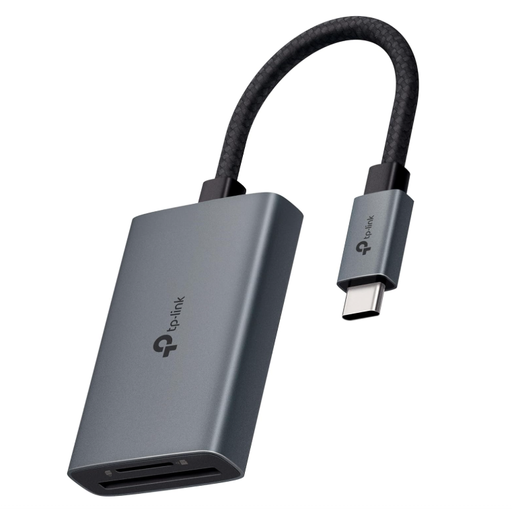
What makes this model stand out The TP-Link UA440C is designed for high performance. With its UHS-II compatibility, it achieves transfer speeds of up to 312 MB/s, according to the manufacturer. The robust aluminium housing and braided cable underscore its focus on durability and professional use.
Pros
- SD4.0 UHS-II support for extremely fast data transfers
- Simultaneous reading and writing of SD and microSD cards
- Supports memory cards up to 2 TB in capacity
- Broad plug-and-play compatibility (macOS, Windows, iPadOS, Android, Linux)
- High-quality aluminium alloy casing
Who is it for? The top choice for professional photographers, videographers, and content creators who regularly work with large files like 4K/8K videos or high-resolution photo series and depend on maximum transfer speeds.
Baseus Lite Series USB-A to SD/TF Card Reader
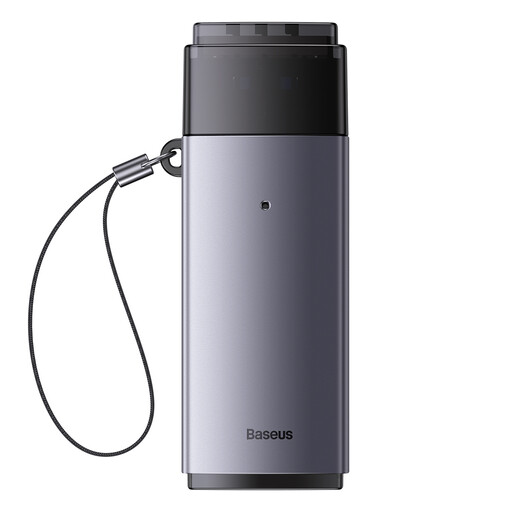
What makes this model stand out This card reader focuses on the essentials: a reliable and simple solution for devices with a USB-A port. It is extremely compact and offers slots for the two most common card formats, SD and TF (microSD).
Pros
- Focused on the widely used USB-A standard
- Supports SD and TF cards
- Very compact and portable design
- Simple plug-and-play use on many operating systems
Who is it for? Perfect for users of desktop PCs or older laptops who need a straightforward, affordable, and portable solution for reading their memory cards without specific speed requirements.
Explore More Options
The models presented here already cover many common scenarios. If you haven't found the right device for your specific needs or if you'd like to compare more models, you can find a wider selection of memory card readers in our USB Card category.
Frequently Asked Questions (FAQ)
What is the difference between UHS-I and UHS-II?
UHS-I and UHS-II are speed classes for SD cards and readers. UHS-I achieves theoretical speeds of up to 104 MB/s. UHS-II uses an additional row of pins to enable significantly higher rates of up to 312 MB/s. For full UHS-II performance, both the card and the SD card reader must support this standard.
Can I use a microSD card in a standard SD card reader?
Yes, that's possible. Many microSD cards come with a passive adapter that converts them to the size of a standard SD card. You can use this adapter to read the card in a dedicated SD slot. However, it's more convenient to use memory card readers that offer separate slots for both formats (SD and microSD/TF) from the outset.
Do I need to install drivers for an SD card reader?
In the vast majority of cases, no. Modern card readers, especially those for USB-A and USB-C, are designed as "Plug and Play" devices. This means that after being connected to the computer, they are automatically recognised by operating systems like Windows, macOS, or Linux and are ready to use immediately, with no manual driver installation required.