
Buyer's Guide to SD Cards for Cameras
Choosing the right SD card for your camera is crucial for safeguarding your shots and maximising your gear's performance. But the market is flooded with technical jargon and marketing promises that often confuse more than they clarify. The wrong choice can not only lead to data loss but also limit your camera's capabilities, such as high-speed burst shooting or high-resolution video recording.
As your Joybuy Product Recommendation Officer, I'm here to help you separate the signal from the noise. This guide focuses on the facts, enabling you to make an informed decision and sidestep common purchasing traps.
The 2 Most Common Mistakes When Buying a Memory Card
Before we dive into the technical details, let's clear up two common misconceptions that often lead to a bad purchase:
- Focusing on maximum read speed: Manufacturers prominently advertise high read speeds (e.g., "up to 200 MB/s"). However, this value is primarily relevant for transferring data from the card to your computer. For in-camera recording performance, the write speed is what's critical. A slow write speed will cause your camera's buffer to fill up during burst shooting and can lead to aborted recordings during video capture.
- Ignoring Video Speed Classes (V-Class): For recording 4K video on an SD card, it's not the peak speed but the guaranteed minimum sustained write speed that matters. Many buyers overlook the V30 (or V60/V90) rating. A card without the appropriate V-Class certification is unsuitable for professional video work, even if its advertised "maximum" speed seems high.
Key Parameters for Choosing Your SD Card
To find the right fast SD card for your DSLR or mirrorless camera, you need to check three core parameters.
1. Speed Classes: UHS, U-Class, and V-Class
An SD card's label contains a series of symbols that define its performance. The most important are:
- Bus Interface (UHS-I vs. UHS-II):UHS-I is the most common standard, offering speeds up to 104 MB/s. UHS-II achieves higher speeds via a second row of contacts but is only supported by specific, typically more expensive camera models. For most users, a high-quality SDXC UHS-I card offers the best balance of price and performance.
- UHS Speed Class (U1 vs. U3): The "U" with a number inside indicates the minimum write speed. U3 guarantees at least 30 MB/s, which is required for most 4K video recording. U1 (10 MB/s) is only sufficient for Full HD video or photography.
- Video Speed Class (V-Class): This is the most precise rating for video recording. A V30 memory card guarantees a minimum sustained write speed of 30 MB/s and is the de facto standard for reliable 4K recording. V60 (60 MB/s) and V90 (90 MB/s) are relevant for even higher resolutions and bitrates (e.g., 6K/8K video).
2. Capacity: The Right Size for Your Needs
Capacity determines how many photos or how much video footage you can store. Modern cameras produce large files, especially when shooting in RAW format or recording 4K video.
- SDHC (High Capacity): Up to 32 GB. Often too small for today's demanding applications.
- SDXC (Extended Capacity): From 64 GB to 2 TB. This is the standard for current cameras. A 256GB SD card is a popular all-rounder, offering ample space for most projects without maximising the risk should a card fail. For videographers or during long events, a 512 GB or 1 TB card can be a wise choice.
3. Reliability and Durability
Reliability is paramount, especially for professional jobs or while travelling. Look for durability ratings, such as waterproof, shockproof, and temperature-resistant. Brands like Lexar Professional often conduct rigorous testing to guarantee their products' longevity under demanding conditions.
Our Top Recommendations Guide
Here are some recommendations tailored to different photographic needs.
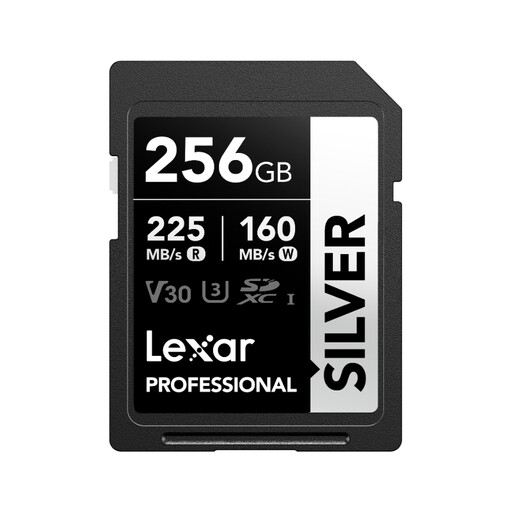
Lexar 256GB SD Card SILVER, Up to 205MB/s Read, 140MB/s Write, SDXC UHS-I Memory Card
Why It's a Match: It offers an excellent balance of high capacity (256 GB), fast write speeds for RAW burst shooting, and a reliable V30 certification for occasional 4K video projects. Perfect for modern mirrorless cameras or DSLRs.
This card sidesteps the "empty speed promise" trap by offering a V30 certification. This guarantees a sustained write speed of 30 MB/s, which is crucial for smooth 4K recording.
Its high write speed of up to 140 MB/s quickly clears the camera's buffer, while the high read speed (with a compatible reader) accelerates your post-production workflow.
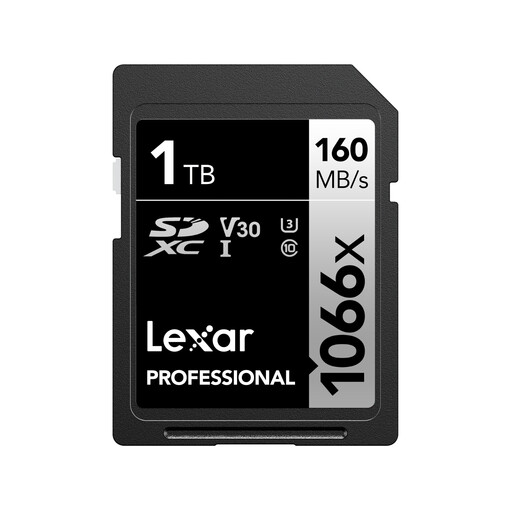
Lexar 1TB Professional 1066x SD Card, UHS-I, C10, U3, V30
Why It's a Match: For videographers and photographers working long events like weddings or documentaries. The massive 1 TB capacity minimises the need to swap cards, reducing the risk of missing a critical moment.
Instead of relying on theoretical peak speeds, this Lexar Professional series card offers a proven, rugged design and the essential V30 specification for 4K video, making it a dependable tool.
The combination of 1 TB of storage and a high write speed of up to 120 MB/s enables uninterrupted recording of high-resolution footage for many hours.
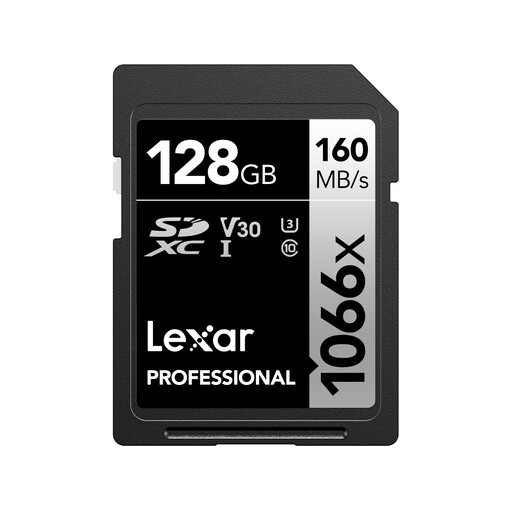
Lexar 128GB Professional 1066x SD Card, UHS-I, C10, U3, V30
Why It's a Match: A true workhorse for photographers who need a reliable memory card for daily use. 128 GB provides ample space for travel and day trips, while the professional-grade specs offer peace of mind.
This card avoids compromising on reliability. Instead of opting for a cheap, no-name card, it delivers the proven performance of the Lexar Professional series at a very accessible price point.
Excellent value for money. You get professional specifications (V30, high write speed) and durability suitable for any type of photography and videography.
Looking for More Options?
We have compiled a complete, up-to-date list of products that fully meet these strict selection criteria.
Frequently Asked Questions (FAQ)
How do I correctly format a new SD card for my camera?
Always format a new memory card in the camera you intend to use it with. Use the corresponding menu function in your camera to do this. This ensures the card has the optimal file structure for your device and helps prevent potential read errors or data corruption. Avoid formatting the card on a PC or Mac for camera use.
What is the difference between an SD card and a microSD card with an adapter?
While a microSD card with an adapter will work in an SD card slot, the adapter introduces an extra mechanical and electrical connection. This can be a potential point of failure for connection issues or speed loss. For critical shoots using an SD card for a DSLR or mirrorless camera, a native, full-size SD card is recommended as it provides a more robust and direct connection.
How long does an SD card last?
An SD card's lifespan is measured in write cycles. Modern cards are designed for thousands of cycles and are very durable. Nevertheless, they are wear-and-tear items. For professional users, it's good practice to replace heavily used cards every few years to minimise the risk of failure. Regardless of the card's age, it is essential to immediately back up important data to a separate medium after every shoot.