
RTX 5090 Gaming Laptop Buyer’s Guide and Recommendations
As a Joybuy Product Recommendation Officer, my role is to provide you with clear, objective information to help you make informed purchasing decisions. Anyone looking for an RTX 5090 gaming laptop needs uncompromising performance for the most demanding tasks—whether it's 4K gaming, professional video editing, or complex AI applications. This article serves as a guide to understanding the technical specifications and finding the right models for your needs.
Recommended High-End Gaming Laptops
Selecting a device in this performance class requires attention to details that go beyond just the product name. Three core components are crucial for overall performance and its suitability as a desktop replacement.
1. Graphics Performance: Understanding GPU TGP and VRAM
The NVIDIA GeForce RTX 5090 is the core component, but its performance can vary between models. A crucial metric is the TGP (Total Graphics Power), measured in watts. A higher TGP allows the GPU to maintain higher clock speeds for longer, which directly translates to more frames per second (FPS) in gaming and shorter render times in creative applications. Models with a TGP of 175W represent the top tier of performance. Equally important is the graphics memory: 24 GB of GDDR7 VRAM is designed for texture-heavy games at 4K resolution and for editing 8K video footage. An RTX 5080 laptop with 16 GB of GDDR7 VRAM is a powerful alternative that is more than sufficient for many users.
2. Processor and Platform: The Role of the Core Ultra 9
A latest-generation Core Ultra 9 laptop, such as the Intel Core Ultra 9 290HX, features a hybrid architecture of Performance-cores (P-cores) for demanding primary tasks and Efficiency-cores (E-cores) for background processes. This ensures optimized performance distribution and efficiency. Another key feature of these processors is the integrated NPU (Neural Processing Unit). It accelerates AI-powered tasks directly on the device, which is beneficial when using AI filters in video editing software or running local language models, for example.
3. Display and Form Factor: The 18-Inch Gaming Notebook as a Workstation
For a true desktop replacement experience, a large, high-quality display is essential. An 18-inch gaming notebook offers an immersive canvas suitable for both gaming and productive work with multiple windows. Look for the following features:
- Mini-LED Technology: Delivers excellent contrast and high brightness levels, often certified as VESA DisplayHDR 1000.
- Resolution: A UHD+ resolution (3840 x 2400 pixels) provides razor-sharp images, ideal for a laptop for 4K gaming and video editing.
- Color Gamut Coverage: 100% coverage of the DCI-P3 color space is crucial for professional image and video editing to ensure accurate color representation.
- Refresh Rate:120 Hz or higher ensures smooth motion in games and during desktop navigation.
High-End Gaming Laptop Recommendations
Here is a selection of models tailored for demanding users. The descriptions are based on the technical data provided by the manufacturer.
MSI Raider 18 Max HX A2WJ-1074 Gaming Laptop
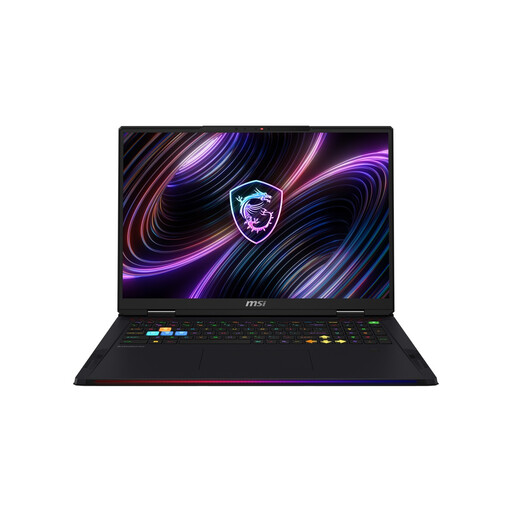
Why It Stands Out The MSI Raider 18 Max HX combines an NVIDIA GeForce RTX 5090 with a 175W TGP and the Intel Core Ultra 9 290HX Plus processor. According to the manufacturer, MSI OverBoost technology allows for a combined power output of up to 260W to max out the CPU and GPU under full load. The 18-inch Mini-LED display with UHD+ resolution and a 120 Hz refresh rate completes the package.
Advantages
- Graphics Card: NVIDIA GeForce RTX 5090 with 24 GB GDDR7 VRAM and 175W TGP.
- Processor: Intel Core Ultra 9 290HX Plus with 24 cores and an NPU.
- Display: 18-inch UHD+ Mini-LED panel with 120 Hz and VESA DisplayHDR 1000.
- Connectivity: Equipped with Wi-Fi 7 and two Thunderbolt 5 ports for future-proof connections.
Who Is It For? This model is aimed at hardcore gamers and content creators who need extremely high mobile performance for 4K gaming and compute-intensive applications, and who value state-of-the-art connectivity.
MSI Titan 18 HX AI A2XWJG-656
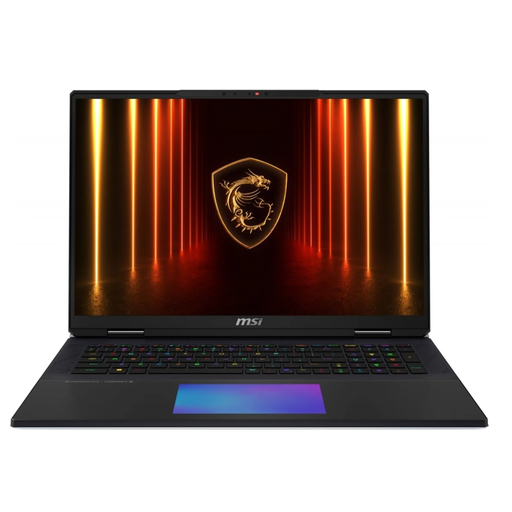
Why It Stands Out The MSI Titan 18 HX AI is designed as the ultimate mobile workstation. It not only features the RTX 5090 and a Core Ultra 9 processor but also distinguishes itself with a massive 6 TB total SSD capacity and a mechanical keyboard with Cherry MX switches. The vapor chamber cooling system is engineered to effectively dissipate the heat from these high-performance components, even under sustained load.
Advantages
- Storage: Enormous 6 TB SSD capacity distributed across three M.2 slots.
- Keyboard: Mechanical SteelSeries keyboard with Cherry MX switches for precise tactile feedback.
- Cooling: Advanced vapor chamber cooling system for stable performance.
- Display: 18-inch UHD+ Mini-LED display with 120 Hz and 100% DCI-P3 color gamut coverage.
Who Is It For? Professional users such as 3D artists, video producers, and developers who require maximum storage and computing power for complex projects and appreciate a premium tactile input device.
MSI Stealth 18 HX Gaming Laptop
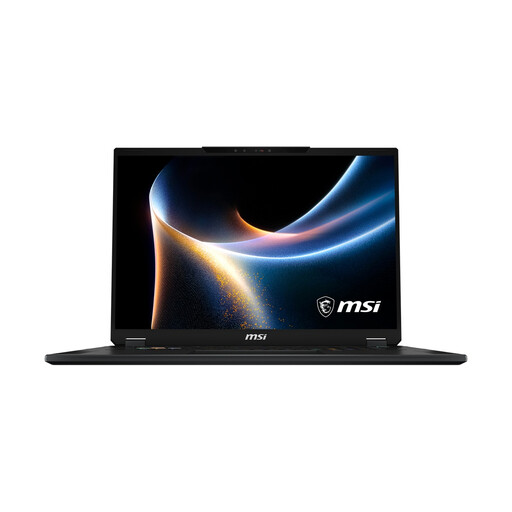
Why It Stands Out The MSI Stealth 18 HX delivers powerful performance in a comparatively slimmer chassis. It is equipped with an NVIDIA GeForce RTX 5080 with 16 GB of VRAM and a 150W TGP. Combined with the Intel Core Ultra 9 290HX processor and the high-quality 18-inch Mini-LED display, it represents a very capable option for gaming and creative work.
Advantages
- Graphics Card: Powerful NVIDIA GeForce RTX 5080 with 16 GB GDDR7 VRAM.
- Design: At 19.9 mm thick, it is relatively slim for an 18-inch device in this performance class.
- Display: Identical 18-inch UHD+ Mini-LED panel as the top-tier models.
- Price-to-Performance Ratio: Offers near-flagship performance at a potentially more accessible price point.
Who Is It For? Users looking for a very powerful MSI gaming laptop for 4K gaming and content creation, but who don't necessarily need the absolute peak performance of the RTX 5090 and prefer a slightly more portable design.
Storage Expansion and Accessories
While the featured laptops already come with generous internal storage, power users often need additional high-speed external solutions for backups or project archives. If you want to expand your storage or build a complementary setup, selecting the right components can be a logical next step. You can also find a selection of fast storage options, such as a black SSD, in our assortment.
Frequently Asked Questions (FAQ)
What is the main advantage of an RTX 5090 gaming laptop? The main advantage is its ability to smoothly run current and future games at 4K resolution with maximum graphics settings and ray tracing enabled. Furthermore, its enormous computing power significantly accelerates professional workflows in 3D rendering, video editing, and AI development, allowing the device to serve as a full-fledged replacement for a high-end desktop PC.
Is an RTX 5080 laptop sufficient for demanding gaming? Yes, a laptop with a GeForce RTX 5080 offers outstanding performance that is more than sufficient for most current and upcoming games at 1440p and 4K resolutions. It is a very capable option and can offer a more balanced price-to-performance ratio for users who don't need to run every title at the absolute maximum settings.
What should you look for in the cooling system of a high-end gaming laptop? Effective cooling is crucial to enable the CPU and GPU to maintain their high performance under load without being throttled by overheating (thermal throttling). Look for advanced cooling systems like vapor chambers or configurations with multiple fans and a dense network of heatpipes. Manufacturer claims about cooling systems, such as "Cooler Boost" or similar technologies, indicate a solution specifically designed for high heat dissipation.