
Choosing High-Quality PC RGB Fans
Choosing the right RGB PC fan can significantly impact your system's cooling performance and aesthetics. But the market is flooded with marketing promises that often create more confusion than clarity. Many users invest in fans that are either too loud, fail to deliver the expected cooling performance, or turn out to be incompatible with their system. This guide will help you understand the crucial technical specs and sidestep common purchasing pitfalls.
The 3 Most Common Mistakes When Buying PC Fans
Before we dive into the technical details, let's look at three widespread issues that can lead to frustration and unnecessary expense:
- The "Airflow" Trap: Many manufacturers advertise high CFM (Cubic Feet per Minute) ratings, suggesting powerful airflow. However, high airflow is only truly useful for a case fan in an open system. For use on a water-cooling radiator or a dense CPU heatsink, this metric is often irrelevant. Here, it's static pressure that counts—a factor that is frequently overlooked.
- The RGB vs. ARGB Dilemma: Not all RGB lighting is created equal. Standard RGB fans (usually with a 4-pin connector) can only display one colour at a time. If you want addressable RGB fans (ARGB fans, 3-pin connector) that enable complex, multi-colour effects, your motherboard or a separate controller must support them. A mismatch here leads to limited functionality or even complete incompatibility.
- Misleading Noise Level Specs: The noise level, specified in decibels (dBA), is measured by manufacturers under idealised conditions. In a real-world chassis, mounted on a radiator, the actual noise produced can be significantly higher due to vibrations and air turbulence. The quality of the fan bearing is an often-overlooked but critical factor for a consistently quiet PC fan.
What Really Matters: The Core Parameters Explained
To make an informed decision, you should carefully examine three technical aspects. These determine performance, noise levels, and compatibility.
Static Pressure vs. Airflow: Which Fan for Which Purpose?
The most important distinction lies in the design of the fan blades. The two central performance metrics are:
- Airflow: Measured in CFM (Cubic Feet per Minute) or m?/h. This value indicates how much air volume the fan can move per unit of time. Fans with high airflow are ideal for moving large volumes of air through an open PC case to ensure general heat exchange.
- Static Pressure: Measured in mmH?O. This value describes the force with which the fan can push air through resistance. A high static pressure is essential for fans for radiators on water-cooling systems or the dense fins of CPU coolers. A pure airflow fan would fail here, as it lacks the force to push air through the narrow gaps.
Therefore, check the intended application before buying: case ventilation (airflow) or radiator/heatsink (static pressure).
Connectors and Control: Understanding PWM, RGB, and ARGB
Compatibility depends on the connectors. Look out for the following standards:
- PWM Fans (4-Pin): This is the standard for precise speed control. The motherboard or a fan controller can dynamically adjust the fan's speed based on system temperature. This allows for quiet operation at idle and maximum cooling performance under load. Fans with a 3-pin connector are only voltage-controlled and are less precise.
- RGB (12V, 4-Pin): All LEDs on the fan light up in the same colour. Control is simple, but the effects are limited.
- ARGB (5V, 3-Pin): "Addressable RGB" means each LED can be controlled individually. This enables complex rainbow effects and dynamic animations. Ensure your motherboard has a 5V ARGB header or that you purchase an ARGB fan kit with a compatible controller.
Bearing Types: The Heart of Quiet Operation and Longevity
The bearing is crucial for a fan's noise level and lifespan. Common types include:
- Sleeve Bearing: Inexpensive, but louder in operation and with a shorter lifespan, especially when mounted horizontally.
- Ball Bearing: More durable than sleeve bearings and less sensitive to mounting orientation, but often audible at low speeds.
- Fluid Dynamic Bearing (FDB): These bearings offer a long lifespan and are extremely quiet due to a self-lubricating fluid layer. They represent the most balanced option for most users. According to manufacturer specifications, models like those from NZXT can achieve a lifespan of up to 60,000 hours.
Recommendations by Purpose
Here are a few models that are well-suited for specific user profiles based on their objective specifications.
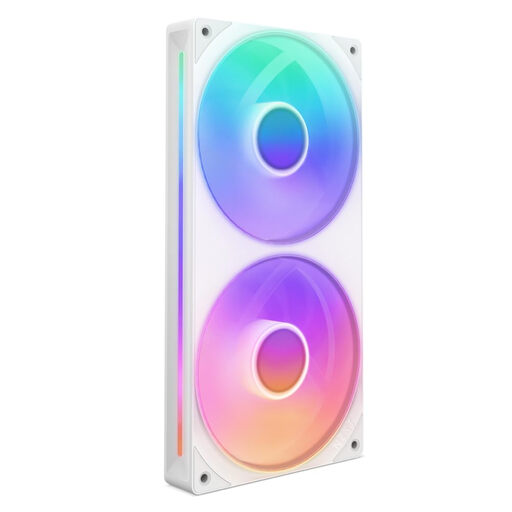
NZXT F240 RGB Core - 240mm Single-Frame Fan Unit, White
Why This Fits Their Persona: Ideal for users aiming for a flawless, uncluttered look. The single-frame unit combines two 120mm fans, drastically simplifying installation and cable management.
Solves the problem of cable clutter and the complex installation of multiple fans. Its ARGB functionality (via a 5V header) prevents the compatibility trap of standard RGB.
The design is optimised for high static pressure, making it suitable for radiators. The fluid dynamic bearings ensure quiet operation.
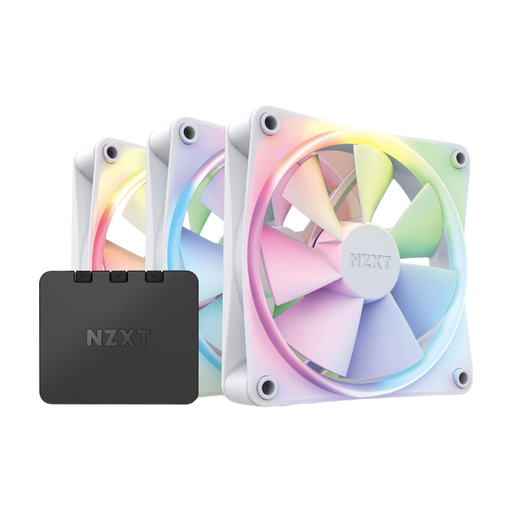
NZXT F120 RGB Fans 3-Pack with Controller
Why This Fits Their Persona: Perfect for beginners who want a working RGB setup without the hassle of compatibility research. This ARGB fan kit includes three fans and the matching controller.
Completely bypasses the RGB/ARGB dilemma, as the included controller ensures compatibility. Control is centralised via the NZXT CAM software.
An all-in-one solution for immediate use. The fans are designed for a balanced compromise between static pressure and airflow, making them versatile.
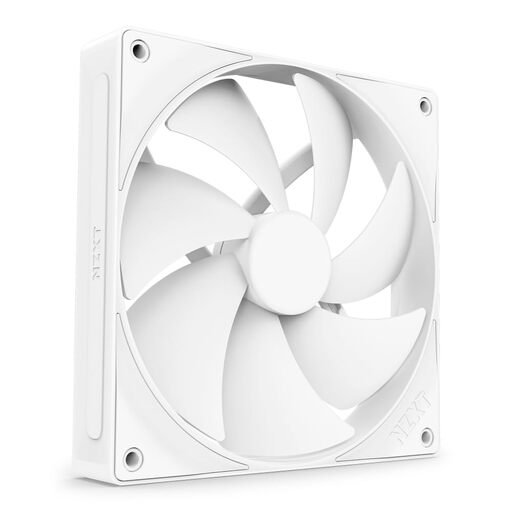
NZXT F140P Static Pressure Fan 140mm
Why This Fits Their Persona: For users who prioritise raw cooling performance. This fan is specifically optimised for high static pressure, making it ideal for use on thick radiators or CPU coolers.
Directly addresses the "airflow trap" by clearly positioning itself as a static pressure specialist. It doesn't promise all-rounder capabilities but delivers targeted performance.
Maximum cooling performance in restrictive environments. The PWM fan control and fluid dynamic bearing ensure efficient and quiet operation despite its high performance.
Looking for More Options?
If you want to further optimise your system, a central control unit is often the next logical step. We've curated a selection of products that provide precise control over both fans and lighting.
Frequently Asked Questions (FAQ)
What is the difference between RGB and ARGB fans?
The main difference lies in how the LEDs are controlled. RGB fans use a 4-pin (12V) connector and can only display a single colour across the entire fan at one time. ARGB fans (Addressable RGB) use a 3-pin (5V) connector, allowing each LED to be controlled individually. This enables complex, multi-colour patterns like the popular "rainbow" effect. ARGB requires a compatible 5V header on the motherboard or a dedicated controller.
How can I control the speed and lighting of my fans?
Fan speed is ideally controlled via a 4-pin PWM connector on the motherboard or a fan controller. This allows for automatic adjustment based on system temperature. Lighting is controlled via the corresponding RGB (4-pin) or ARGB (3-pin) header. Software like NZXT CAM or your motherboard manufacturer's RGB software (e.g., Asus Aura Sync, MSI Mystic Light) allows you to synchronise and customise effects. A dedicated controller like the NZXT RGB & Fan Controller bundles these functions and often provides more ports and a unified software environment.
When should I choose a high static pressure fan?
A fan with high static pressure is always the right choice whenever airflow will meet resistance. The most common use cases are:
- Radiators for AIO or custom water-cooling loops.
- Dense fin stacks on CPU air coolers.
- Dust filters or restrictive front panels on PC cases.
For simple case ventilation, where air can circulate freely, a high-airflow fan is typically sufficient.