
RGB Fan Buyer's Guide: Choosing Cooling Performance and Style
Choosing the right components is crucial for a PC's performance and appearance. An RGB fan serves two important functions: it provides efficient PC case cooling while giving the system a custom aesthetic. However, with a vast array of models, sizes, and lighting options, making the right choice can be overwhelming.
This guide serves as an objective resource. It explains the essential technical features and presents a selection of top models for 2026 to help you make an informed decision for your system.
What to Look for When Buying RGB Fans
Before you decide on a model, several fundamental criteria should be considered. These factors determine not only the cooling performance but also the noise level and compatibility with your PC case.
Size and Airflow: 120mm vs. 140mm
The most common sizes for case fans are 120mm and 140mm.
- 120mm PC Fan: This size is the universal standard and is compatible with most PC cases. They offer a good balance of performance and space efficiency.
- 140mm Case Fan: Larger fans can often move a higher volume of air at lower RPMs. The result can be quieter operation with comparable or even better cooling performance. Before purchasing, check your case's specifications to ensure compatibility.
Control and Noise Levels: The Importance of PWM
A PWM fan (Pulse Width Modulation) is the standard for today's performance-oriented systems. Unlike older DC fans that regulate their speed by changing voltage, PWM allows for more precise and dynamic control of the fan speed by the motherboard. The system can automatically adjust fan speed based on the current temperature, resulting in a very quiet PC fan at idle and maximum cooling performance under load.
Lighting Types: The Difference Between RGB and ARGB
Lighting is a key feature of RGB fans, but there's an important technological distinction:
- Standard RGB (12V, 4-Pin): All LEDs on the fan light up in the same color simultaneously. The color selection is vast, but complex effects like rainbow gradients are not possible.
- ARGB (Addressable RGB, 5V, 3-Pin): An ARGB fan features individually addressable LEDs. This enables dynamic and complex lighting effects, allowing multiple colors to be displayed on a single fan at the same time. Most modern motherboards offer corresponding ARGB headers and software for synchronization.
Top RGB Fan Recommendations
Here is a selection of RGB fans that stand out for their specific technical features and use cases.
CORSAIR RS120 ARGB 120mm PWM Fan Triple Pack
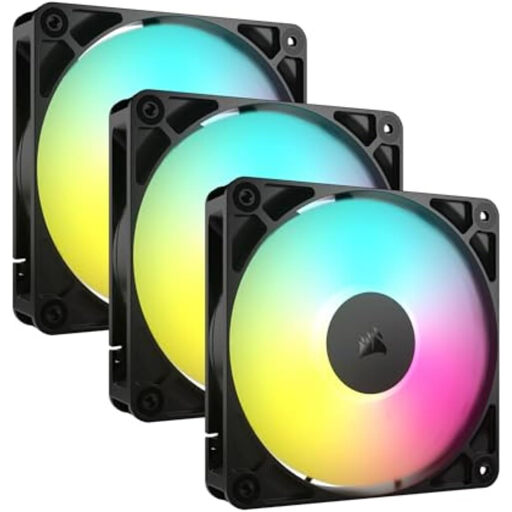
Why It Stands Out The CORSAIR RS120 ARGB fan 3-pack is an all-in-one solution for users who prioritize clean cable management and easy installation. The daisy-chain connection system allows multiple fans to be linked with a single set of cables, significantly reducing cable clutter in the case. The magnetic dome bearing is designed for durability and quiet operation.
Pros
- Complete Package: Includes three fans for comprehensive case ventilation.
- Simplified Cable Management: Daisy-chain connectors reduce the number of cables needed.
- PWM Control: Automatic fan speed adjustment for an optimal balance of cooling and noise.
- Durable Bearing: The magnetic dome bearing ensures reliable, low-friction operation.
- ARGB Lighting: Customizable lighting effects for modern PC builds.
Who Is This Model For? This set is ideal for PC builders and upgraders looking for a straightforward and aesthetically pleasing cooling solution. Users who want to install multiple fans while maintaining a tidy system will particularly benefit from the thoughtful connection design.
MSI MPG EZ120 ARGB WHITE Fan
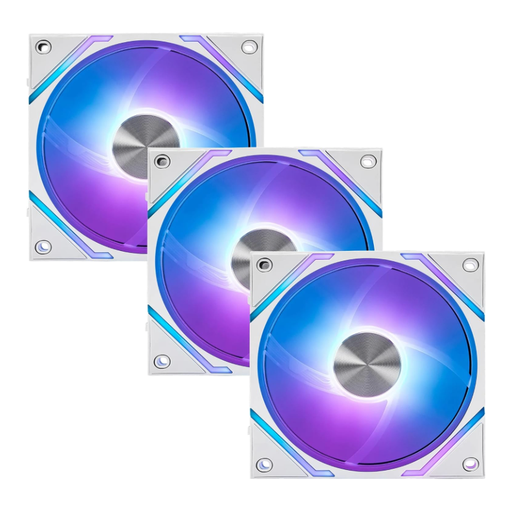
Why It Stands Out The MSI MPG EZ120 ARGB is distinguished by its innovative magnetic frame design, which enables a tool-free and secure connection of multiple fans. Combined with the included hub, up to 18 fans can be managed in one system. With an airflow of 73.82 CFM and a static pressure of 2.56 mm H2O, it delivers high cooling performance. The fluid dynamic bearing is engineered for quiet operation and a long lifespan.
Pros
- Magnetic Frame Design: Simplifies installation and ensures a stable connection.
- High-Performance Specs: Strong airflow and static pressure for demanding cooling tasks.
- Quiet Operation: The fluid dynamic bearing reduces operational noise.
- Scalability: The included hub supports a large number of fans.
- Mystic Light Compatibility: Seamless integration into the MSI ecosystem for lighting control.
Who Is This Model For? This model is aimed at enthusiasts building a system with a white color scheme and high cooling demands. The simple, magnetic assembly and high scalability make it especially attractive for complex builds with many fans.
NZXT F140 RGB Duo 140mm Dual-Sided RGB Fan
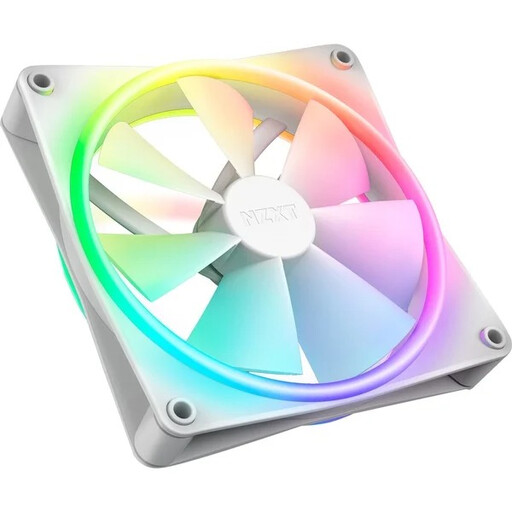
Why It Stands Out The NZXT F140 RGB Duo is a 140mm case fan whose main feature is its dual-sided RGB lighting. With 20 individually addressable LEDs on both sides of the fan, it creates impressive lighting effects from every angle. The fan blade design is balanced to provide both high airflow and good static pressure, making the fan versatile for use as an intake or exhaust fan.
Pros
- Dual-Sided RGB Lighting: 20 ARGB LEDs provide vibrant illumination visible from the front and back.
- Balanced Design: Equally suitable for use as a case fan (airflow) and on radiators (static pressure).
- Fluid-Dynamic Bearing: Ensures quiet and long-lasting operation.
- PWM Control: Allows for dynamic speed adjustment.
- CAM Software Integration: Full customization and synchronization of lighting and fan curves via NZXT CAM software.
Who Is This Model For? This fan is the right choice for PC builders where aesthetics are a top priority. Anyone building a showcase system with glass side panels who wants to ensure the lighting is impressive from every perspective will find this to be a fitting solution.
Other Options for Your PC Case Cooling
The models presented here cover various use cases. However, the choice of the right fan depends on many factors, including the bearing technology, which affects longevity and noise levels. If you are interested in other PC components or specific parts like high-quality Ball Bearings, you can find additional options in our wider selection.
Frequently Asked Questions
What is the difference between RGB and ARGB fans?
Standard RGB fans (12V, 4-pin) can only display one color at a time across all LEDs. ARGB fans (Addressable RGB, 5V, 3-pin) allow for individual control of each LED, enabling complex, multi-color effects like rainbow waves.
How many case fans are recommended for good PC case cooling?
A common setup for effective PC case cooling is to create positive or negative air pressure. A balanced configuration often consists of two to three intake fans (front/bottom) and one exhaust fan (rear/top). However, the optimal number heavily depends on the case, the installed components, and their heat output.
Do RGB fans require special connectors?
Yes. In addition to the 4-pin PWM connector for the fan motor, RGB fans need a separate connector for the lighting. For standard RGB, this is a 4-pin 12V connector; for ARGB, it's a 3-pin 5V connector. Check if your motherboard has the corresponding headers. Alternatively, many fan kits come with a dedicated controller that is powered via USB or SATA.