
Esports Mouse Buyer's Guide: Razer Viper V3 Pro
Choosing the right gaming mouse can be the difference between victory and defeat, especially in competitive gaming. However, the market is flooded with marketing buzzwords and technical specs that confuse more than they clarify. Many gamers invest in expensive models only to find they don't suit their playstyle or are plagued by defects. This guide will help you understand the crucial features and make an informed decision, with a focus on models like the Razer Viper V3 Pro.
As a Joybuy Product Recommendation Officer, my job is to provide objective and practical advice so you can find gear that actually enhances your performance, rather than just looking good on paper.
The 3 Most Common Mistakes When Buying a Gaming Mouse
Before we dive into the technical details, let's look at the most common pitfalls that often lead to a bad purchase.
- The DPI Myth: Manufacturers advertise extremely high DPI (Dots Per Inch) values, often exceeding 30,000. In practice, even professional players rarely use more than 1600 DPI. An extremely high DPI value is not an indicator of a better sensor; what matters are tracking accuracy, smoothing, and error correction. Buying a mouse just for a high DPI number is often a wasted investment.
- Misunderstanding "Wireless Freedom": A wireless gaming mouse promises freedom of movement, but not all models are suitable for esports. Cheaper or older wireless technologies can suffer from latency (delay), signal instability, or short battery life. In a competitive environment where milliseconds count, a poor wireless connection can be a significant disadvantage.
- Weight Over Ergonomics: The trend towards the ultra-lightweight mouse has led some manufacturers to neglect ergonomics to shave off every possible gram. A mouse that doesn't fit well in your hand can lead to cramps and imprecise movements, no matter how light it is. The weight must be balanced with a comfortable shape for long gaming sessions.
What Really Matters: The Core Parameters Explained
To avoid these traps, focus on the following performance-critical parameters.
Polling Rate in Hz
The polling rate indicates how often the mouse reports its position to the computer. The standard for gaming mice is 1000 Hz (1000 times per second). However, models like the Razer Viper V3 Pro offer an 8000Hz polling rate mouse.
- 1000 Hz: An update every 1 millisecond (ms). Sufficient for most gamers.
- 8000 Hz: An update every 0.125 ms. This results in a visibly smoother cursor movement on high-refresh-rate monitors (240 Hz and above) and reduces click latency to a minimum. This is particularly relevant for high-precision, fast movements in a gaming mouse for FPS games. Note that a higher polling rate also consumes more CPU power.
Weight and Form Factor
A lightweight gaming mouse allows for faster reactions and changes in direction. The Razer Viper V3 Pro, for example, weighs only 54g. However, more important than the raw weight are the balance and the shape:
- Symmetrical Shape: Suitable for various grip styles (Claw, Fingertip) and potentially for both left- and right-handed users.
- Ergonomic Shape: Specifically shaped for right-handed users, often providing more comfort for palm grip during long sessions.
An ultra-lightweight mouse under 60 grams is ideal for players who frequently lift and reposition their mouse (low-sense players).
Sensor and Switch Technology
The sensor is the heart of the mouse. Instead of focusing on the maximum DPI value, the following aspects are more important:
- Tracking Speed (IPS): Indicates how fast you can move the mouse before the sensor loses tracking. Values above 400 IPS are more than sufficient for human movements.
- Optical Switches: Unlike mechanical switches, optical switches use a light beam to trigger the signal. This prevents the "double-click" issue that can occur with mechanical switches due to wear and tear, and it offers an extremely fast actuation time.
Top Gear for Gamers
Here are some recommendations tailored to different needs and budgets.
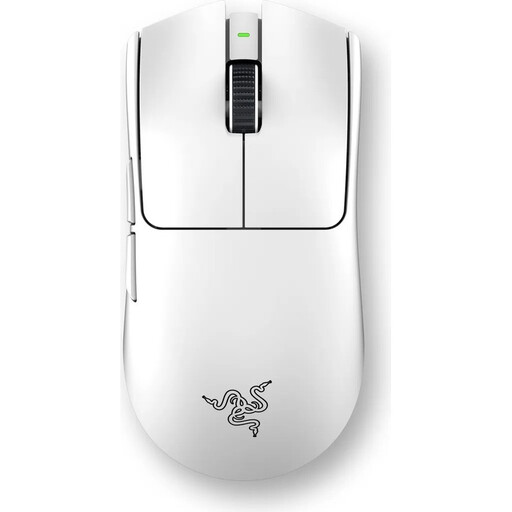
Razer Viper V3 Pro Wireless Esports Gaming Mouse, 54g Ultra-Light, White
Why This Fits Their Persona: Designed for players who make no compromises on speed and precision. The combination of extremely low weight and state-of-the-art wireless technology makes it a tool for the highest demands in esports.
Razer HyperPolling technology with a true 8000 Hz polling rate provides an extremely stable and low-latency wireless connection. The ultra-light 54g design is combined with a proven symmetrical shape that prioritises comfort over pure weight reduction.
Razer Focus Pro 35K Sensor Gen-2 for maximum precision; 3rd generation optical switches for durability and rapid response.
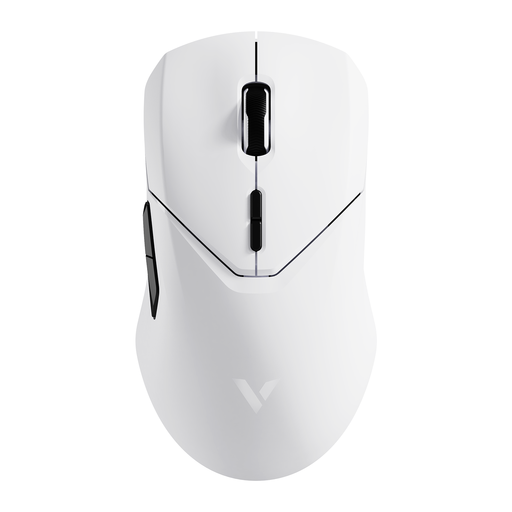
RAPOO VT9Pro 4K Wireless Gaming Mouse - Superlight, White
Why This Fits Their Persona: Ideal for gamers who want a high-performance wireless mouse with plenty of features for various game genres, without paying the premium for the absolute top-tier polling rate.
Offers a stable 4K wireless connection, which is a significant step up from 1K mice without the high CPU load of 8K. The 68g weight is light but balanced and combined with a comfortable shape.
Long battery life of up to 180 hours (according to the manufacturer); 10 programmable buttons for high customisability.
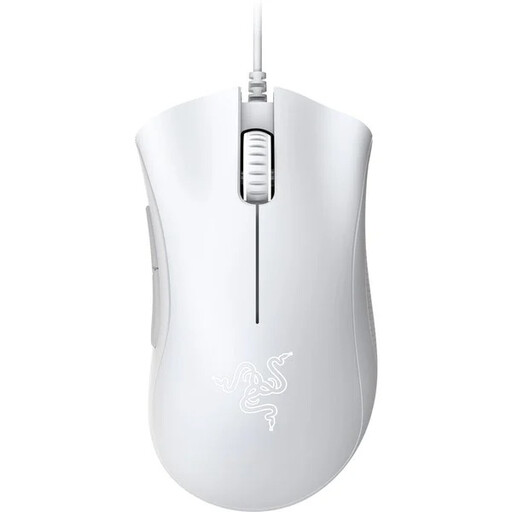
Razer DeathAdder Essential (2021) Wired Gaming Mouse, White
Why This Fits Their Persona: For players entering the competitive scene who prioritise a proven ergonomic shape and reliability over wireless features or ultra-lightweight designs. A solid foundation without unnecessary frills.
As a wired mouse, it eliminates any concerns about latency and battery life. The focus is on a highly acclaimed ergonomic shape that ensures comfort for hours, rather than just following the weight trend.
Proven ergonomic design for high comfort; reliable performance and durable switches at an accessible price point.
The right mouse is only one part of an optimised gaming setup. A stable, ergonomic desk is just as crucial for ensuring comfort and performance over many hours.
Looking for More Options?
An optimised setup goes beyond the mouse. Discover our selection of peripherals and furniture designed for performance and ergonomics.
Frequently Asked Questions (FAQ)
Is the 8000Hz polling rate on the Razer Viper V3 Pro noticeable?
For players with high-refresh-rate monitors (e.g., 240 Hz or 360 Hz), the difference in smoother cursor movement and reduced system latency can be noticeable. On standard monitors (60 Hz or 144 Hz), the advantage is less pronounced. The technology also requires a sufficiently powerful CPU to process the data.
How long does the Razer Viper V3 Pro's battery last?
According to Razer, the battery life is up to 95 hours when used at 1000 Hz. With constant use of the 8000Hz HyperPolling technology, the runtime is reduced, as the more frequent data transmission consumes more energy. The exact duration depends on individual usage.
Is the Razer Viper V3 Pro suitable for left-handed users?
The mouse has a symmetrical body, which is comfortable for many grip styles. However, the programmable thumb buttons are located exclusively on the left side of the body. This means the mouse is primarily optimised for right-handed use. Left-handed users might find the side buttons difficult or impossible to reach.