
Rapoo Multi-Device Mouse Buying Guide 2026: How to Find the Right Model for You
By a Joybuy Product Recommendation Officer, July 09, 2026
Manoeuvring between multiple computers, laptops, and tablets can significantly disrupt your workflow. Using different mice for each device, dealing with a tangle of cables, and constantly switching your grip leads to a cluttered desk and reduced efficiency. A sophisticated solution to this problem is a single, high-performance mouse that can switch seamlessly between different systems.
As your Joybuy Product Recommendation Officer, I have compiled the most relevant information on Rapoo's multi-device mice. This article serves as an objective guide to help you select the model that is precisely tailored to the demands of a modern, flexible workspace. We will examine the crucial features and present a selection of models designed for different user profiles.
What to Look for When Choosing a Multi-Device Mouse
The decision to buy a new mouse should be based on clear, technical criteria. Here are three key aspects to help you make an informed choice.
1. Connectivity and Device Management
A core function of a multi-device wireless mouse is its ability to connect to various systems. Pay attention to the supported connection modes:
- 2.4 GHz Wireless: Connects via a USB dongle and often provides a stable, responsive connection. Newer technologies like NearLink, which Rapoo uses in some models, aim to further reduce latency and power consumption.
- Bluetooth: Allows for a direct connection without an extra dongle, which is especially convenient for laptops and tablets. A
Bluetooth mouse for PC and laptopshould ideally support modern standards like Bluetooth 5.0 to ensure reliable pairing. - Wired Mode: Offers the ability to continue using the mouse while it's charging or in situations where a wireless connection is not desired.
Check how many devices can be paired simultaneously and how easy it is to switch between them. Models that allow you to switch with the press of a button are essential for a fluid workflow.
2. Ergonomics and Design
When using a mouse for hours every day, comfort is crucial. An ergonomic wireless mouse is shaped to support the natural posture of your hand and prevent fatigue. Consider the following points:
- Size and Shape: The mouse should fit your hand size. Models are available in standard sizes as well as more compact "mini" versions for smaller hands or mobile use.
- Thumb Rest: A pronounced rest for the thumb relieves strain on the hand muscles and improves control.
- Materials and Grip: Non-slip surfaces on the sides ensure a secure hold, even during fast movements.
3. Functionality and Customisation
Modern mice are more than just pointing devices; they are tools for boosting productivity.
- Programmable Buttons: A
mouse with programmable buttonsallows you to assign frequently used commands, macros, or shortcuts. This is particularly beneficial for developers, designers, and power users. - DPI Adjustment: DPI (Dots Per Inch) determines the sensor's sensitivity. An adjustable DPI setting is important for adapting the mouse speed to different screen resolutions and tasks. High DPI values are suitable for large monitors or fast-paced gaming, while lower values allow for more precise control in detailed work.
- Battery Life and Charging Options: A
rechargeable mousewith a long battery life and a USB-C charging port offers convenience and avoids waste from disposable batteries. Some models also support wireless charging via the Qi standard.
Our Top Picks for Rapoo Multi-Device Mice in 2026
Based on the criteria above, we have put together a selection of Rapoo models that cater to different needs.
RAPOO MT760 PRO Wireless Mouse
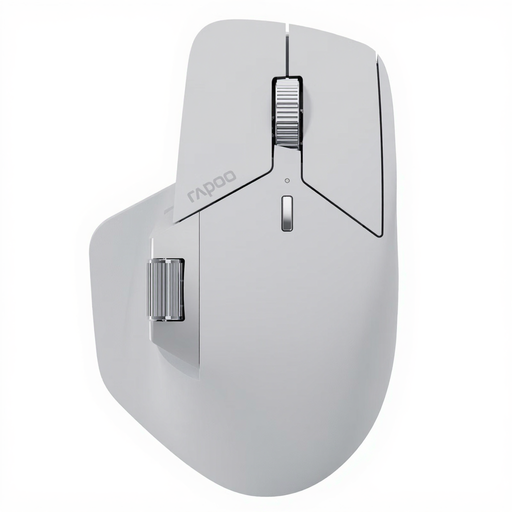
What makes it stand out: The MT760 PRO is designed for maximum performance and connectivity. It uses NearLink wireless technology, which, according to the manufacturer, provides exceptionally low latency and lower energy consumption. With the ability to connect up to seven devices and M+ Cross-Computer technology for seamless file transfers between computers, it is a comprehensive productivity mouse. The high-precision sensor with 12,000 DPI and a 2,000 Hz polling rate is aimed at users with high demands for precision.
Pros:
- Connects with up to 7 devices (NearLink, Bluetooth, Wired)
- High-performance sensor with 12,000 DPI and 2K polling rate
- 11 programmable buttons with on-board memory
- Long battery life of up to 120 days (manufacturer's claim, depends on usage)
- M+
cross-computer mousetechnology for working across multiple files
Who it's for: Professionals, developers, and creatives who work on multiple high-performance systems simultaneously and require maximum precision for tasks like graphic design, video editing, or occasional gaming.
RAPOO MT760L Multi-Device Wireless Bluetooth Mouse
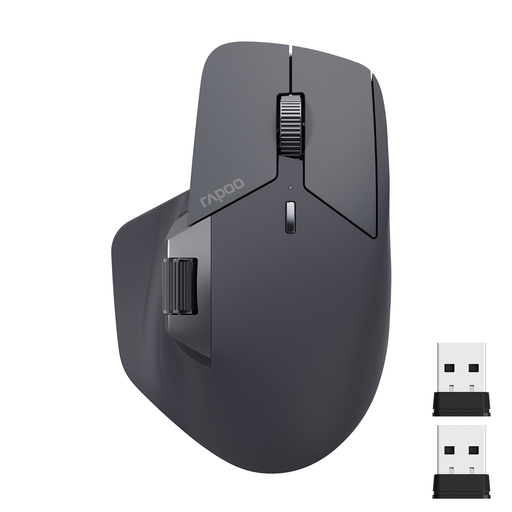
What makes it stand out: The MT760L is a versatile model that offers a solid balance between functionality and user-friendliness. It supports connections with up to four devices via Bluetooth 5.0 and 2.4 GHz wireless. With 4,000 DPI, 11 programmable buttons, and M+ Cross-Computer technology, it is well-equipped for demanding office work and multitasking scenarios. The ergonomic design with a thumb rest and side scroll wheel supports comfortable work over long periods.
Pros:
- Connects with up to 4 devices (Bluetooth, 2.4 GHz, Wired)
- Sensor with up to 4,000 DPI, adjustable in 7 levels
- 11 programmable buttons for workflow optimisation
- Ergonomic design with a side scroll wheel
- Battery life of up to 90 days (manufacturer's claim)
Who it's for: Office workers, students, and all-around users who need a reliable and functional mouse for daily work on a PC, laptop, and tablet, and who value ergonomics and efficiency.
RAPOO MT760Mini Bluetooth Wireless Mouse
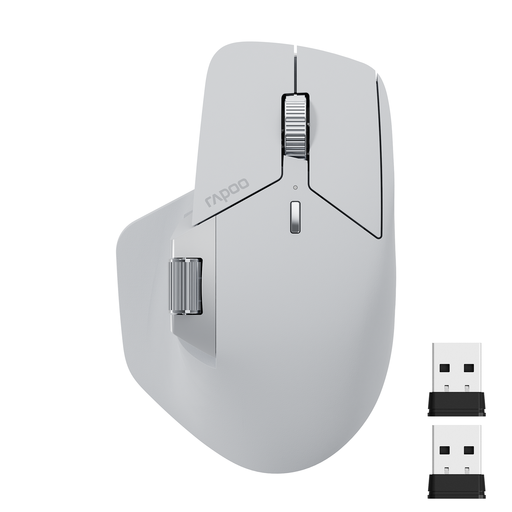
What makes it stand out: The MT760Mini offers many of the core features of its larger counterparts in a more compact form factor. It also connects with up to four devices and features M+ Cross-Computer technology. With 4,000 DPI and 11 programmable buttons, it is a full-featured productivity mouse despite its smaller size. Its compact shape makes it a great choice for mobile users or people with smaller hands.
Pros:
- Compact design for mobility and smaller hands
- Connects with up to 4 devices
- Full feature set with 11 programmable buttons and M+ technology
- Sensor with up to 4,000 DPI
- Rechargeable battery
Who it's for: Users who frequently work on the go, prefer a clean and minimalist workspace, or are looking for an ergonomic mouse for smaller hands without sacrificing professional features.
More Options for Your Workspace
A mouse is just one component of an optimised workspace. If you want to further personalise and accelerate your workflow, a customisable keyboard can be a valuable addition.
Discover our selection of programmable keyboards to complete your setup and take your efficiency to the next level.
Frequently Asked Questions (FAQ)
What is Rapoo's M+ Cross-Computer Technology?
M+ Cross-Computer Technology is a software feature developed by Rapoo. After installing the driver and connecting the computers to the same Wi-Fi or Ethernet network, it allows you to move the mouse cursor seamlessly across the screen edges from one computer to another. It also enables file transfers between the connected systems using copy and paste.
How do I connect a Rapoo multi-device mouse to multiple devices?
The connection process is typically straightforward. You can pair devices via Bluetooth or the included 2.4 GHz USB dongles. Each device is assigned to a channel. Switching between connected devices is then done by pressing a dedicated button on the mouse, which cycles through the different channels.
Is a higher DPI number always better?
Not necessarily. A high DPI number means the mouse cursor travels a long distance on the screen with only a small physical movement of the mouse. This is useful for large 4K or ultrawide monitors and fast actions in games. However, for standard office tasks or precise design work on a smaller screen, a DPI setting that is too high can result in a jittery and difficult-to-control cursor. A mouse with adjustable DPI levels offers the flexibility to adapt the sensitivity to the task at hand.