
QD-OLED Gaming Monitor: Buyer's Guide and Recommendations for 2026
Choosing a monitor is based on an analysis of technical parameters that directly impact the user experience. QD-OLED (Quantum Dot Organic Light Emitting Diode) technology represents an advancement in the display sector, combining the advantages of OLED panels with the color brilliance of Quantum Dots. Unlike conventional LCD screens that require a backlight, OLED pixels are self-emissive. This allows for pixel-level brightness control, resulting in a theoretically infinite contrast ratio and true blacks. The integration of Quantum Dots expands the displayable color gamut and increases peak brightness, which is particularly relevant for rendering HDR Monitor content.
Buyer's Guide: Technical Criteria for Selection
The decision to purchase a QD-OLED Gaming Monitor should be based on an evaluation of specific technical features tailored to your individual use case.
Resolution and Aspect Ratio
Resolution defines the pixel density and, consequently, the image sharpness. Common options include:
- WQHD (2560 x 1440 pixels): Offers a significant increase in sharpness over Full HD and is an established standard for demanding PC gaming. It represents a balance between image quality and the demands placed on the graphics card.
- DQHD (5120 x 1440 pixels): This resolution is found in 32:9 Ultrawide Gaming Monitor models. It corresponds to the screen real estate of two WQHD monitors placed side-by-side, enabling an extremely immersive field of view ideal for racing simulations, strategy games, and productive multitasking.
Refresh Rate and Response Time
These two parameters are crucial for the smooth rendering of motion.
- Refresh Rate (Hz): Indicates how many frames the monitor can display per second. A 240Hz Monitor updates the image 240 times per second, resulting in extremely smooth motion that can be advantageous in competitive games. Models with 144 Hz already offer a very fluid experience for most users.
- Response Time (GtG): Measures the time a pixel takes to change from one shade of gray to another. QD-OLED panels achieve values as low as 0.03 ms. Such a low response time minimizes motion blur and ghosting, leading to a clearer image during fast camera pans.
Panel Technology and Color Performance
The core technology is a key determinant of image quality.
- Color Volume: QD-OLED monitors often cover over 99% of the DCI-P3 color space. This standard, originating from the digital film industry, ensures vibrant and saturated colors.
- Color Accuracy (Delta E): A value of Delta E ≤ 2, as specified on some models, indicates high factory-calibrated color precision, which is relevant for content creation.
- HDR Certification: The VESA DisplayHDR True Black 400 seal guarantees that the monitor meets strict requirements for peak brightness and black levels when displaying High Dynamic Range (HDR) content.
Connectivity
The available ports determine compatibility with various devices.
- Monitor with HDMI 2.1: This port is essential for current-gen consoles like the PlayStation 5 and Xbox Series X/S. It enables the transmission of 4K signals at 120 Hz or WQHD at 120 Hz and supports features like Variable Refresh Rate (VRR) and Auto Low Latency Mode (ALLM).
- DisplayPort 1.4a: The standard port for PCs to achieve high resolutions and refresh rates.
- USB-C: A multi-functional port that can transmit video signals (via DP Alt Mode), data, and power (Power Delivery) through a single cable. This is especially practical for connecting laptops.
Our Picks for 2026
Based on an analysis of technical specifications, we present two models that cater to different user profiles.
MSI MAG 271QPX QD-OLED E2 Gaming Monitor
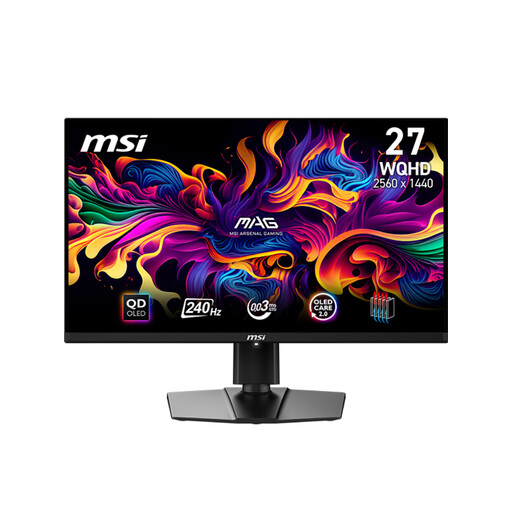
Why We Recommend This Product The MSI MAG 271QPX combines a WQHD resolution with an extremely high 240 Hz refresh rate and a 0.03 ms response time. This combination is engineered for maximum performance in fast-paced, competitive games. The VESA ClearMR 13000 certification quantifies its low motion blur.
Pros
- High Refresh Rate: 240 Hz for maximum motion clarity.
- Fast Response Time: 0.03 ms (GtG) to minimize ghosting.
- Modern Connectivity: Two HDMI 2.1 ports for 120 Hz console gaming, plus DisplayPort 1.4a and USB-C.
- High Color Quality: 99% DCI-P3 coverage and a color accuracy of Delta E ≤ 2.
- Ergonomic Stand: Adjustable for height, tilt, swivel, and pivot.
Who It's For This model is aimed at competitive gamers and esports enthusiasts who refuse to compromise on response speed and motion fluidity in fast-paced titles like first-person shooters or battle royale games.
Gigabyte Aorus Curved Gaming Monitor CO49DQ OLED
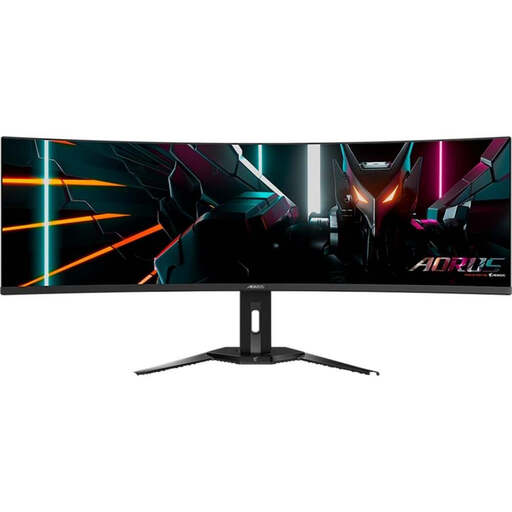
Why We Recommend This Product The Gigabyte Aorus CO49DQ delivers maximum immersion with its 49-inch, 32:9 panel and 1800R curvature. The DQHD (5120x1440) resolution replaces a dual-monitor setup, eliminating the distracting center bezel. The integrated KVM switch enhances productivity by allowing you to control multiple devices with a single mouse and keyboard.
Pros
- Immersion: Massive 49-inch Curved Monitor panel with a 32:9 aspect ratio.
- Productivity: Integrated KVM switch and a USB-C port with 18W Power Delivery.
- Excellent Image Quality: QD-OLED technology with 99% DCI-P3 and DisplayHDR True Black 400.
- Smooth Gameplay: 144 Hz refresh rate and 0.03 ms response time.
- Extensive Connectivity: 2x HDMI 2.1, 1x DisplayPort 1.4, and a USB hub.
Who It's For This model is ideal for users seeking a maximally immersive experience in simulations (racing, flight) and cinematic single-player games. At the same time, its vast screen real estate and KVM switch make it an excellent choice for power users, content creators, and professionals who engage in heavy multitasking.
More Options for Your Setup
The monitors featured here are designed for stationary setups. If you need a flexible solution for expanding your workspace on the go or are looking for a compact secondary screen for your laptop, portable monitors could be a worthwhile addition. You can find a selection of such devices in our Laptop Screen Extender category.
Frequently Asked Questions (FAQ)
1. What is the difference between QD-OLED and conventional OLED (WOLED)? Conventional WOLED (White OLED) panels use white OLEDs with color filters to produce red, green, and blue. QD-OLED, on the other hand, uses a blue self-emissive layer, whose light is converted into high-purity red and green by a quantum dot layer. The blue light is displayed directly. This approach can lead to higher color purity and a larger color volume, especially at high brightness levels.
2. What is the risk of burn-in on QD-OLED monitors? The burn-in of static image elements is a known characteristic of OLED technologies. However, modern OLED Gaming Monitor models integrate advanced protection mechanisms. Features like "OLED Care," included in the featured models, use algorithms for pixel and logo detection, as well as a pixel-shifting mechanism, to distribute the load evenly and minimize the risk of permanent image retention.