
Buying a projector: how to compare resolution, brightness and smart features
A projector can turn your living room, bedroom or garden into a big screen. The choice ranges from a compact mini projector to a powerful laser projector for a dedicated home cinema. However, impressive marketing claims don’t automatically mean a projector is right for you. What matters is the technical specification, how you plan to use it and which features it genuinely supports.
Common pitfalls when buying a projector
1. ‘4K supported’ doesn’t mean native 4K resolution
Many models are advertised as 4K projectors, even though their native panel resolution is 1920 × 1080 pixels. In this case, ‘4K supported’ or ‘4K decoding’ means the projector can process a 4K signal. The picture is then output at 1080p.
For films, TV series and gaming, a Full HD projector with native 1080p resolution can be a sensible choice. If you really need more picture detail, check the native resolution of the panel or chip rather than relying on signal support alone.
2. Unclear brightness claims make comparisons difficult
Manufacturers use different measurements, such as lumens, ANSI lumens and ISO lumens. For a fairer comparison, look for ANSI lumens or ISO lumens wherever possible. A high figure means little if it isn’t based on a consistent measurement method.
A projector with around 300 to 600 ANSI lumens is generally better suited to darkened rooms. Higher figures are more practical in a living room with some ambient light. For an outdoor projector, bear in mind that even high brightness can’t replace a dark setting and a suitable projection surface.
3. Built-in streaming apps aren’t always equivalent
A smart projector with Wi-Fi might seem like a straightforward alternative to a TV. In practice, operating systems, app selection and certifications vary considerably. If you’re looking for a projector with Netflix, check whether the app is officially built in or can only be used through screen mirroring or an external streaming stick.
Wi-Fi and Bluetooth also serve different purposes: Wi-Fi streams content or connects the projector to your network, while Bluetooth is mainly used for speakers, headphones and other audio devices.
Check these specifications before you buy
Native resolution and HDR
For films and gaming, a 1080p projector with native Full HD resolution is a good starting point. HDR10 can process brightness and colour information, but it requires compatible content and suitable picture reproduction. ‘HDR’ is no substitute for details about native resolution and brightness.
Autofocus and keystone correction
A projector with autofocus automatically adjusts the sharpness when you set it up. Automatic keystone correction compensates for a trapezoid-shaped picture when the projector isn’t positioned exactly parallel to the wall. These features make portable use easier, although projecting at a sharp angle can affect the usable picture area and level of detail.
Also check the correction range, such as ±30° or ±45°, and look for features such as obstacle detection and automatic image alignment.
Distance, picture size and connections
The throw ratio shows how far the projector needs to be from the wall to produce a particular picture width. A ratio of 1.2:1 needs less distance than 1.4:1. Before you buy, check:
- your preferred picture size and available setup distance,
- an HDMI port for a laptop, console or streaming stick,
- USB and audio ports,
- Bluetooth for headphones or speakers,
- operating noise and adequate ventilation,
- the power supply if you’re buying a portable projector.
For gaming, an HDMI connection is often more predictable than wireless mirroring. Check the technical specifications for the response time, refresh rate and input lag of the model you’re considering.
Our picks for different needs
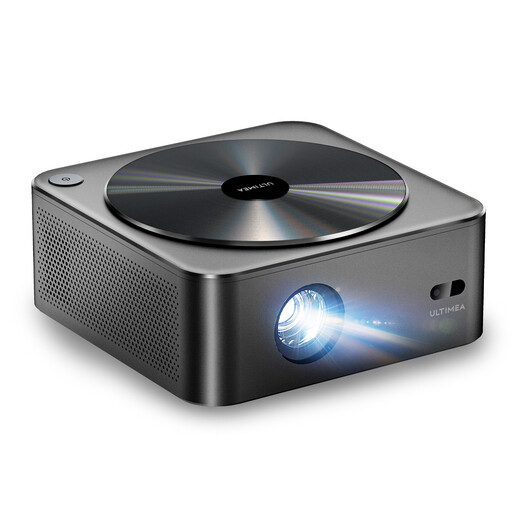
Ultimea Apollo P40 Projector HDR10 1080p
Why this product suits this profile: Native 1080p resolution, 700 ANSI lumens, Wi-Fi and Bluetooth cover the typical needs of film and TV fans, as well as occasional gamers.
The native resolution is clearly stated; 4K is described as decoding, not as the panel’s native resolution.
Autofocus, 6D keystone correction up to ±45°, dual-band Wi-Fi and DSP speakers with 2 × 5 W.
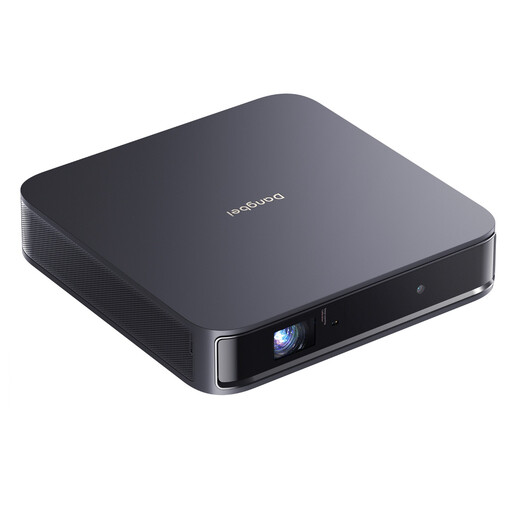
Dangbei Atom Portable Laser Projector
Why this product suits this profile: Combining DLP technology, an ALPD laser light source, Google TV and official Netflix support, this model is aimed at buyers looking for an integrated home cinema setup.
The native resolution is 1080p, with 4K HDR supported as an input signal. Netflix support is explicitly listed as official.
1200 ISO lumens, a stated laser light source life of 30,000 hours, automatic focus and keystone adjustment, and Dolby Audio.
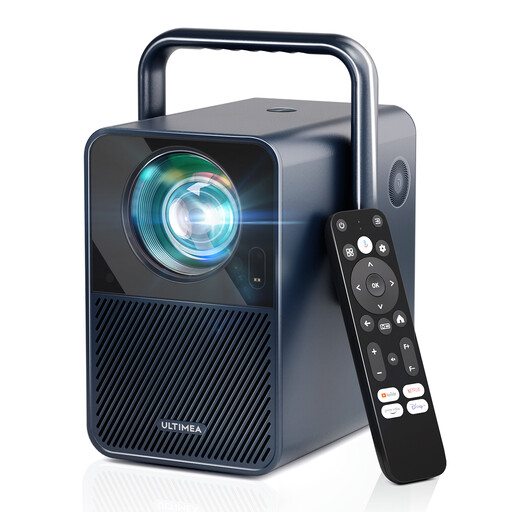
Ultimea Poseidon E40 Projector
Why this product suits this profile: For regular film nights and changing setup locations, this model offers built-in Android TV, Netflix support and a higher stated brightness than compact entry-level models.
The product specifications distinguish between native 1080p resolution and 4K decoding. The built-in system lists specific streaming platforms.
1000 ANSI lumens, Android TV 11.0, 6D keystone correction, autofocus, obstacle detection and 2 × 10 W speakers.
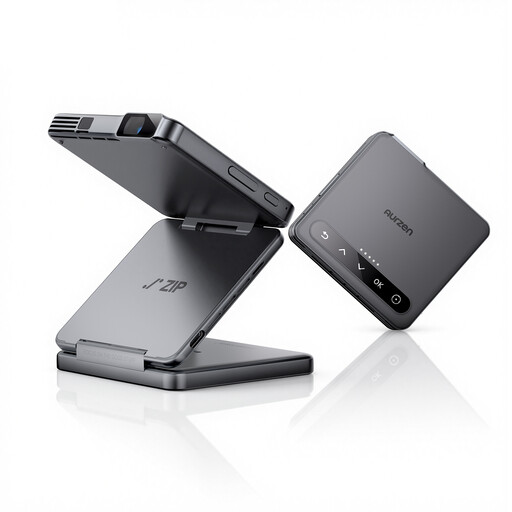
Aurzen Tri-Fold DLP Mini Projector
Why this product suits this profile: Its foldable design, built-in stand and battery make it a good fit for anyone looking for a portable projector for travel, presentations or dark outdoor settings.
Battery life is stated as up to 1.5 hours. This gives you a realistic basis for planning portable use, rather than assuming it can run indefinitely without mains power.
DLP technology, ToF autofocus, Wi-Fi, Bluetooth, USB-C and a built-in 5000 mAh battery.
Looking for more options?
We’ve put together a complete, regularly updated list of products that meet these strict selection criteria and fully comply with the safety regulations in force in the EU.
Safe and practical setup
Place the projector on a stable, level surface with plenty of ventilation. Don’t block the vents with walls, fabric or soft furnishings. For a bedroom, we recommend projecting onto a matt, light-coloured wall or screen. Outdoors, protect the device from moisture, rain and dust.
Don’t look directly into the active projection lens. Children should only use the projector under supervision. After switching it off, let it cool down before moving or storing it. Electronic devices should not be put in household waste; take them to the appropriate recycling or return scheme instead.
Projector FAQs
How bright should a projector be for the living room?
It depends on the ambient light and picture size. Lower ANSI lumen figures may be enough for darkened rooms. Higher figures are useful in daylight or for a large projection. Darkening the room often improves the picture more than choosing a projector with an overstated brightness claim.
How long does a projector last?
Lifespan depends on the light source, cooling, usage and maintenance. Laser projectors are often advertised with a long light source life. For LED and LCD models, check the manufacturer’s figures for the light source, along with the ventilation and cleaning guidance. There’s no one-size-fits-all guarantee for how long a projector will last.
Does a projector use more electricity than a TV?
Power consumption depends on brightness, operating mode, speakers and light source. A projector may use more energy than a comparable TV if it’s used for long periods every day. For occasional film nights, overall consumption is usually modest. Check the power rating in watts, and use a switched socket or the mains switch when you’ve finished watching.