
PC Wi-Fi Cards: A Buyer’s Guide and Recommendations
By Joybuy Product Recommendation Officer, July 05, 2026
A desktop PC often delivers high performance for work and leisure, but it typically relies on a wired LAN connection by default. This can restrict your flexibility in placing the computer within a room. The solution is to upgrade with a Wi-Fi card for your PC. Such an internal card provides a stable, fast, and wireless internet connection.
This guide is designed to help you find the right Wi-Fi network card for your needs. We'll explain the key technical features and present a selection of models for various use cases—from everyday browsing to demanding gaming.
Selection Criteria for Your New Wi-Fi Card
Before you decide on a model, several technical aspects should be considered. These factors determine the performance, compatibility, and feature set of your new connection.
The Right Wi-Fi Standard: Wi-Fi 5, 6E, or 7?
The Wi-Fi standard is crucial for speed and stability. Each standard has specific advantages:
- Wi-Fi 5 (802.11ac): A proven and widespread standard that is perfectly adequate for everyday tasks like browsing, sending emails, and streaming HD video. Cards with this standard offer excellent value for money.
- Wi-Fi 6E (802.11ax): This standard extends Wi-Fi 6 by adding the 6 GHz frequency band. The result is significantly lower latency and less interference from other networks. A WiFi 6E card is an excellent choice for online gaming and 4K/8K streaming, as it enables an extremely responsive connection.
- Wi-Fi 7 (802.11be): The latest standard, designed for the most demanding requirements. A WiFi 7 adapter offers extremely high data rates, Multi-Link Operation (MLO) for an even more stable connection, and is the most future-proof option for users with high-end systems and fibre optic internet.
Interface and Compatibility: PCIe and Operating System
Most internal Wi-Fi cards connect to the computer's motherboard via a PCIe (PCI Express) interface. Before purchasing, check if your motherboard has a free PCIe slot (usually x1) available.
Equally important is compatibility with your operating system. While many cards work with older versions of Windows, using the 6 GHz band of Wi-Fi 6E and Wi-Fi 7 generally requires Windows 11.
Practical Extra Features: Bluetooth Integration
Many modern Wi-Fi cards offer more than just an internet connection. A Wi-Fi card with Bluetooth is particularly convenient, as it allows you to connect wireless peripherals like mice, keyboards, headsets, or controllers directly to your PC without needing an extra USB dongle. This not only saves a USB port but also ensures a tidy workspace.
Three Wi-Fi Cards Compared
Based on the criteria mentioned, we have compiled a selection of cards that cover different requirements.
TP-Link Archer T4E AC1200
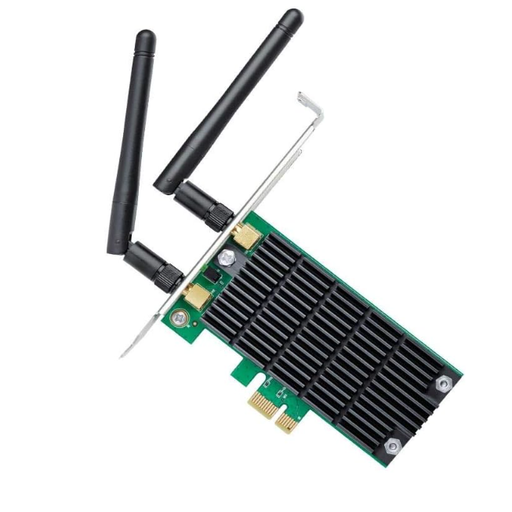
TP-Link Archer T4E PCIe Network Card, Dual Band WiFi AC1200
What makes it stand out: The Archer T4E is a reliable and affordable solution for upgrading a desktop PC with stable dual-band Wi-Fi. It uses the Wi-Fi 5 standard (AC1200) and delivers speeds of up to 867 Mbps on the 5 GHz band and 300 Mbps on the 2.4 GHz band. Thanks to Beamforming technology, Wi-Fi signals are targeted directly at connected devices, improving connection quality.
Advantages:
- Solid AC1200 dual-band speed for everyday applications
- Two external antennas for good signal coverage
- Broad compatibility with Windows 11/10/8.1/8/7/XP
- Includes a low-profile bracket for installation in compact cases
Who is it for?: Users looking for a simple and inexpensive way to equip their PC with Wi-Fi for internet browsing, office work, and HD streaming.
TP-Link Archer TXE75E WiFi 6E
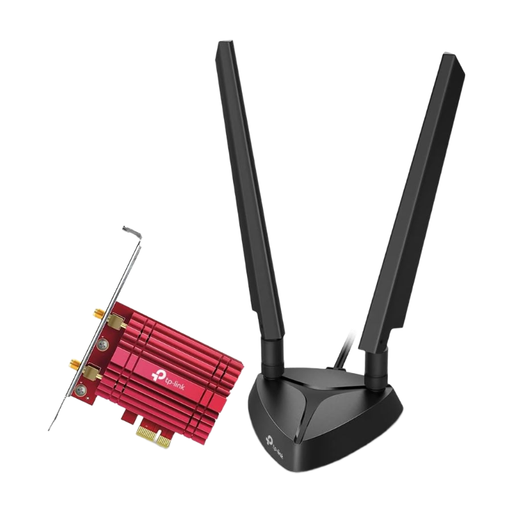
TP-Link Archer TXE75E WiFi 6E PCIe Network Card AXE5400
What makes it stand out: The TP-Link Archer TXE75E is a high-performance card for demanding users. As a WiFi 6E card, it provides access to the exclusive 6 GHz band, which minimises interference and ensures extremely low latency—a crucial advantage for online gaming and real-time applications. The card is equipped with an Intel chipset and features integrated Bluetooth 5.2.
Advantages:
- AXE5400 tri-band speed (6 GHz + 5 GHz + 2.4 GHz)
- Access to the low-interference 6 GHz band (requires Windows 11)
- Integrated Bluetooth 5.2 functionality
- External antennas with a magnetic base for flexible placement
- Supports modern WPA3 encryption
Who is it for?: Gamers, streamers, and power users who need maximum Wi-Fi performance, minimal latency, and a stable connection for bandwidth-intensive applications.
TP-LINK Archer TBE550E Wi-Fi 7
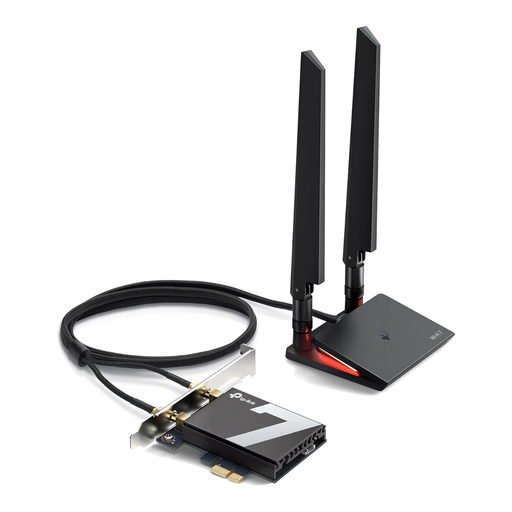
TP-LINK Archer TBE550E Wi-Fi Card for PC, Tri-Band BE9300 Wi-Fi 7
What makes it stand out: The Archer TBE550E is a WiFi 7 adapter that brings the latest generation of wireless technology to your desktop PC. With theoretical speeds of up to 9300 Mbps across three bands, this card is built for the most extreme network demands. It leverages the full potential of the 6 GHz band and offers features like 320 MHz channels for double the throughput. Integrated Bluetooth 5.4 ensures an even more stable and secure connection with peripherals.
Advantages:
- Cutting-edge technology with Wi-Fi 7 for maximum performance and future-proofing
- Extremely high BE9300 tri-band speeds
- Integrated Bluetooth 5.4 for improved range and stability
- WPA3 encryption for enhanced network security
- Designed exclusively for Windows 11 (64-bit)
Who is it for?: Tech enthusiasts, early adopters, and users with high-end hardware and very fast internet connections who want the best possible wireless performance without compromise.
Looking for more options?
This selection represents just a fraction of the available choices. If you are looking for other models or specific features, you can find a wider range of solutions in our main category.
Discover our entire range of Wi-Fi Accessories.
Frequently Asked Questions (FAQ)
How can I add Wi-Fi to my PC?
Adding Wi-Fi to a desktop PC is straightforward. You will need an internal PCIe Wi-Fi card. Turn off the PC, open the case, insert the card into a free PCIe slot, and secure it. After restarting the computer, install the drivers provided by the manufacturer to activate the card.
Is a PCIe Wi-Fi card more stable than a USB Wi-Fi adapter?
Generally, PCIe cards offer a more stable and powerful connection. Thanks to their direct connection to the motherboard and often larger, externally positionable antennas, they achieve higher speeds and better signal quality. USB adapters, on the other hand, are more flexible and easier to install but can be inferior in terms of performance and stability, especially under high network load.
Do I need a compatible router for a Wi-Fi 6E or Wi-Fi 7 card?
To take full advantage of the new standards, especially the 6 GHz band, a compatible Wi-Fi 6E or Wi-Fi 7 router is required. However, the cards are backwards compatible, meaning they will also work with older routers (e.g., Wi-Fi 5 or 6), but only at the speed and with the technology supported by those routers.