
PC Gaming Speakers Buyer's Guide for Audio
Choosing the right PC gaming speakers is crucial for an immersive gaming experience. However, the market is flooded with marketing promises that often create more confusion than clarity. Many users invest in products that look impressive on paper but disappoint in practice. This guide will help you avoid common pitfalls and make an informed decision based on objective criteria.
Common Pitfalls When Buying PC Speakers
Before you make a purchase, you should familiarise yourself with the most common issues that lead to buyer's remorse.
- Misleading Power Ratings: Many manufacturers advertise high wattage, often declared as "Peak Power." However, this value only describes a brief, maximum load capacity and says little about the actual sound quality during continuous operation. More relevant is the RMS (Root Mean Square) power, which indicates the continuous, usable output and is a more reliable indicator of volume and clarity.
- Neglected Connectivity Options: A budget speaker with only a 3.5mm jack can quickly become a bottleneck. Modern setups benefit from more flexible connections. For example, a USB-C speaker can draw both audio and power through a single cable, ensuring a clean setup. A Bluetooth speaker for PC offers wireless freedom, but latency is a critical factor here.
- RGB Lighting as a Distraction: Eye-catching PC speakers with RGB lighting may look good, but it's sometimes used to distract from mediocre audio performance. Good lighting should be an additional feature that complements the aesthetics, not replace the core function—the sound.
What Really Matters When Making Your Choice
To separate the wheat from the chaff, focus on the following technical parameters. These define the quality and functionality of your future desktop gaming speakers.
Driver Size and Sound Profile
The drivers are the heart of any speaker. Their size and design significantly determine the sound profile.
- Full-Range Drivers: Models with 2.5-inch or 2.75-inch drivers often provide a balanced reproduction of mids and highs. They are a good compromise between a compact form factor and full-bodied sound.
- Bass Reproduction: For noticeable bass without an external subwoofer, small PC speakers with bass rely on clever engineering. Look for features like a rear-facing bass reflex port, which enhances low frequencies and provides a richer foundation for explosions or music.
- Sound Modes (EQ): Some speakers offer preset equalizer modes for gaming, music, and movies. A dedicated gaming mode, for example, can emphasize footsteps and other crucial in-game audio cues.
Connectivity and Latency
The way you connect your speakers affects both convenience and performance.
- USB Connection: A connection via USB-C or USB-A is often the most straightforward solution. It acts as a digital sound card, bypassing the PC's often interference-prone onboard sound card and ensuring clean signal transmission.
- Bluetooth: For a wireless connection, the Bluetooth standard is crucial. Look for models with Bluetooth 5.3 or 5.4, as they enable lower latency (often under 40 ms). This is essential for synchronized audio in gaming.
- 3.5mm AUX Input: The classic jack offers universal compatibility with almost any audio device, from laptops and tablets to older consoles.
Form Factor and Ergonomics
Size and design play a significant role, especially on a crowded desk.
- Compact Dimensions: Pay attention to the width and height of the speakers to ensure they fit next to your monitor without taking up too much space.
- Angled Design: A slight tilt of the speakers (e.g., by 10 degrees) is a thoughtful detail. It directs the sound directly towards your ears and minimizes reflections from the desk surface, resulting in a clearer soundstage.
- Controls: Easily accessible buttons for controlling volume, input source, and lighting enhance everyday convenience.
Our recommendations for every buyer
Here are some recommendations tailored to different needs and setups.
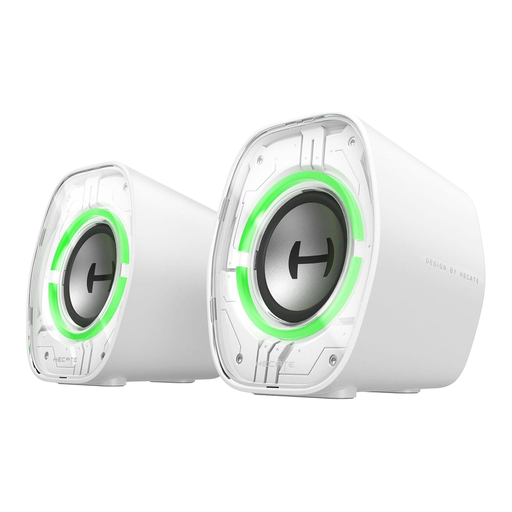
Edifier G1000 II Desktop Computer Speakers for Gaming - White
Why This Fits Their Persona: Ideal for users aiming for a minimalist or futuristic setup. The compact, white design and 9 dynamic RGB modes allow for seamless integration into any desk aesthetic without compromising on functionality.
This model bypasses the connectivity trap with its triple connection options (Bluetooth 5.4, USB-C, AUX). The RGB lighting is not a gimmick but a complement to solid 2.5-inch drivers and three EQ modes.
Very compact design at only 9.1 cm wide, fitting on any desk. The 10° tilt optimizes sound projection and reduces reflections.
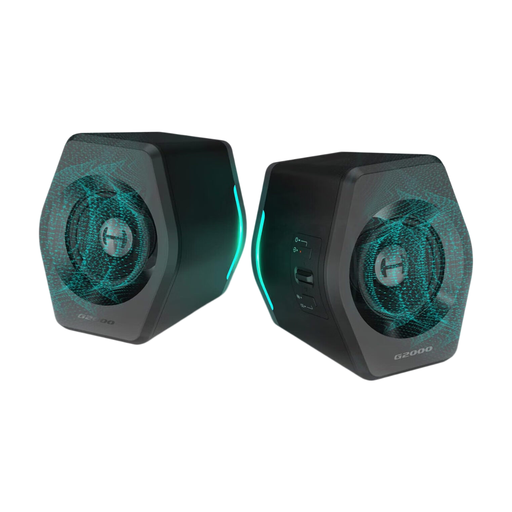
Edifier G2000 32W PC Gaming Speakers - Black
Why This Fits Their Persona: For gamers who prioritize audio performance over pure aesthetics. With 16W of RMS power and 32W of peak power, this system delivers powerful sound that doesn't lose clarity even in action-packed scenes.
This model avoids the trap of exaggerated power ratings by combining a solid RMS power output with high-quality 2.75-inch drivers and a bass reflex port. The additional subwoofer output proves that the focus is on genuine, expandable sound.
Higher audio output and a dedicated subwoofer-out for future bass upgrades. The three EQ modes (Game, Music, Movie) provide acoustic customization for different use cases.
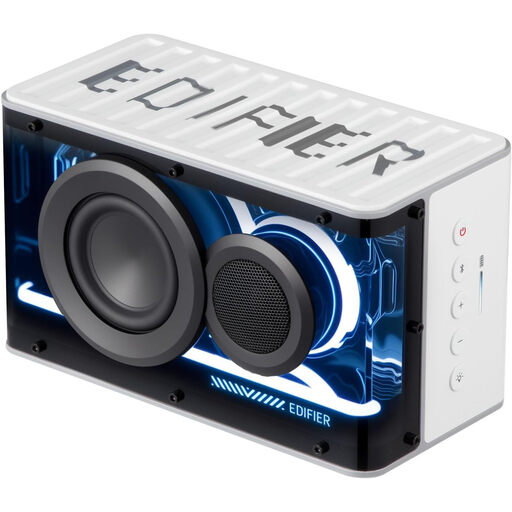
Edifier QD25 Bluetooth Speaker | Portable Desktop Audio - White
Why This Fits Their Persona: Perfect for users who want to use a speaker not just at their PC, but also around the house or on the go. The combination of desktop-grade performance, Hi-Res Audio, and a 15-hour battery life makes it extremely versatile.
This model is more than just a simple Bluetooth speaker. With Hi-Res Audio certification, a dedicated gaming mode, and app control for EQ and RGB, it delivers audio quality that far exceeds typical portable devices.
Combines high-resolution audio quality for the desktop with portable flexibility thanks to a 2500mAh battery. The ability to pair two units into a stereo pair offers an immersive soundstage.
Looking for more options?
We have compiled a complete, real-time updated list of products that fully meet these strict selection criteria and safety regulations.
Frequently Asked Questions (FAQ)
Do I need a subwoofer for gaming speakers?
Not necessarily. Many modern small PC speakers with bass use thoughtful designs like bass reflex ports to create a sufficient low-end foundation for most users and games. A separate subwoofer is mainly for enthusiasts who want maximum bass intensity for movies or bass-heavy music genres. Models with a dedicated subwoofer output offer a sensible upgrade path for the future.
Is Bluetooth suitable for PC gaming speakers?
Yes, as long as modern standards are used. Look for models with Bluetooth 5.3 or newer, as they support special low-latency modes (often under 40 ms). This minimizes the delay between video and audio, which is crucial for fast-paced games. However, for a completely latency-free transmission, a wired connection via USB or AUX remains a very reliable choice.
How important is RGB lighting on PC speakers?
The importance of RGB lighting is purely aesthetic and depends on personal preference. PC speakers with RGB can significantly enhance the atmosphere of a gaming setup and create a cohesive overall look. However, audio quality should always be the primary decision criterion. A good product is characterized by a combination of solid sound and customizable lighting, rather than using light effects to distract from weak audio performance.