
Panoramic Glass PC Case Selection Guide
A panoramic glass PC case is more than just a container for your components—it's a stage. It transforms a powerful rig into a visual centerpiece, impressively showcasing carefully selected hardware and ARGB lighting. But the path to the perfect showcase PC is paved with pitfalls. Many cases that look stunning in product photos turn out to be thermal or functional disappointments in practice.
As your Joybuy Product Recommendation Officer, I'll help you see through the marketing promises. In this guide, I'll show you the most common purchasing mistakes and which technical parameters you need to watch out for to make an informed decision for your next gaming PC case.
The 3 Most Common Mistakes When Buying a Panoramic Case
The aesthetics of a panoramic case can easily distract from critical functional flaws. Make sure you don't fall into one of these three traps:
- The "Aquarium Effect" Without Airflow: Many cases with large, uninterrupted glass panels look impressive but drastically restrict airflow. Without sufficiently sized air intakes—often realized through mesh grilles on the top, bottom, or rear—heat builds up inside. The result: your expensive components like the CPU and GPU will throttle their performance (thermal throttling) to avoid overheating.
- Misleading Compatibility Claims: A case might be advertised as "ATX-compatible," but the devil is in the details. It's often only during the build process that you discover a top-mounted 360mm radiator collides with the RAM modules, or the new, oversized graphics card has no room to spare. This becomes especially critical with modern standards like reverse-connection motherboards, which require special cutouts on the back of the motherboard tray.
- The Cable Management Disaster: An ATX glass case is meant to show off the hardware, not a messy tangle of cables. Many models don't offer enough space on the back, lack well-designed cable routing channels, or have too few tie-down points. The result is an untidy build that defeats the aesthetic purpose of the case.
What Really Matters: The Decisive Parameters
To avoid these mistakes, focus on the following technical specifications. These define whether a case just looks good or is also a solid foundation for a high-performance system.
Cooling Concept and Fan Layout
A well-thought-out cooling concept is non-negotiable for a panoramic case. Check the manufacturer's specifications carefully:
- Fan Mounts: How many fans can be mounted and where? Options on the side, bottom, and top are crucial. Bottom fans are particularly effective for directly cooling the graphics card. Models with pre-installed PC cases with ARGB fans offer a good starting point.
- Radiator Compatibility: Check the maximum size for radiators (e.g., 240mm, 280mm, 360mm) at the various mounting positions. Watch out for potential conflicts with other components.
- Airflow Design: Favour models that use perforated panels (mesh) in addition to glass to ensure unobstructed airflow. A good mid-tower case balances aesthetics and cooling performance.
Compatibility and Interior Flexibility
Measure twice, buy once. Compatibility goes far beyond just the motherboard form factor.
- Motherboard Support: Ensure that your desired format (Mini-ITX, Micro-ATX, ATX, or E-ATX case) not only fits but also leaves enough room for connectors.
- Reverse-Connection Support: If you're aiming for an extremely clean look, explicitly look for compatibility with motherboards like ASUS BTF or MSI Project Zero. The case must have the appropriate cutouts on the back of the motherboard tray for this.
- Maximum Dimensions: Note the maximum graphics card (GPU) length, maximum CPU cooler height, and maximum power supply length. Meticulously compare these values with the specifications of your chosen components.
Selections for Every Builder
Here are some models that represent a considered choice for different user profiles based on objective features.
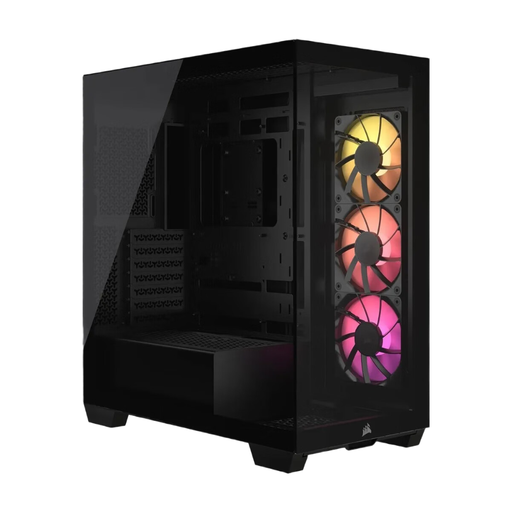
Corsair 3500X ARGB Mid-Tower ATX PC Case - Black
Why This Fits Their Persona: Ideal for users aiming for an immaculate, cable-free interior. Compatibility with reverse-connection motherboards is the key feature for hiding virtually all cables from view, allowing the panoramic aesthetic to shine.
It solves the "cable management disaster" by explicitly supporting reverse-connection compatible motherboards (e.g., ASUS BTF). This enables an extremely clean main chamber.
Supports up to 10 fans and large radiators, which avoids the "aquarium effect." Three Corsair RS120 ARGB fans are pre-installed for good baseline airflow.
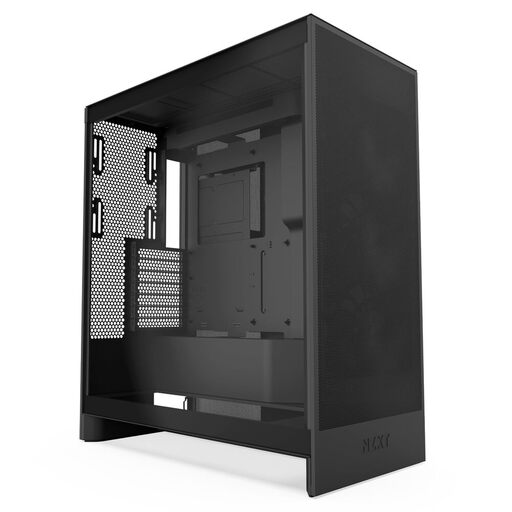
NZXT H7 Flow Mid-Tower ATX Airflow PC Gaming Case
Why This Fits Their Persona: For users who prioritize cooling performance above all else. This case combines a large glass side panel for showcasing hardware with an uncompromising focus on airflow through perforated panels.
It actively combats the "aquarium effect" with a high-performance mesh front and dedicated GPU cooling options, supporting up to three 120mm fans at the bottom.
Excellent flexibility for water cooling, with support for up to a 420mm radiator in the front. The intuitive cable management system simplifies a clean build.
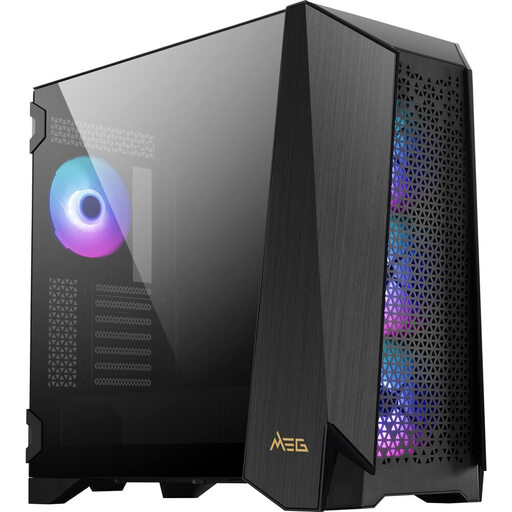
MSI MEG PROSPECT 700R Mid-Tower ATX PC Gaming Case
Why This Fits Their Persona: For builders who refuse to compromise. This case offers space for large E-ATX cases, massive GPUs (up to 400mm), and complex custom water-cooling loops, paired with unique features like a touchscreen panel.
Addresses the "misleading compatibility claims" trap with an extremely spacious and modular design. The interchangeable side panel allows for adaptation to E-ATX boards or additional fans.
Four pre-installed 140mm ARGB fans and space for up to 10 fans in total ensure high cooling performance. The 4.3-inch IPS touchscreen offers software-independent control and monitoring.
Looking for more options?
We have compiled a complete, up-to-date list of products that fully meet these strict selection criteria and relevant safety standards.
Frequently Asked Questions (FAQ)
1. Are panoramic glass PC cases generally worse for cooling?
Not necessarily. Cooling performance depends on the overall design. Modern panoramic cases often integrate discreet mesh panels on the top, bottom, or rear to facilitate good airflow. Models that offer multiple fan positions (especially on the side and bottom) can achieve very good cooling performance despite the large glass surfaces. The key is to choose a model that was intentionally designed for airflow.
2. What does "reverse-connection compatible" mean for a case?
This refers to compatibility with a new generation of motherboards (e.g., ASUS BTF, MSI Project Zero) where the primary power and data connectors are moved to the back of the board. A compatible case must have corresponding cutouts behind the motherboard tray to make these connectors accessible. The advantage is an extremely tidy interior without visible main cables, which maximizes the aesthetics of a panoramic build.