
Nintendo Switch 2 Case Buyer's Guide: Purchase Pitfalls
The Nintendo Switch 2 has arrived, and with it, the desire to protect your new console from day one. A suitable case isn't a luxury; it's a sensible investment in the device's longevity. However, the market for Switch 2 accessories is already overwhelming and filled with products that overpromise and underdeliver. Many buyers fall into traps that diminish their gaming enjoyment and ultimately lead to unnecessary expenses.
As a Joybuy Product Recommendation Officer, I see it as my duty to provide you with objective and practical guidance. In this guide, we'll highlight the three most common pitfalls when buying a Nintendo Switch 2 case and show you which crucial features to look for to make an informed decision.
The Most Common Pitfalls When Buying a Protective Case
Before you decide on a model, you should be aware of the typical flaws that often only become apparent after the purchase.
- The Dock Incompatibility Trap: Many cases, especially more rugged models, are too thick for the official Nintendo dock. The result: every time you want to play on the TV, the case has to be tediously removed. This is not only impractical but also increases the risk of scratches from constant installation and removal.
- Blocked Vents and Imprecise Buttons: A poorly designed Nintendo Switch 2 protective case can cover the console's ventilation slots. This obstructs heat dissipation, which can lead to the device overheating and potentially cause performance issues. Equally annoying are inaccurate cutouts that make the buttons feel mushy or hinder access to ports.
- Subpar Materials: Cheap cases made from soft silicone or low-quality TPU tend to yellow quickly, stretch, and lose their fit. The initial protection wears off after just a few months, and the case becomes unsightly.
What Really Matters: The Key Buying Criteria
To avoid the problems mentioned above, you should focus on three core features when choosing your Nintendo Switch 2 case.
1. Verified Dock Compatibility
The most important functional feature for many users is the question: Is the case dock compatible? Look for explicit statements from the manufacturer confirming that the case can be used with the original Nintendo Switch 2 dock. Models with a slim profile and precise manufacturing generally offer the most reliability here. A case that allows for seamless switching between handheld and TV modes integrates perfectly into your daily gaming routine.
2. Material and Protection Concept
The material is a key determinant of protection, feel, and durability. The most common materials are:
- TPU (Thermoplastic Polyurethane): Flexible and shock-absorbent. Ideal for cushioning minor drops. High-quality TPU also retains its shape and doesn't discolour as quickly.
- PC (Polycarbonate): A hard, rigid plastic that offers excellent scratch protection. It's often used in combination with TPU (hybrid cases) to combine shock and scratch resistance.
Consider what level of protection you need. For example, a Rugged Armor Switch 2 case offers greater protection for on-the-go use, while a slimmer Nano Pop Switch 2 case focuses on design and basic everyday protection.
3. Precision in Design and Ergonomics
A high-quality case is distinguished by its exact cutouts. Check that all ports (USB-C, headphones), speakers, buttons, and especially the air intake and exhaust vents are freely accessible. Ergonomics are also crucial: the case should improve the console's grip without making it bulky or uncomfortable for long gaming sessions.
Product Selections by User
Based on the criteria above, we have identified a few models that are suitable for different types of users.
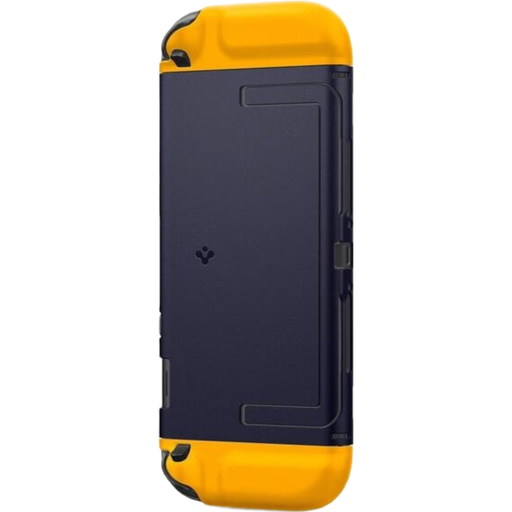
Spigen Nano Pop Case for Nintendo Switch 2 - Navy Blue
Why it's a great fit: Perfect for users seeking reliable everyday protection that enhances the console's design with a two-tone accent without adding bulk.
According to the manufacturer, this Spigen Nintendo Switch 2 Case is fully compatible with the official dock. The precise cutouts ensure full button functionality and unobstructed vents.
Offers a balanced combination of protection and aesthetics. The three-piece design protects the console and Joy-Cons separately, maintaining full modularity.
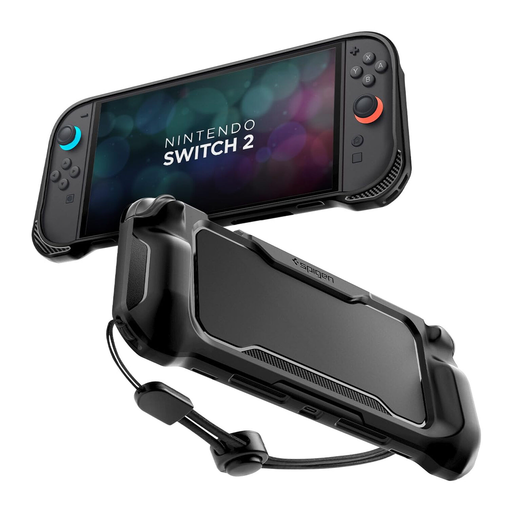
Spigen Rugged Armor Case for Nintendo Switch 2 - Matte Black
Why it's a great fit: For anyone who often carries their console in a backpack and needs maximum protection from bumps and drops without wanting an extremely bulky case.
The design focuses on maximum protection while maintaining precise cutouts for all functions to prevent overheating or usability issues. The grippy texture helps prevent accidental drops.
Provides enhanced shock protection and improved grip thanks to its robust material and special texture. Includes a wrist strap for extra security on the go.
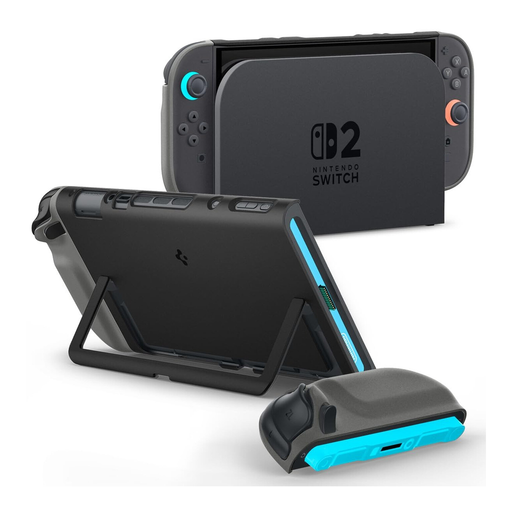
Spigen Nano Pop Case special edition for Nintendo Switch 2 - Black Red Blue
Why it's a great fit: For gamers who want to combine functionality with a unique, eye-catching design. The Special Edition offers proven quality in an exclusive colourway.
Based on the proven Nano Pop platform, it is also dock-compatible. The fit is identical to the standard model, thus avoiding all the typical problems with blocked buttons or ports.
Combines full functionality, including dock compatibility and an integrated kickstand, with an exclusive, multi-coloured design that stands out from the crowd.
Looking for more options?
We have compiled a complete, up-to-date list of products that fully meet these strict selection criteria and safety standards.
Frequently Asked Questions (FAQ)
Does a protective case affect the cooling of the Nintendo Switch 2? A well-designed Nintendo Switch 2 protective case features precise cutouts for all ventilation slots. It is crucial to choose a case from a reputable manufacturer that has taken the console's thermal design into account. Cases that block these vents can lead to overheating and performance throttling. Always check that the air pathways are clear after installation.
Can I detach the Joy-Cons while the case is on? Most modern cases, especially multi-piece designs like the Spigen Nano Pop, are designed so that the Joy-Cons can be detached without removing the entire case. For one-piece cases, particularly more rugged models, this may be necessary. This information is usually provided in the manufacturer's product description.
Do I need to remove a case for docking? This depends entirely on the case's design. Many slim cases are explicitly advertised as being dock compatible. Larger, heavy-duty protective cases often do not fit in the dock. If TV mode is a frequent use case for you, this feature should be a primary decision-making criterion.