
Multi-Device Mouse Picks for Enhanced Productivity
By Joybuy Product Recommendation Officer, July 14, 2026
Anyone who switches daily between a desktop PC, a laptop, and perhaps even a tablet knows the challenge: multiple mice and keyboards clutter your desk and interrupt your workflow. A Multi-Device Mouse is designed to solve this exact problem. It allows for seamless switching between different systems with a single click, thereby boosting your efficiency.
This guide is here to help you understand how these mice work and what their key features are. We will introduce a selection of models tailored to the needs of professional users, creatives, and developers, and explain the most important criteria to consider when making your choice.
What to Look for in a Multi-Device Mouse
Choosing the right model depends on your individual workflow. Three main criteria are especially important:
1. Connectivity and Compatibility
A wireless multi-device mouse can connect in two ways: via Bluetooth or a 2.4 GHz USB receiver (dongle).
- Multi-Device Bluetooth Mouse: The connection is made directly with the device, without occupying a USB port. This is ideal for modern laptops like a MacBook or ultrabooks with limited ports. Most models can pair with up to three devices simultaneously.
- USB Receiver: A small dongle provides a stable and often lower-latency connection. Some manufacturers offer a receiver that is compatible with multiple devices from the same brand (e.g., Logi Bolt).
Before purchasing, check that the mouse is compatible with all your operating systems (Windows, macOS, iPadOS, Linux).
2. Ergonomics and Design
For hours of daily use, an ergonomic mouse is a worthwhile investment. Models with a contoured shape that support the natural posture of your hand and wrist can reduce fatigue. Look for features like a thumb rest and well-placed buttons. For work environments like open-plan offices or a home office, a quiet-click mouse is a considerate choice, as it significantly minimises clicking sounds.
3. Precision and Customisable Features
For tasks that require high precision (e.g., photo editing, CAD, programming), a sensor with a high DPI (Dots Per Inch) count is beneficial. A value of 4000 DPI or more allows for precise movements, even on high-resolution 4K or 5K monitors.
A professional wireless mouse also stands out with its customisable buttons. Using the accompanying software, you can assign specific commands or macros to buttons to speed up repetitive tasks. This is particularly useful for a mouse for programmers or designers looking to optimise their workflow.
Professional Wireless Mice We Recommend
Based on the criteria mentioned, we have compiled a selection of models designed for demanding work environments.
Logitech MX Master 4 Ergonomic Wireless Mouse
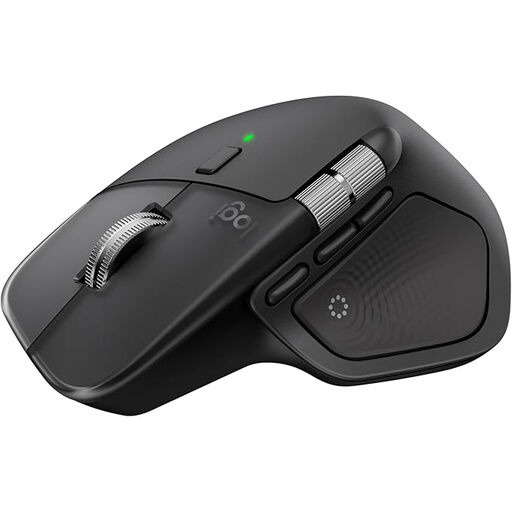
Logitech MX Master 4 Ergonomic Wireless Mouse
-
Why it stands out: The MX Master 4 introduces new control concepts with the "Actions Ring" and haptic feedback. The haptic feedback provides tangible responses to actions, while the Actions Ring displays context-sensitive shortcuts directly at the cursor. The electromagnetic MagSpeed scroll wheel allows for scrolling 1,000 lines per second.
-
Pros:
- 8K DPI Sensor: Precise tracking on virtually any surface, including glass (4 mm minimum thickness).
- Quiet Clicks: Reduces click noise by 90% compared to previous models.
- Multi-Device Connectivity: Connect with up to 3 devices via Bluetooth or the Logi Bolt USB-C receiver.
- Ergonomic Design: Angled shape and thumb wheel to reduce hand strain.
- Quick-Charge Function: One minute of charging via USB-C provides up to three hours of use.
-
Who it's for: Creatives and power users who value innovative features, tactile feedback, and maximum customisation to accelerate their workflow.
Logitech MX Master 3S Bluetooth Edition Wireless Mouse
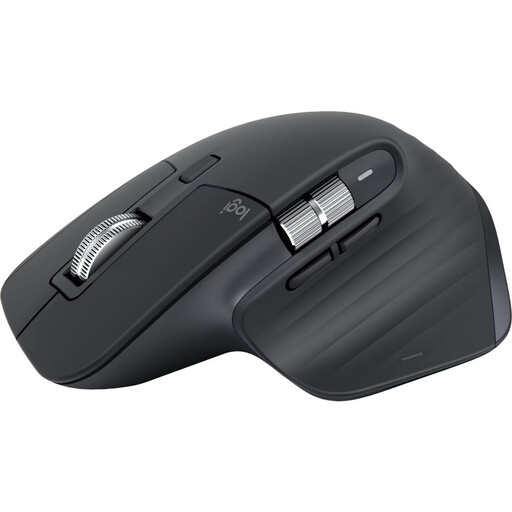
Logitech MX Master 3S Bluetooth Edition Wireless Mouse
-
Why it stands out: The MX Master 3S Bluetooth Edition intentionally omits a dongle, targeting users who prefer a direct and straightforward connection. It combines the series' proven ergonomics with Quiet Click technology, making it an excellent choice for quiet work environments.
-
Pros:
- Pure Bluetooth Connection: Pair with up to 3 devices without a USB receiver.
- 8K DPI Darkfield Sensor: Reliable tracking, even on glass.
- MagSpeed Scroll Wheel: Switch between rapid and precise, line-by-line scrolling.
- Long Battery Life: Up to 70 days on a full charge.
- Proven Ergonomics: The contoured shape provides comfort for long workdays.
-
Who it's for: Professional users, especially MacBook and PC users with few USB ports, who are looking for a quiet, precise, and reliable mouse for the office or home office.
RAPOO MT760 PRO Wireless Mouse (Logitech MX Master Alternative)
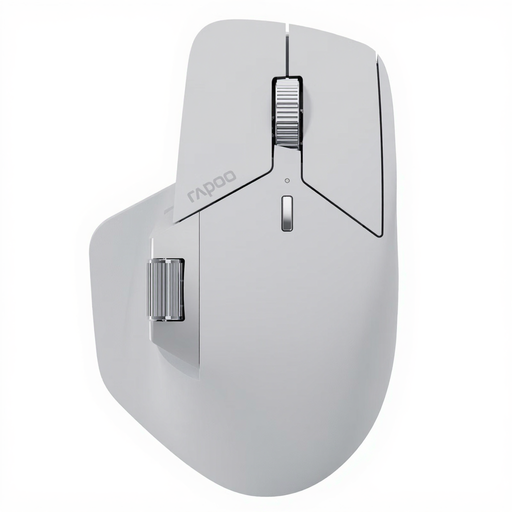
RAPOO MT760 PRO Wireless Mouse
-
Why it stands out: The RAPOO MT760 PRO positions itself as a strong Logitech MX Master alternative and leverages the innovative NearLink technology. This promises exceptionally low latency and high energy efficiency. With the ability to connect up to seven devices, it sets a high standard for multitasking.
-
Pros:
- Extreme Connectivity: Connect with up to 7 devices (NearLink, Bluetooth, wired).
- High Performance:12K DPI sensor and a 2000 Hz polling rate for extremely responsive inputs.
- Long Battery Life: Up to 120 days of use on a single charge.
- 11 Programmable Buttons: Extensive customisation options for complex workflows.
- M+ Cross-Computer Technology: Seamless cursor flow and file transfer between different computers.
-
Who it's for: Power users, developers, and data analysts who need to manage a maximum number of devices and are looking for a technically advanced mouse with long battery life and high precision.
Discover More Options
The models presented here cover the needs of many professional users. If you haven't found the right product for your specific requirements—such as a different budget, a left-handed design, or other features—you can find more options in our collection.
Explore our entire selection of Wireless Mice.
Frequently Asked Questions
What defines a multi-device mouse?
A multi-device mouse is capable of establishing an active connection to multiple devices simultaneously (e.g., two laptops and a tablet). Using a dedicated button, often called "Easy-Switch," the user can seamlessly switch control between these devices without needing to re-pair the mouse each time.
How do I connect a mouse to multiple devices like a PC and a MacBook?
The process is typically straightforward. First, put the mouse into pairing mode and connect it to your first device (e.g., the MacBook) via Bluetooth. Then, select another channel on the mouse, put it into pairing mode again, and connect it to the second device (e.g., the PC). After that, you can switch between controlling the MacBook and the PC at the press of a button on the mouse.
Is an ergonomic mouse worthwhile for programmers and office work?
For users who spend many hours at the computer every day, an ergonomic mouse can make a noticeable difference. Its special design promotes a more natural posture for the hand and wrist. This can help reduce strain and discomfort during long and intensive use.