
Mini Bluetooth Keyboards: Recommendations and Buyer’s Guide
Working, studying, or creating on a tablet or smartphone is often hampered by cumbersome touchscreen typing. A mini Bluetooth keyboard offers a practical solution to boost productivity and comfort on the go, without taking up much space in your bag.
This article serves as your guide. It highlights the key criteria to consider when choosing a compact keyboard and presents a selection of models with various features. Our goal is to provide you with an informed basis for your decision.
By a Joybuy Product Recommendation Officer
What to Look for When Choosing a Compact Keyboard
The market for wireless keyboards is vast. To find the right model for your needs, several technical and functional aspects are crucial.
1. Connectivity and Compatibility
The primary function of a Bluetooth keyboard is a stable, wireless connection. Ensure the keyboard is compatible with your devices' operating systems (e.g., iOS, Android, Windows, macOS). Many models today offer a multi-device keyboard feature. This allows you to pair the keyboard with multiple devices simultaneously—such as your laptop, tablet, and smartphone—and switch between them at the touch of a button. This is especially useful for users working within a flexible device ecosystem.
2. Portability: Size, Weight, and Design
For a travel keyboard, dimensions and weight are key factors. A compact keyboard without a number pad (TKL format) is already significantly more space-efficient. Even more mobile is a foldable keyboard, which can be collapsed to the size of a wallet. Compare the dimensions when folded and unfolded, as well as the total weight, to ensure the keyboard meets your mobility requirements.
3. Extra Features for Enhanced Productivity
Additional features can make your daily workflow much easier. A keyboard with a touchpad eliminates the need for a separate mouse, creating a laptop-like experience, which is particularly beneficial when using a keyboard for a tablet. Those who frequently work in public spaces like libraries, trains, or cafés will appreciate a quiet keyboard. Models with a scissor-switch mechanism are often a great choice here, as they provide a quiet yet precise keystroke.
Top Mini Bluetooth Keyboard Picks
Based on the criteria mentioned, we have curated a selection of models that cater to different user profiles.
UNIQ Forio Foldable Bluetooth Keyboard
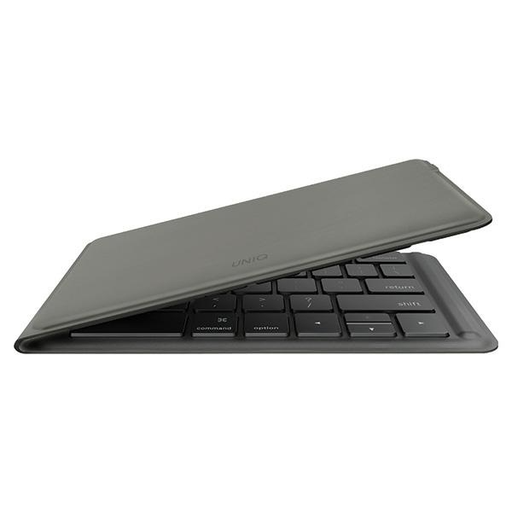
Why it stands out The UNIQ Forio's main feature is its foldable design. When folded, it measures just 167 x 105 x 13 mm and weighs only 175g, making it extremely portable.
Pros
- Foldable Design: Folds down compactly for easy transport.
- Lightweight: At just 175g, it's very light and perfect for travel.
- Broad Compatibility: Supports iOS, Windows, macOS, and Android.
- Rechargeable Battery: Offers up to 26 hours of use per the manufacturer and charges via USB-C.
Who it's for Users for whom maximum portability and an ultra-compact form factor are top priorities. Ideal for digital nomads, commuters, and anyone who frequently changes their workspace.
Inateck Tablet Keyboard with Touchpad (KB01105)
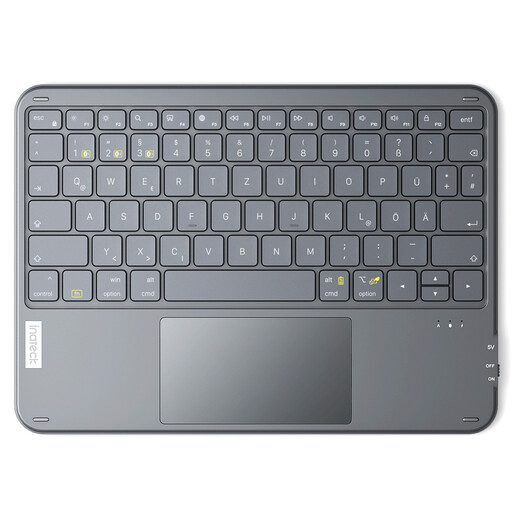
Why it stands out This model combines an ultra-thin 5 mm profile with an integrated touchpad. It effectively turns a tablet into a laptop substitute and features a German QWERTZ layout.
Pros
- Integrated Touchpad: Allows for precise cursor control without an external mouse.
- Multi-Device Connection: Can be connected to up to three devices simultaneously.
- German Keyboard Layout: A full-fledged QWERTZ iPad keyboard for error-free typing in German.
- Ultra-Slim Profile: Very sleek and light, at just 5 mm thick and 228g.
Who it's for Tablet users (especially iPad or Windows) who are looking for an all-in-one solution with keyboard and mouse functionality in a single device and value a German key layout.
CHERRY KW 7100 Mini Bluetooth Keyboard
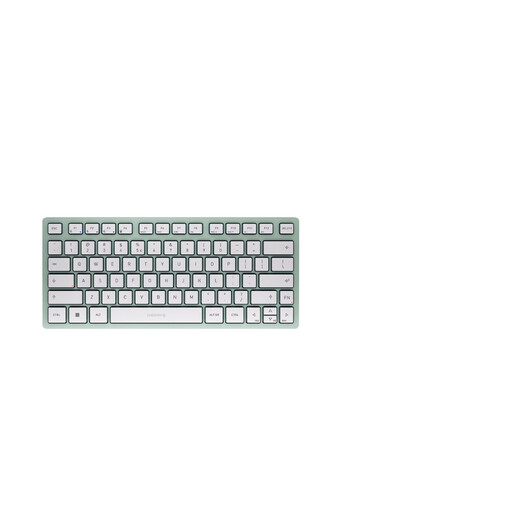
Why it stands out The KW 7100 Mini uses the proprietary CHERRY SX scissor-switch mechanism. This technology ensures an exceptionally quiet, precise, and comfortable typing feel, making it an excellent quiet keyboard.
Pros
- CHERRY SX Scissor Mechanism: Delivers a quiet yet tactile keystroke.
- Long Battery Life: Up to 18 months on two AAA batteries, according to the manufacturer.
- Multi-Device Function: Allows switching between three paired devices.
- Includes Accessories: Comes with a matching protective sleeve for transport.
- Note: This model comes with a US (QWERTY) layout.
Who it's for Prolific writers who value a high-quality, low-noise typing experience. Suitable for use in offices, libraries, or other quiet environments.
Looking for a Different Style?
The models featured cover key functional priorities like portability, touchpad integration, and typing comfort. If none of these match your aesthetic preferences or if you're looking for specific colours, there are other alternatives to explore.
For more options, including different designs and colour schemes, you can browse our selection of cute red keyboard.
Frequently Asked Questions
What should I look for in a mini Bluetooth keyboard for a tablet?
For a keyboard for a tablet, three points are particularly relevant:
- Compatibility: Ensure the keyboard is explicitly optimised for your tablet's operating system (e.g., iPadOS, Android) so that all special function keys work correctly.
- Size and Weight: The keyboard should be light and compact to maintain the tablet's portable nature.
- Extra Features: An integrated touchpad can significantly simplify navigation and replace a separate mouse.
Can I connect a mini Bluetooth keyboard to multiple devices?
Yes, many modern models are designed as multi-device keyboards. They can typically be paired with two to three devices at the same time. A dedicated button or key combination allows you to quickly switch between your laptop, tablet, and smartphone without having to re-establish the connection each time.
What does QWERTZ mean on an iPad keyboard?
QWERTZ refers to the standard keyboard layout in German-speaking regions, named after the first six letters in the top row of keys. For users who primarily type in German, a QWERTZ iPad keyboard is important because it ensures the correct placement of umlauts (?, ?, ü), the ? (eszett), and special characters, including the swapped positions of the Z and Y keys. With a different layout (e.g., QWERTY), the characters printed on the keys will not match the input.