
Buying a memory card: choosing the right capacity, speed and compatibility
A memory card may look like a simple accessory at first glance. In practice, however, the card format, write speed and device compatibility determine whether photos are saved, videos are recorded without interruptions or games load reliably. A high GB figure alone is not enough to guide your choice.
Typical unsuitable purchases are caused by three misunderstandings:
- Read speed is confused with write speed: High read speeds mainly make data transfers faster. For video recording and burst photography, sustained write speed is what matters.
- ‘Up to’ figures are understood as continuous performance: Maximum values often only apply under certain conditions, such as when using a suitable card reader or compatible interface.
- The card format is not checked: A microSD card will not automatically fit every device. A standard SD slot requires an SD adapter, which is not included with every offer.
The most important parameters when buying a memory card
1. Format and device compatibility
A microSD card is commonly used in smartphones, tablets, action cameras, drones, security systems and handheld consoles. Larger SD cards are mainly found in digital cameras, camcorders and laptops.
Cards with capacities of 64 GB or more are usually microSDXC cards or SDXC cards. Your device must support this standard. You should also check the manufacturer’s specifications for maximum capacity and supported file system. Despite its suitable size, a microSDXC card may be incompatible with older devices.
2. Write speed and speed classes
For basic photography, music and Full HD applications, a Class 10 memory card is often sufficient. The Class 10 designation indicates a guaranteed sequential minimum write speed of 10 MB/s.
For continuous video recording, further specifications are relevant:
- UHS-I: Refers to the bus interface and does not automatically indicate the actual write speed.
- U1: Minimum write speed of 10 MB/s under the relevant classification conditions.
- U3: Minimum write speed of 30 MB/s.
- V10 and V30: Video Speed Class ratings with a guaranteed minimum write speed of 10 or 30 MB/s respectively.
A U3 V30 memory card is therefore more suitable for many 4K recordings than a basic Class 10 card. Whether the camera can actually make use of this performance depends on the device, file format and recording profile.
3. Capacity suited to your intended use
A 128GB memory card is suitable for everyday photos, Full HD videos, apps or moderate dashcam use. If you regularly store lots of RAW photos, longer video files or several games, you may wish to choose a 256GB memory card.
A 512GB memory card or 1TB memory card provides more space for large media collections and games. With dashcams and security cameras, however, you should look beyond capacity alone. Continuous recording puts more strain on storage than occasional file transfers. Check whether the device manufacturer recommends a particular card or a high-endurance version.
Which memory card is right for each user profile?
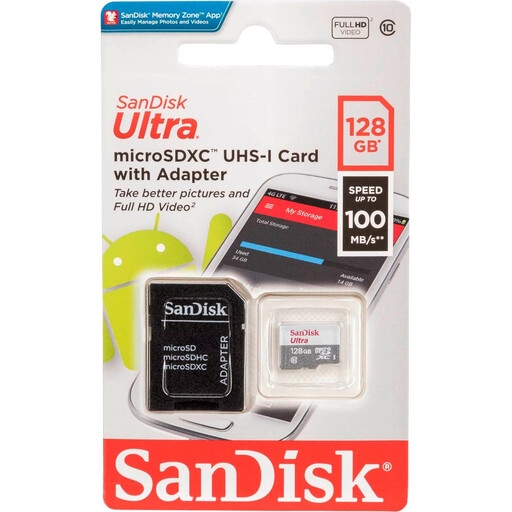
SanDisk Ultra 128GB microSDXC Card
Why this product suits this profile: This 128GB microSDXC card is designed for smartphones, tablets, action cameras and everyday Full HD recording. It offers read speeds of up to 100 MB/s, as well as Class 10, U1, V10 and A1 ratings.
The stated write speed of up to 10 MB/s makes it easier to assess the card’s performance. For demanding 4K or continuous recording, choose a model with a higher classification.
128 GB capacity, UHS-I interface, A1 classification and compact design. An SD adapter is not included with this offer.
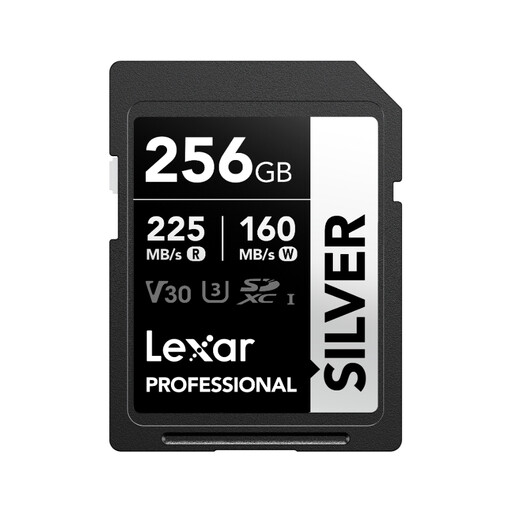
Lexar 256GB SD Card SILVER
Why this product suits this profile: This SDXC UHS-I card is aimed at photographers and videographers who need 256 GB, U3 and V30 for burst photography and compatible 4K recording.
The specifications distinguish between maximum read speed and write speed. According to the product description, read speeds of up to 205 MB/s require a compatible Lexar card reader.
Write speeds of up to 140 MB/s, a V30 rating and compatibility with many Canon, Sony and Nikon cameras according to the supplier’s specifications.
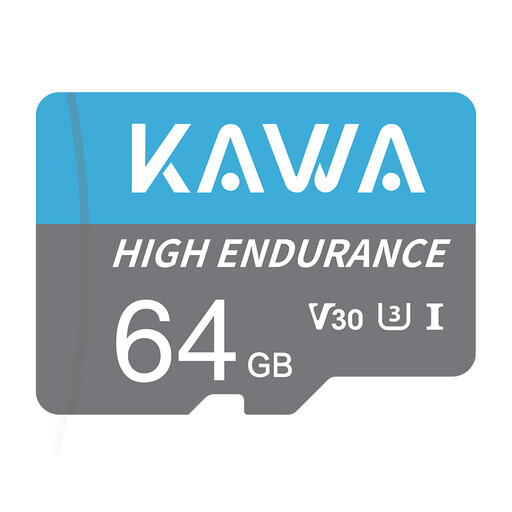
KAWA 64GB Micro SD Card High Endurance
Why this product suits this profile: According to the product description, this microSDXC card is intended for dashcams, security cameras, baby monitors, smartphones and drones, and is rated A1, U3, Class 10 and V30.
This choice takes continuous operation into account rather than looking only at storage capacity. Even so, check that your dashcam or camera supports this capacity and file system.
Stated read speeds of up to 100 MB/s and write speeds of up to 60 MB/s, with a design intended to withstand temperature, water, magnetic and X-ray exposure.
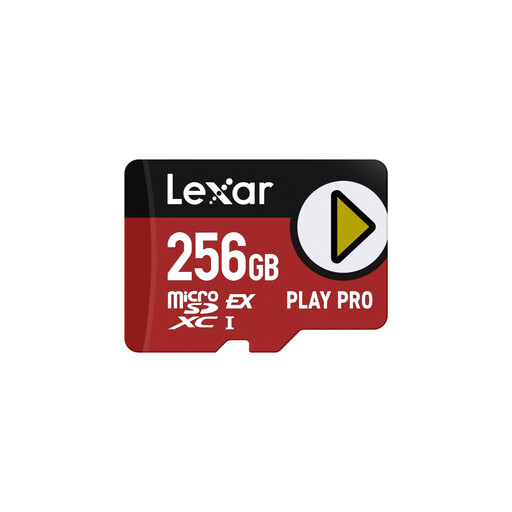
Lexar PLAY PRO microSDXC Express Card 256GB
Why this product suits this profile: This 256GB memory card is intended for handheld consoles and other devices with a microSD Express interface. It offers read speeds of up to 900 MB/s and write speeds of up to 600 MB/s.
The high speed figures only apply when microSD Express is supported. In older UHS-I or UHS-II devices, the card operates at the performance available from the device.
A2 classification, PCIe/NVMe technology and 256 GB capacity. The stated IPX7 rating is not a substitute for regular data backups.
Looking for more options?
We have put together a complete, regularly updated list of products that fully meet these strict selection criteria and the safety regulations applicable in the EU.
Memory cards for dashcams, cameras or gaming consoles
For a memory card for a dashcam, check the specific camera model, recommended capacity and the demands placed on the card by loop recording. Some models, such as those from DDPAI or 70mai, are designed for particular dashcams. For a memory card for a camera, V30, U3 and actual write speed are often the key considerations.
For a memory card for a gaming console, device approval is particularly important. A microSD Express card can only achieve its high performance figures when used with a suitable Express interface. You will also need a suitable card reader to transfer data to a computer. USB-A and USB-C ports are not automatically the same speed.
Memory card FAQ
How long does a memory card last?
Service life depends on the memory cells, amount of data written, temperature and usage. Frequent overwriting, as with dashcams, puts more strain on a card than occasional photo transfers. Important files should be backed up regularly regardless.
Does a new memory card need to be formatted?
In many cases, formatting the card in the target device is advisable. This allows a camera, smartphone, console or dashcam to create the appropriate file system and folder structure. Any data stored on the card beforehand will be deleted.
Why is my memory card slower than stated?
‘Up to’ figures often require a compatible device, suitable card reader and appropriate files. Actual speed may be lower because of the interface, file system, numerous small files or simultaneous write operations.