
Mechanical Gaming Keyboard 2026: A Buying Guide to Layouts, Rapid Trigger and Switches
A mechanical gaming keyboard can deliver reliable performance for many years, whether you use it for gaming or typing. However, eye-catching marketing claims do not automatically mean a model is the right choice. The key factors are the layout, connection type, switch technology and how you actually use the keyboard at your desk.
Common Buying Mistakes and Marketing Traps
1. “Mechanical feel” does not always mean mechanical technology
Some models advertise a mechanical typing feel while using a membrane construction. The MageGee TS91, for example, is described as featuring a “Mechanical-Feel” design. That is not the same as a mechanical keyboard with individual mechanical switches.
Before buying, check whether the model uses:
- mechanical switches,
- optical switches,
- magnetic switches or
- a membrane mechanism
This distinction is essential if you want to replace switches or customise the keyboard later.
2. Polling rate is often overvalued
An 8 kHz polling rate means that the keyboard can theoretically report its input data to the computer up to 8,000 times per second. This can reduce the technical transmission interval, but it is not a standalone measure of gaming performance.
The actual experience also depends on the game, operating system, USB connection, firmware and PC workload. For many users, a stable wired connection is more valuable than the highest possible number.
3. US layout can be impractical for everyday use
Many compact gaming keyboards are sold with a QWERTY US layout. For users in Germany, this means losing the familiar positions of “Z” and “Y”, German special characters and, in some cases, suitable key legends for umlaut keys.
If you regularly write, code or use the keyboard for working from home, look specifically for a QWERTZ keyboard. Switching the software layout to German does not change the physical key legends.
The Most Important Parameters Before Buying
Layout and Size
The form factor determines which keys are directly accessible:
- 60% gaming keyboard: usually 61 keys, without dedicated function keys, arrow keys or a number pad. Functions are often accessed via the Fn key. This format is well suited to small desks and FPS players who need plenty of room for mouse movement.
- 75% gaming keyboard: typically 82 or 83 keys, with function keys, arrow keys and part of the navigation cluster. This compact mechanical keyboard combines a smaller footprint with everyday practicality.
- Tenkeyless, or 87-key keyboard: without a number pad, but with a dedicated row of function keys.
- Full-size keyboard: around 104 or 108 keys, including a number pad. It is practical for spreadsheets, accounting and extensive typing, but requires more desk space.
For German workflows, a QWERTZ model with correctly labelled keys is usually less complicated than an imported US model.
Switch Technology and Rapid Trigger
Traditional mechanical switches can be linear, tactile or clicky. Linear switches offer a smooth, consistent keypress, while tactile models provide a noticeable bump. Clicky variants also produce a pronounced acoustic signal, which can be distracting in shared spaces.
A Hall-effect keyboard uses magnetic sensing. On compatible models, the actuation point and, in some cases, the reset point can be configured in software. Magnetic switches are often hot-swappable, but compatibility with conventional MX switches cannot be assumed.
Rapid Trigger can detect a key reset based on the direction of movement. This is particularly useful for quick directional changes in FPS games. Check whether the software supports profiles, dead zones and an adjustable actuation point. Such a feature cannot replace practice or guarantee better gaming performance.
Connectivity and Customisation
A wired gaming keyboard with USB-C requires neither a battery nor wireless pairing. It is a practical choice for desktop PCs. If the cable is detachable, the USB-C port should be mechanically protected and the cable should not be bent sharply.
A hot-swappable keyboard lets you replace compatible switches without soldering. You must check the number and design of the pins, as well as support from the PCB. Keycaps are not always universally compatible either, especially for special keys and compact layouts.
An RGB keyboard primarily improves visibility and the look of your setup. Adjustable brightness, switchable effects and software that works with your operating system are the features that matter most. RGB lighting should not be confused with greater input accuracy.
Product Selection by Usage Profile

AJAZZ AK820 Wired Mechanical Keyboard, 75%, QWERTZ
Why This Fits Their Persona: The compact QWERTZ layout is ideal for beginners who want to combine gaming with everyday typing without giving up arrow and function keys.
The product specifications explicitly state that it has 82 keys in a German QWERTZ layout and a wired USB-C connection.
Hot-swap support for compatible 3- and 5-pin switches, RGB lighting and a volume control.
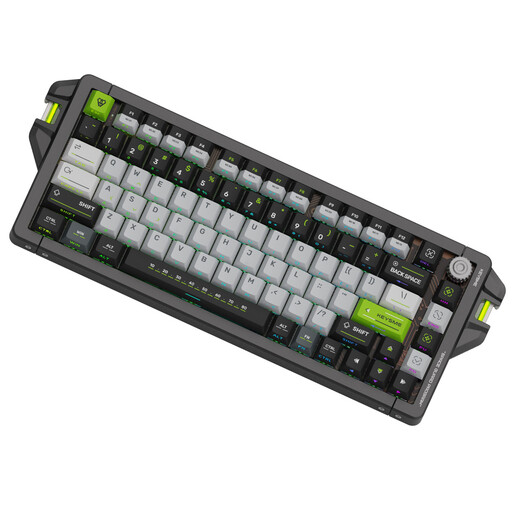
KEYSME AHD-HCKR-C 75% Gaming Keyboard
Why This Fits Their Persona: This model is aimed at FPS players and technology enthusiasts looking for magnetic switches, Rapid Trigger and extensive configuration options.
The manufacturer specifications state an adjustable trigger range of 0.1 to 4.0 mm, Rapid Trigger and a wired 8 kHz polling rate. However, the layout is US QWERTY.
CNC-machined aluminium case, PBT dye-sublimated keycaps and hot-swap support according to the product description.
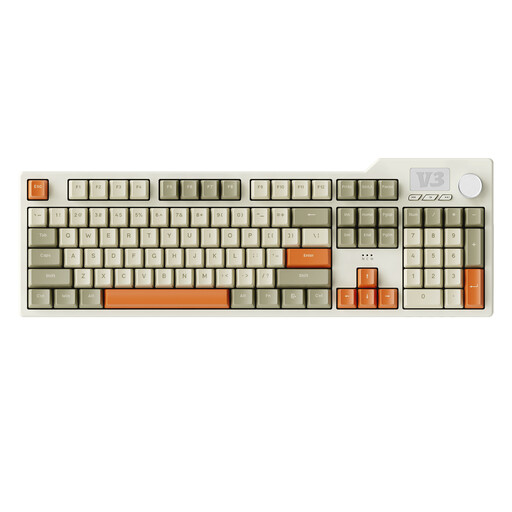
AJAZZ AK35I V3 Full-Size Gasket Mechanical Gaming Keyboard
Why This Fits Their Persona: Heavy typists, office users and anyone who needs a number pad get a complete 104-key layout for gaming and productive tasks.
This selection avoids an aggressively reduced layout. Hot-swap support, USB-C and programmable macros make future customisation easier.
According to the product description: Sea Salt linear switches, PBT keycaps, five layers of dampening and a volume control.
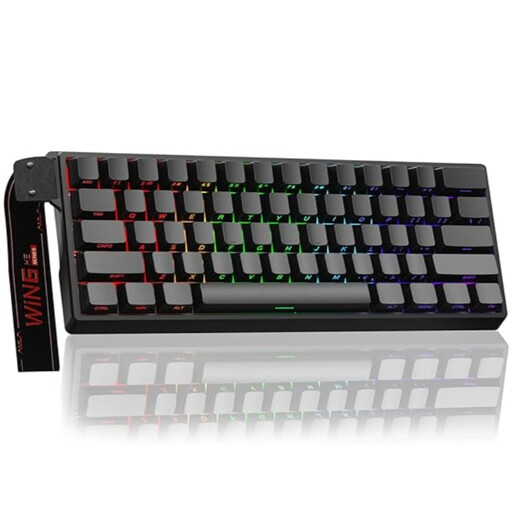
AULA WIN60HE 60% Gaming Keyboard
Why This Fits Their Persona: The compact form factor leaves plenty of room for the mouse and suits users who prefer a Hall-effect keyboard for fast-paced PC games.
The product name lists magnetic switches, Rapid Trigger mode, hot-swap support and an 8,000 Hz polling rate. The US layout should be checked before purchase.
Compact 60% format, wired connection and RGB lighting according to the product specifications.
Additional Selection Criteria for Germany
Check compatibility with Windows or macOS, cable length and the position of the USB-C port. For imported models, you should also review the manual, return policy and details of the responsible EU contact point.
For routine care, a dry or slightly damp cloth is usually sufficient. Disconnect the keyboard from the computer before cleaning it. Liquids, high humidity and direct heat sources can damage the electronics, key legends and switches. Small components such as keycaps and switches should be kept out of the hands of young children.
Looking for more options?
Our regularly updated selection includes more wired USB-C keyboards for gaming, working from home and everyday use.
Frequently Asked Questions About Mechanical Gaming Keyboards
How long does a mechanical gaming keyboard last?
Its lifespan depends on the switches, usage, dust, liquids and build quality. Manufacturers often quote very high keystroke ratings, but these figures do not guarantee the lifespan of the keyboard as a whole. Replaceable switches and keycaps can make maintenance easier.
Is Rapid Trigger essential for every player?
No. Rapid Trigger is mainly useful for players who want to configure short actuation and reset distances in fast-paced games. For office work, typing and casual gaming, the layout, typing feel and connection reliability are often more important.
Is an 8 kHz polling rate worth it?
It can increase the technical polling frequency, but it requires compatible firmware, a suitable USB connection and supporting software. If you do not use the relevant features, you may see no meaningful practical benefit. The polling rate should therefore be assessed alongside switch technology, layout and build quality.