
Mechanical Keyboard: Buyer's Guide and Recommendations for 2026
A mechanical keyboard differs from conventional membrane keyboards primarily in its key mechanism. Beneath each keycap is an individual mechanical switch that provides precise tactile and acoustic feedback. This design leads to greater durability, a more consistent typing feel, and extensive customisation options, making it the preferred choice for gamers, developers, and heavy typists.
Choosing the right model depends on your specific requirements for acoustics, haptics, layout, and connectivity. This guide breaks down the technical criteria essential for making an informed purchasing decision.
Buyer's Guide: What to Look for in a Mechanical Keyboard
The decision to buy a mechanical keyboard is based on balancing several technical parameters. The following criteria are crucial for your selection.
1. Switch Types: The Heart of the Keyboard
The switch type is the defining factor for the typing feel and sound profile. There are three main categories:
- Linear Switches: These offer a smooth, resistance-free keystroke from top to bottom. They are especially popular with gamers as they allow for rapid, repeated keystrokes without any tactile bump. They often fall into the quiet mechanical keyboard category.
- Tactile Switches: They produce a noticeable bump at the actuation point without making a loud clicking sound. This type is an all-rounder, well-suited for typing, as it provides clear feedback on key activation.
- Clicky Switches: This variant combines the tactile bump with a distinct, audible click. Many heavy typists appreciate this auditory feedback, but it can be considered disruptive in office environments or shared spaces.
2. Layout and Form Factor: From Full-Size to Compact
The size of the keyboard affects both ergonomics and the available space on your desk. Common form factors include:
- Full-Size (100%): The standard layout, including a number pad, function keys, and a navigation cluster. Suitable for users who frequently enter numerical data.
- TKL (Tenkeyless, 80%): This layout omits the number pad, creating more space for mouse movement. A popular format for gaming keyboards.
- 75% Layout: A compact keyboard that condenses the arrow keys and some navigation keys into a tighter block. It's a great compromise between a small footprint and functionality.
- 60% / 65% Layout: Extremely compact form factors that omit the function row, arrow keys, and navigation cluster. These functions are often accessible via key combinations (Fn layer).
3. Connectivity: Wired, Wireless, or Both?
The connection method is a crucial factor for flexibility and your intended use case.
- Wired (USB-C): Offers the lowest latency and a stable connection without any battery management. Often preferred for competitive gaming.
- Wireless (2.4 GHz): A wireless keyboard using a 2.4 GHz dongle provides a low-latency connection that is nearly on par with a wired one. Ideal for a clean setup without compromising on performance.
- Bluetooth Keyboard: Allows connection to multiple devices (PC, tablet, smartphone) and easy switching between them. Latency is typically slightly higher than with 2.4 GHz, but it's negligible for typing and general use.
- Tri-Mode: Models that combine all three options (USB-C, 2.4 GHz, Bluetooth) offer maximum flexibility.
4. Additional Features
- RGB Lighting: An RGB keyboard allows for individual customisation of the key lighting. This serves not only an aesthetic purpose but can also be used to highlight important key bindings.
- Hot-Swap Capability: A hot-swap keyboard allows you to change the mechanical switches without soldering. This offers maximum customisation of the typing feel and simplifies repairs.
- Compatibility: Ensure the keyboard natively supports your operating system. Many models offer easy switching for a keyboard for Mac and Windows. The standard QWERTY keyboard layout is common in most regions.
Our Top Picks for 2026
Based on the technical criteria above, we have curated a selection of models that cater to different user profiles.
Ajazz AK820 Pro 75% Mechanical Tri-Mode Keyboard
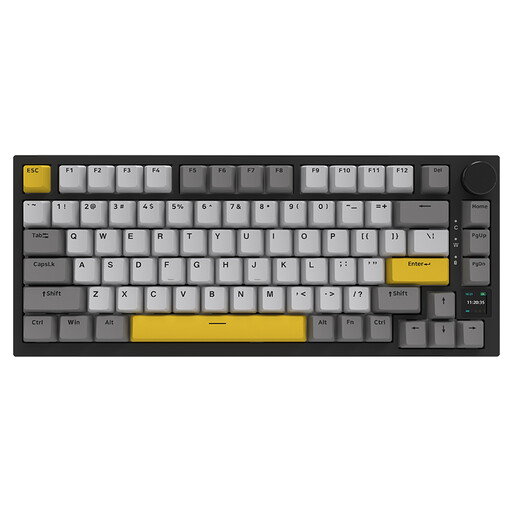
Why We Recommend It The Ajazz AK820 Pro integrates advanced features typically found in higher-priced custom keyboards. Its TFT colour screen, which displays status information (battery level, connection mode, date) and customisable GIFs, is a standout feature in this category. The gasket-mount structure, combined with a flex-cut PCB and multiple dampening layers, delivers a soft, muted sound profile and a flexible typing experience.
Pros:
- Interactive TFT Screen: Visualises system information and supports customisable displays.
- Tri-Mode Connectivity: Flexible switching between 2.4G, Bluetooth 5.1, and USB-C.
- Gasket-Mount Structure: Provides a cushioned and flexible typing feel.
- Hot-Swap Capability: Easy switch replacement without soldering.
- South-Facing RGB LEDs: Ensures bright and even keycap illumination.
Who It's For: This model is aimed at PC enthusiasts and gamers looking for a highly customisable wireless mechanical keyboard with modern features like a display and a gasket-mount design.
Logitech MX Mechanical Wireless Illuminated Performance Keyboard
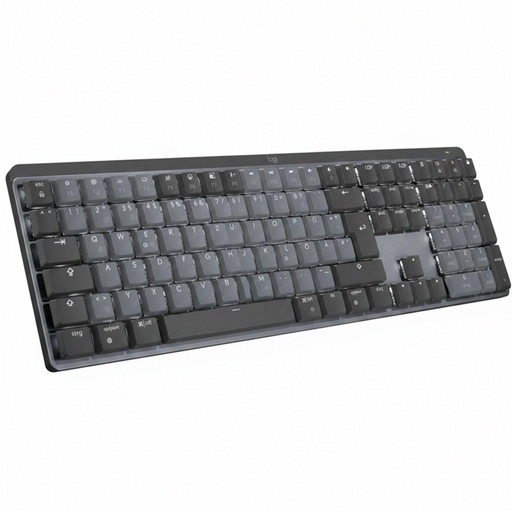
Why We Recommend It The Logitech MX Mechanical is designed for professional use. It features low-profile Tactile Quiet mechanical switches that combine precise feedback with reduced noise, making it ideal for office environments. The smart backlighting, which adapts to ambient light, and seamless multi-device connectivity via Bluetooth or the Logi Bolt receiver streamline the workflow for professionals.
Pros:
- Quiet Mechanical Switches: Tactile feedback with low noise output.
- Smart Illumination: Automatically adjusts to ambient lighting conditions.
- Multi-Device Connectivity: Easily switch between up to three devices.
- Premium Build Quality: Aluminium top case provides stability and durability.
- Standard QWERTY Layout: Ready to use out of the box for most users.
Who It's For: Ideal for professionals, developers, and heavy typists who need a high-quality, quiet mechanical keyboard for productive work across multiple devices (PC, Mac).
ET 60% Wireless Mechanical Gaming Keyboard
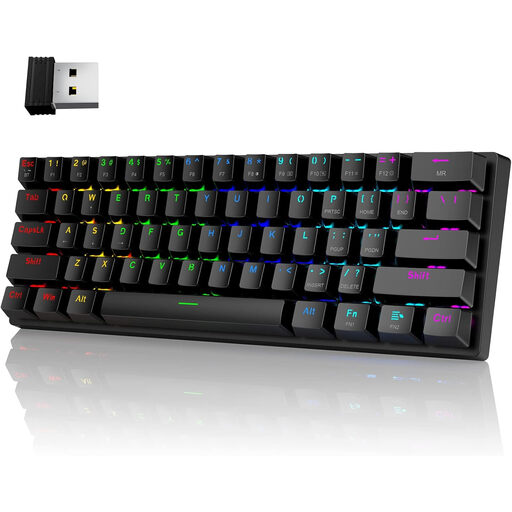
Why We Recommend It This 60% format keyboard is designed for maximum portability and a minimal footprint. By omitting the number pad and function row, it leaves maximum desk space for the mouse, which is especially beneficial for gamers who use low DPI settings. Its tri-mode connectivity makes it a flexible companion for a PC, laptop, or tablet. The classic Blue clicky switches provide distinct acoustic and tactile feedback.
Pros:
- Ultra-Compact 60% Layout: Maximises desk space and is highly portable.
- Tri-Mode Connectivity: Supports 2.4G, Bluetooth, and wired USB-C operation.
- Clicky Blue Switches: Provide clear tactile and audible feedback.
- Extensive RGB Lighting: Features 16 modes and 8 colour options for a personalised gaming atmosphere.
Who It's For: This model is a great choice for gamers and users who want an extremely compact keyboard for on-the-go use or for setups with limited space, and who prefer the feedback of clicky switches.
Discover More Options
The models featured here cover a broad spectrum of use cases. However, if you are looking for other wireless options, prefer different switch types, or need specific layouts, you will find a larger selection of models in our main category.
Discover more models in the category: Bluetooth Mechanical Keyboard
Frequently Asked Questions (FAQ)
1. What is the fundamental difference between a mechanical and a membrane keyboard? The main difference lies in the key construction. Mechanical keyboards use an individual, spring-loaded switch for each key, which results in a more precise keystroke, greater durability, and a superior typing feel. Membrane keyboards use a single rubber sheet under the keys, which is cheaper to produce but often provides a less precise and "mushy" feel.
2. Are mechanical keyboards better for gaming? Many gamers prefer mechanical keyboards for their faster response times, clear feedback (N-key rollover, anti-ghosting), and durability. Linear switches allow for rapid, repeated inputs, while tactile switches provide a tangible confirmation of key activation. Ultimately, the choice depends on personal preference.
3. How do I choose the right switch type for me?
- For Gaming: Linear switches are often the top choice for fast reactions.
- For Typing: Tactile or clicky switches provide satisfying feedback that can improve typing accuracy.
- For Offices/Shared Spaces: As a quiet mechanical keyboard, linear or tactile switches are more suitable than loud clicky switches.